Design with AI
Generate a new design based on this screen using your own content.
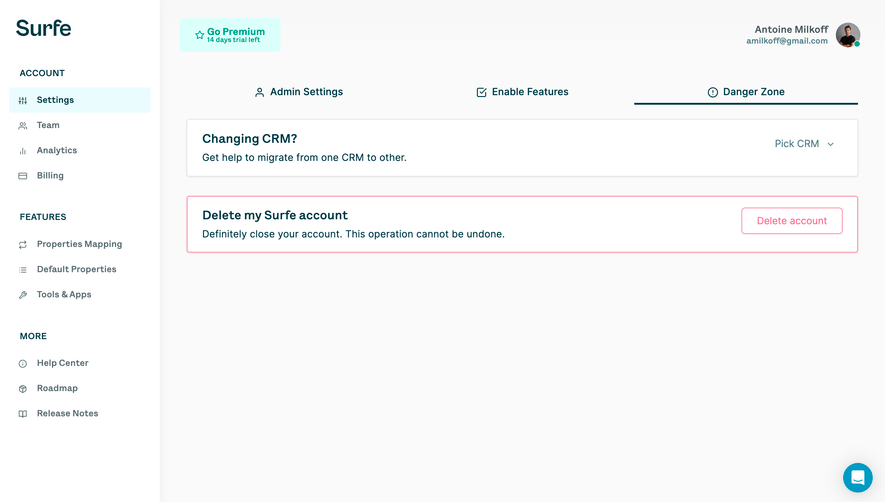
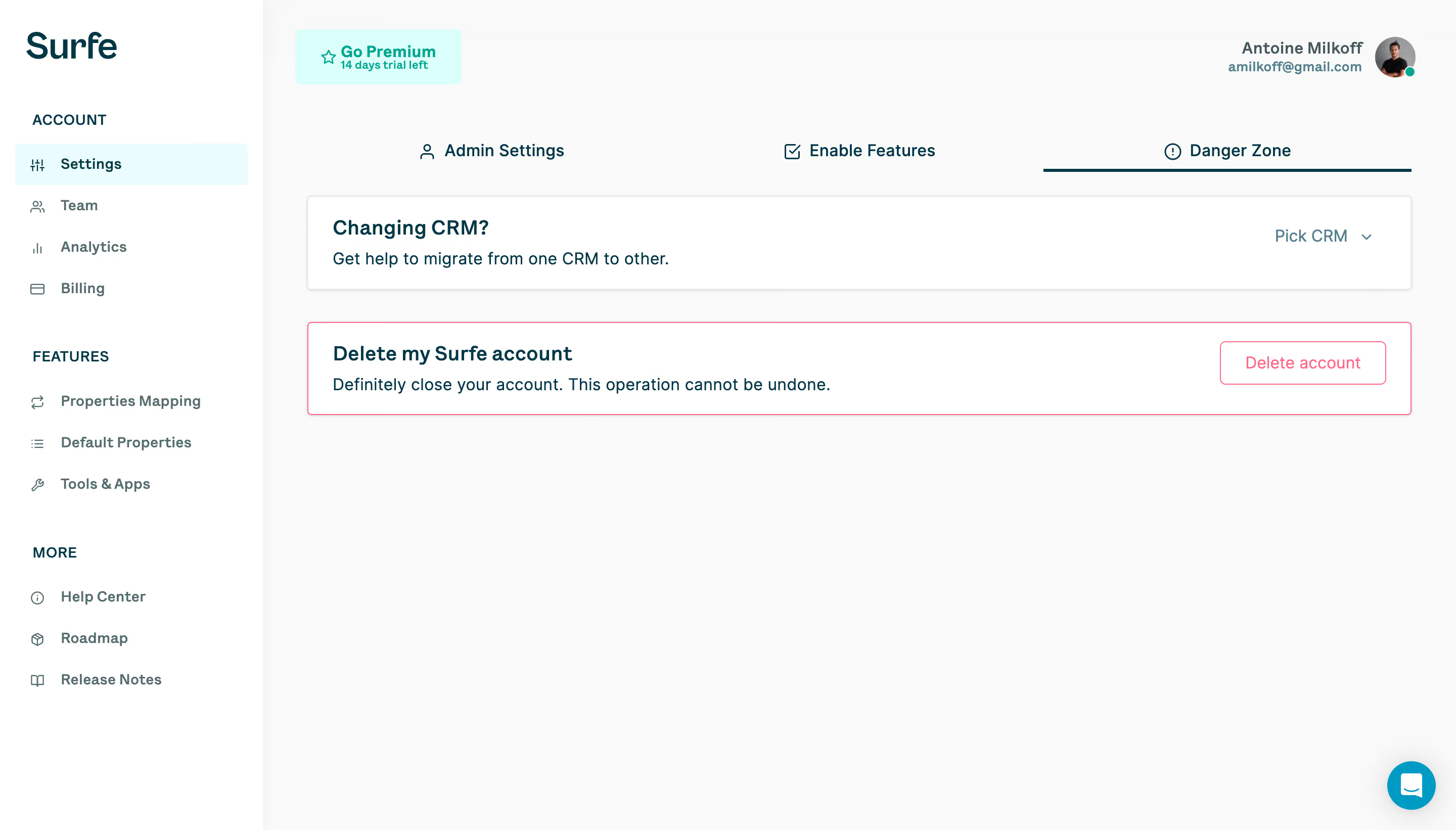
# Design from Reference: Surfe Danger Zone
Create an original, high-fidelity visual design inspired by the reference. Prioritize composition, typography, colors, spacing, and component styling over technical implementation.
## Reference
- **Product:** Surfe
- **Category:** Delete
- **Screenshot:** https://cdn.prod.website-files.com/5e9dc792e1210c5325f7ebbc/6acb69a25e515b69c7964fc3_6acb67d4c72e79fb6db6f616_cms-e8763ad1c7d6f4b7593bb676.webp
Analyze the screenshot first. If inaccessible, request it rather than guessing.
## Content
{{content.instructions}}
{{content.data}}
Preserve essential messaging and factual accuracy. Adapt structure and copy length for visual balance; never invent product claims.
## Visual Design
### Overall aesthetic
- **Character:** A sparse account-settings interface combines dark teal text, a white sidebar and cards, pale gray canvas and restrained cyan highlights.
- **Evidence scale:** The screenshot measures 2880 × 1642 pixels. Sizes below are estimated CSS pixels at an unverified 2× capture density.
### Page composition
- **Sidebar:** A roughly 260-pixel-wide rail holds the Surfe wordmark and three labeled navigation groups, with Settings selected.
- **Top area:** A mint premium/trial badge occupies the upper left of the main canvas; account identity and avatar align right.
- **Main settings:** Three evenly distributed tabs sit above two wide horizontal panels: CRM migration and account deletion. The remainder is open space, with a chat launcher at bottom right.
### Information hierarchy
- **Selected location:** A pale cyan sidebar row and the dark underline beneath Danger Zone establish both navigation levels.
- **Panel content:** Bold headings precede short explanatory sentences, while controls align right on the same panel.
- **Destructive emphasis:** The deletion panel uses a pink outline and matching outlined action, distinguishing it from the neutral CRM panel.
### Typography
- **Navigation:** Group labels are approximately 14 pixels, uppercase and semibold; menu rows are about 14–15 pixels bold.
- **Content:** Panel headings are roughly 20 pixels semibold with 26-pixel leading; supporting sentences and tabs are about 16 pixels.
- **Family:** A humanist sans-serif appears throughout; exact identity is unverified. The wordmark is a separate brand treatment.
### Colors & surfaces
- **Measured neutrals:** ICC-to-sRGB sampling gives #FAFAFA for the main canvas and #FFFFFF for cards/sidebar, with #F9F9F9 and #F8F8F8 nearby surface variations.
- **Measured selection:** Very pale cyan #EBFCFF appears in highlighted interface areas.
- **Semantic contrast:** Dark teal carries titles and icons; muted blue-gray supports navigation and dropdown text. Pink/red marks the destructive border and button.
- **Elevation:** Neutral panels have a fine border and faint shadow; the sidebar edge provides subtle depth without heavy dividers.
### Components
- **Tabs:** Three equal-width icon-and-label targets span the content region, with a thin dark underline only beneath the active tab.
- **Panels:** Cards are roughly 1090 × 92 pixels, with 24-pixel internal padding and 4-pixel corner radii. A roughly 30-pixel gap separates them.
- **Controls:** Pick CRM appears as text with a chevron. Delete account is an approximately 164 × 44-pixel outlined button with modest rounding.
- **Utilities:** A small avatar includes an online dot; the circular cyan chat control is approximately 48 pixels wide.
### Visual rhythm
- **Alignment:** Both panels share the same edges, heading inset and action alignment.
- **Spacing:** Sidebar rows follow a regular approximately 40-pixel cadence, with larger gaps between group headings.
- **Density:** The interface concentrates settings near the top and leaves substantial unused canvas, making the two available actions easy to scan.
### Responsive
- **Observed scope:** Only the desktop resting state is visible; dropdown options and deletion confirmation are not shown.
- **Recommended narrow layout:** Collapse the sidebar, allow tabs to scroll or wrap and stack each panel action beneath its explanation.
- **Recommended controls:** Keep action targets at least 44 CSS pixels tall and prevent the chat launcher from overlapping settings content.
### Adaptation guidance
- **Reusable pattern:** Use a stable account sidebar, a clear secondary tab row and concise horizontal action panels.
- **Destructive flow:** Retain explicit consequence copy and a distinct action style; implement a separate confirmation state because none is documented in the screenshot.
- **Implementation:** Confirm capture density and font before adopting dimensions. Add visible focus states and accessible labels for icon controls.
Use this context to reproduce the reference's visual language: layout, typography, colors, spacing, borders, radii, and distinctive elements. The screenshot takes priority if descriptions conflict.
## Direction
{{preferences.fidelityInstructions}}
## Output
{{output.instructions}}
Deliver a polished, cohesive design with precise alignment, hierarchy, and spacing. Produce the requested visual artifact, not just a description. If unsupported, explain the limitation.
.webp)


.avif)