Design with AI
Generate a new design based on this screen using your own content.
# Design from Reference: Rankfender Set Up Brand
Create an original, high-fidelity visual design inspired by the reference. Prioritize composition, typography, colors, spacing, and component styling over technical implementation.
## Reference
- **Product:** Rankfender
- **Category:** Account Setup
- **Screenshot:** https://cdn.prod.website-files.com/5e9dc792e1210c5325f7ebbc/6acc0f655d6cd572f289cb70_6acc0e4ff0977699c4cd22e0_cms-74ccd720c084b8fbc9bbac29-v3.webp
Analyze the screenshot first. If inaccessible, request it rather than guessing.
## Content
{{content.instructions}}
{{content.data}}
Preserve essential messaging and factual accuracy. Adapt structure and copy length for visual balance; never invent product claims.
## Visual Design
### Overall aesthetic
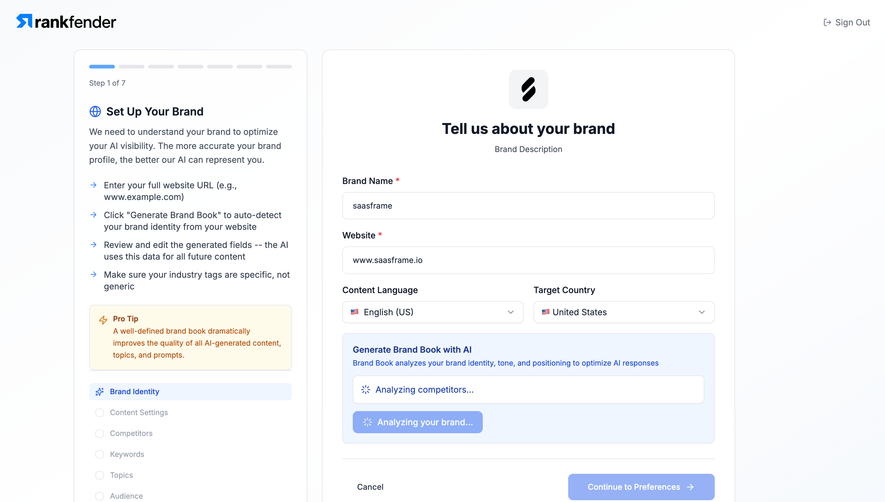
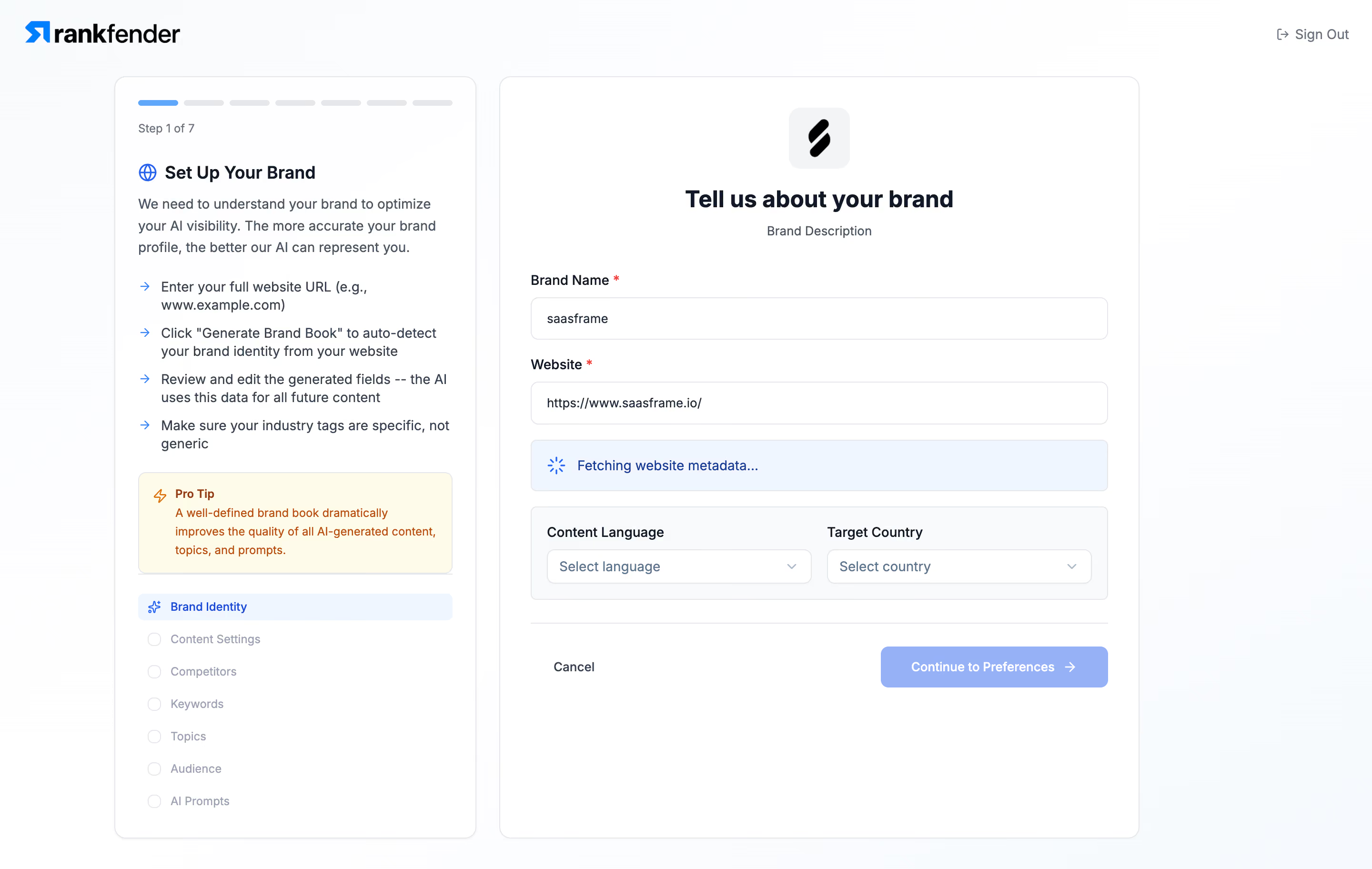
- **Character:** A light onboarding wizard uses white bordered panels, blue selection/loading cues, dark navy text, and a small warm-yellow advisory callout.
- **Evidence:** Source dimensions are 2880 × 1824 px, inspected at 1400 px width. Dimensions below estimate a 1440 px CSS layout at 2× capture; ratio is unverified.
- **State:** The first of seven steps is active and website metadata is visibly being fetched.
### Page composition
- **Header:** Rankfender branding sits left and Sign Out right on a pale canvas.
- **Instruction panel:** A narrow left card contains segmented progress, step label, heading, explanatory prose, four guidance bullets, tip box, and seven-step navigation.
- **Form panel:** A wider right card contains a small brand icon, centered title/subtitle, brand-name and website fields, a loading banner, paired language/country selectors, and bottom actions.
- **Whitespace:** The form occupies the upper portion of a tall panel, leaving a large blank lower region.
### Information hierarchy
- **Step context:** First progress segment and Brand Identity navigation row are blue; later steps are gray.
- **Form title:** A centered bold heading introduces brand information.
- **Required fields:** Brand name and website use external labels and red asterisks; both display values.
- **Loading:** A pale-blue spinner/banner separates identity fields from locale selectors.
- **Actions:** Cancel is plain text; Continue to Preferences is pale blue and appears unavailable during the displayed loading state.
### Typography
- **Family:** A compact interface sans serif is used; exact identity is unverified.
- **Form heading:** Approximately 25–26 CSS px bold.
- **Panel heading:** Around 18 px semibold.
- **Body:** Approximately 14–15 px with 22 px leading.
- **Labels/controls:** Around 14 px medium weight.
- **Utility:** Step caption and tip copy are approximately 12–13 px.
### Colors & surfaces
- **Measured palette:** Samples include white #FFFFFF, near-whites #FEFEFF, #FCFDFE, #FEFFFF, pale blue #F0F6FF, and light gray #F9FAFB.
- **Semantic accents:** Blue marks brand icon, active step, guidance arrows, spinner, and loading panel.
- **Text:** Dark navy establishes headings/labels; slate supports prose and inactive navigation.
- **Tip:** Pale yellow background and orange icon/text identify the advisory callout.
- **Borders:** Thin cool-gray outlines and subtle shadows define both main cards.
### Components
- **Panels:** Approximately 380 px and 672 px wide, 12 px radii, with about 24–32 px padding.
- **Progress:** Seven shallow rounded segments with narrow gaps; only first segment is blue.
- **Inputs:** Full-width outlined fields around 44 px high with 8 px radii.
- **Loading banner:** Pale-blue rectangle about 54 px high, with spinner and message.
- **Locale group:** A pale inset bordered panel contains two equal selectors with trailing chevrons.
- **Step navigation:** Seven compact rows, active first row filled pale blue and later rows using empty status circles.
- **Continue:** Wide pale-blue button with white label and arrow; the displayed enabled state is not independently confirmed.
### Visual rhythm
- **Columns:** A roughly 24 px gap separates instruction and form cards.
- **Field spacing:** Labels sit close above controls; 18–24 px gaps separate groups.
- **Guidance:** Arrow bullets and tip box form a compact left-column reading sequence.
- **Footer:** A rule separates actions from form groups; extensive empty space follows.
### Responsive
- **Observed limit:** Only desktop is shown; actual mobile/loading behavior is unverified.
- **Recommended order:** Put concise step context above the form and move detailed guidance into an accessible expandable region if needed.
- **Recommended fields:** Stack locale selectors on narrow screens and retain visible labels.
- **Recommended states:** Announce loading accessibly and distinguish disabled from focused/enabled actions.
### Adaptation guidance
- **Preserve:** Keep clear step context, required identity fields, visible metadata-fetch state, and locale settings.
- **Implement:** Use labeled fields, accessible progress semantics, status announcements, and predictable keyboard order.
- **Content:** Replace example brand values appropriately; do not infer completed metadata from the loading banner.
- **Validate:** Confirm fonts, CSS dimensions, error/success states, locale options, and responsive ordering.
Use this context to reproduce the reference's visual language: layout, typography, colors, spacing, borders, radii, and distinctive elements. The screenshot takes priority if descriptions conflict.
## Direction
{{preferences.fidelityInstructions}}
## Output
{{output.instructions}}
Deliver a polished, cohesive design with precise alignment, hierarchy, and spacing. Produce the requested visual artifact, not just a description. If unsupported, explain the limitation.
.webp)



.avif)