Design with AI
Generate a new design based on this screen using your own content.
# Design from Reference: Monday User Onboarding
Create an original, high-fidelity visual design inspired by the reference. Prioritize composition, typography, colors, spacing, and component styling over technical implementation.
## Reference
- **Product:** Monday
- **Category:** User Onboarding
- **Screenshot:** https://cdn.prod.website-files.com/5e9dc792e1210c5325f7ebbc/6acbc996f9eac5af75463c24_6acbc737681d3a08a1ee904a_cms-245b55e7e83d8068e5f90cd3.webp
Analyze the screenshot first. If inaccessible, request it rather than guessing.
## Content
{{content.instructions}}
{{content.data}}
Preserve essential messaging and factual accuracy. Adapt structure and copy length for visual balance; never invent product claims.
## Visual Design
### Overall aesthetic
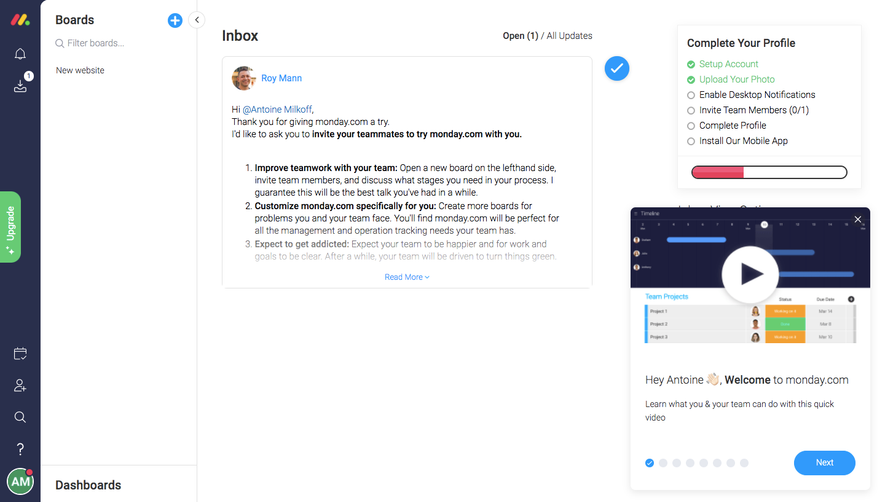
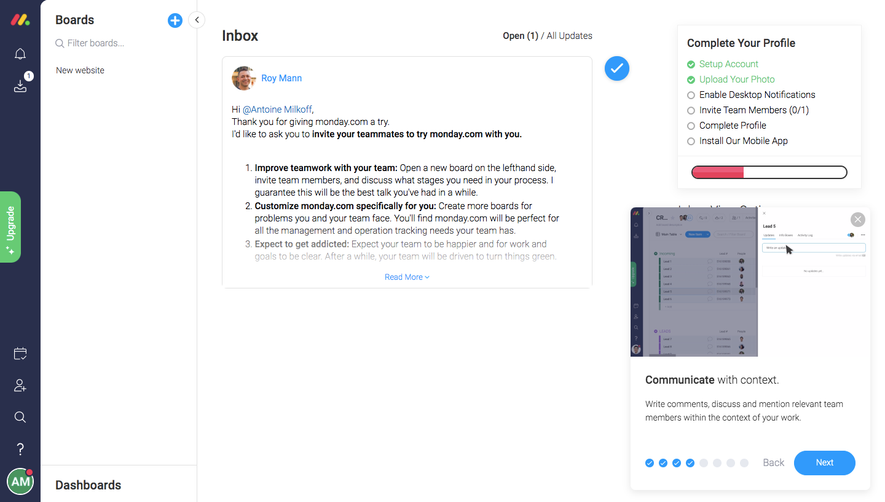
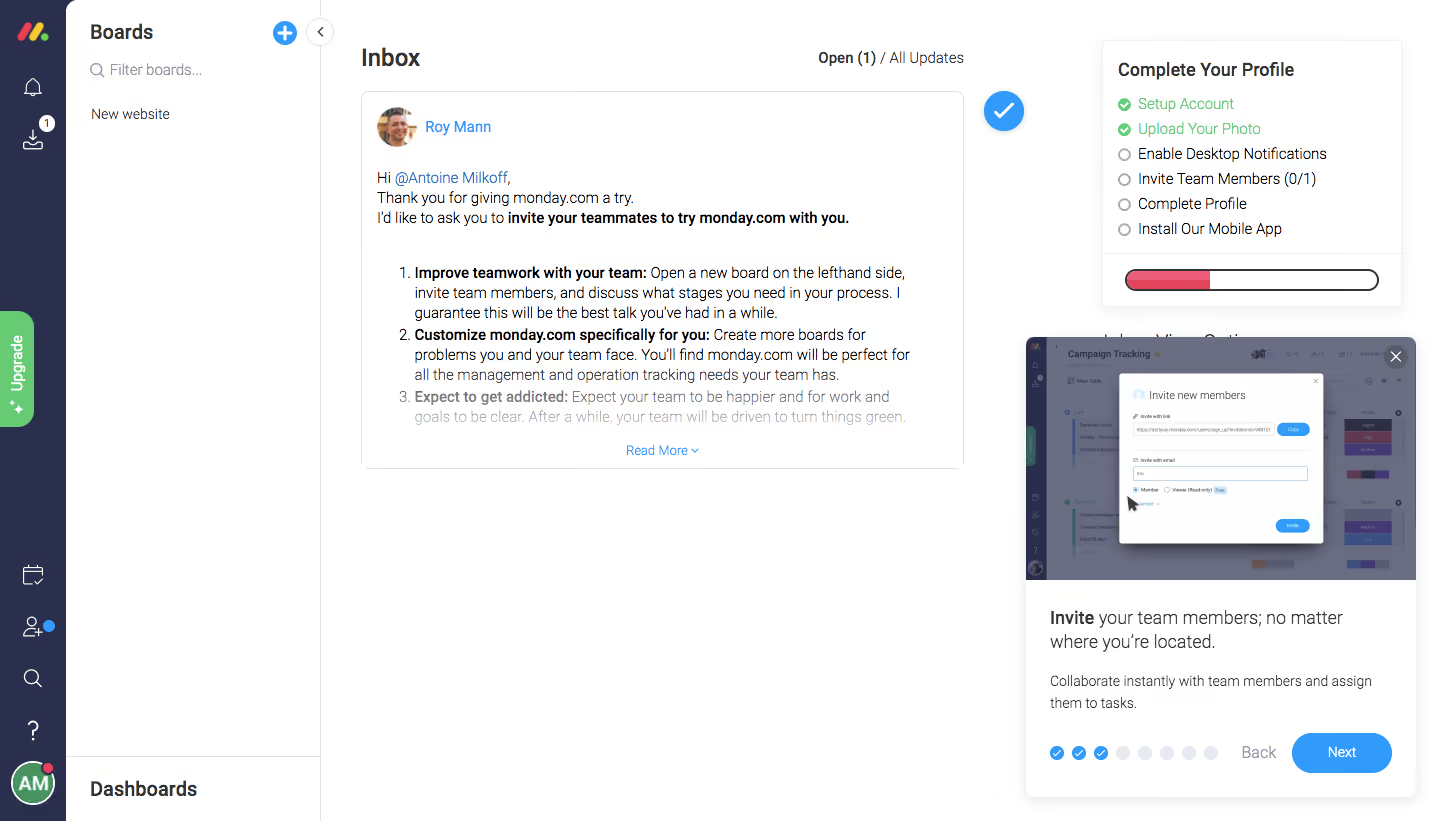
- **Character:** A white productivity workspace combines a dark icon rail, an inbox welcome message and two onboarding aids on the right.
- **Accents:** Blue actions, green completed checklist items and a pink progress fill add status contrast.
### Page composition
- **Capture:** The source is 1440 × 821 pixels. Dimensions approximate image pixels; CSS scale is unverified.
- **Navigation:** A roughly 66-pixel dark rail sits beside a 255-pixel Boards sidebar with filter, board entry and lower Dashboards label.
- **Inbox:** The central region contains a heading, open/all-updates selector and one welcome-message card.
- **Checklist:** A top-right profile card lists six steps and a progress bar.
- **Tour:** A larger floating lower-right card combines an instructional screenshot, heading, description, progress dots and navigation.
### Information hierarchy
- **Welcome:** Avatar/name and greeting introduce a message whose bold numbered leads emphasize team collaboration and customization.
- **Completion:** Green checks identify two completed profile steps; four hollow circles remain.
- **Guidance:** The tour screenshot and Next action establish the immediate onboarding path.
### Typography
- **Family:** A compact sans serif is used; exact identity is unverified.
- **Headings:** Inbox is approximately 24 pixels; sidebar and checklist headings around 20 pixels and bold.
- **Reading:** Message text is around 14 pixels with 20-pixel leading; tour copy uses roughly 16 pixels with 24-pixel leading.
- **Utilities:** Small timestamps, dots and navigation captions are visually subordinate.
### Colors & surfaces
- **Measured base:** White #FFFFFF dominates cards and canvas.
- **Measured rail:** Navy #292F4C forms the narrow icon column.
- **Measured neutral:** #6A6E82 contributes muted interface text; near-whites #FFFEFF/#FEFEFE occur in surfaces.
- **Accent relationships:** Bright blue links/actions, green completion marks and a red-pink progress fill distinguish tasks and status.
### Components
- **Welcome card:** A thin-bordered white panel contains avatar, message, numbered list and centered Read More link; a blue circular check sits outside its right edge.
- **Profile checklist:** A compact bordered/shadowed panel includes six icon/text rows and an outlined pill-shaped progress track.
- **Tour card:** A roughly 390-pixel-wide shadowed white panel has a full-width screenshot, close X, text and bottom controls.
- **Tour progress:** Three blue completed dots precede five pale dots; a blue rounded Next button sits beside Back.
- **Rail:** Line icons stack vertically, with a green vertical Upgrade tab and bottom user avatar.
### Visual rhythm
- **Density:** Compact navigation contrasts with large blank inbox space.
- **Alignment:** Message, list and footer link use consistent card insets.
- **Layering:** Checklist and tour occupy a separate right-hand guidance zone, with the tour extending lower than the inbox card.
### Responsive
- **Observed state:** Only desktop is supplied; compact behavior is unverified.
- **Recommended flow:** Collapse navigation and present checklist/tour sequentially rather than overlapping content.
- **Recommended tour:** Keep dismissal and navigation reachable inside viewport bounds.
### Adaptation guidance
- **Preserve hierarchy:** Separate welcome content, profile completion and active guidance.
- **State fidelity:** Retain observed checks/dots without inferring actual account completion.
- **Screenshot scope:** Treat the invite interface inside the tour as an illustration, not an action to perform.
- **Accessibility:** Label icon controls and communicate checklist/tour progress beyond color.
Use this context to reproduce the reference's visual language: layout, typography, colors, spacing, borders, radii, and distinctive elements. The screenshot takes priority if descriptions conflict.
## Direction
{{preferences.fidelityInstructions}}
## Output
{{output.instructions}}
Deliver a polished, cohesive design with precise alignment, hierarchy, and spacing. Produce the requested visual artifact, not just a description. If unsupported, explain the limitation.
.webp)



.avif)