Design with AI
Generate a new design based on this screen using your own content.
# Design from Reference: GoFundMe Setup Profile Picture
Create an original, high-fidelity visual design inspired by the reference. Prioritize composition, typography, colors, spacing, and component styling over technical implementation.
## Reference
- **Product:** GoFundMe
- **Category:** Account Setup
- **Screenshot:** https://cdn.prod.website-files.com/5e9dc792e1210c5325f7ebbc/6acad5215a5fdf4c30310ea4_6acad4483ce5f4104ebe034e_cms-85ac5b7724ee6cf84d4a05f3.webp
Analyze the screenshot first. If inaccessible, request it rather than guessing.
## Content
{{content.instructions}}
{{content.data}}
Preserve essential messaging and factual accuracy. Adapt structure and copy length for visual balance; never invent product claims.
## Visual Design
### Overall aesthetic
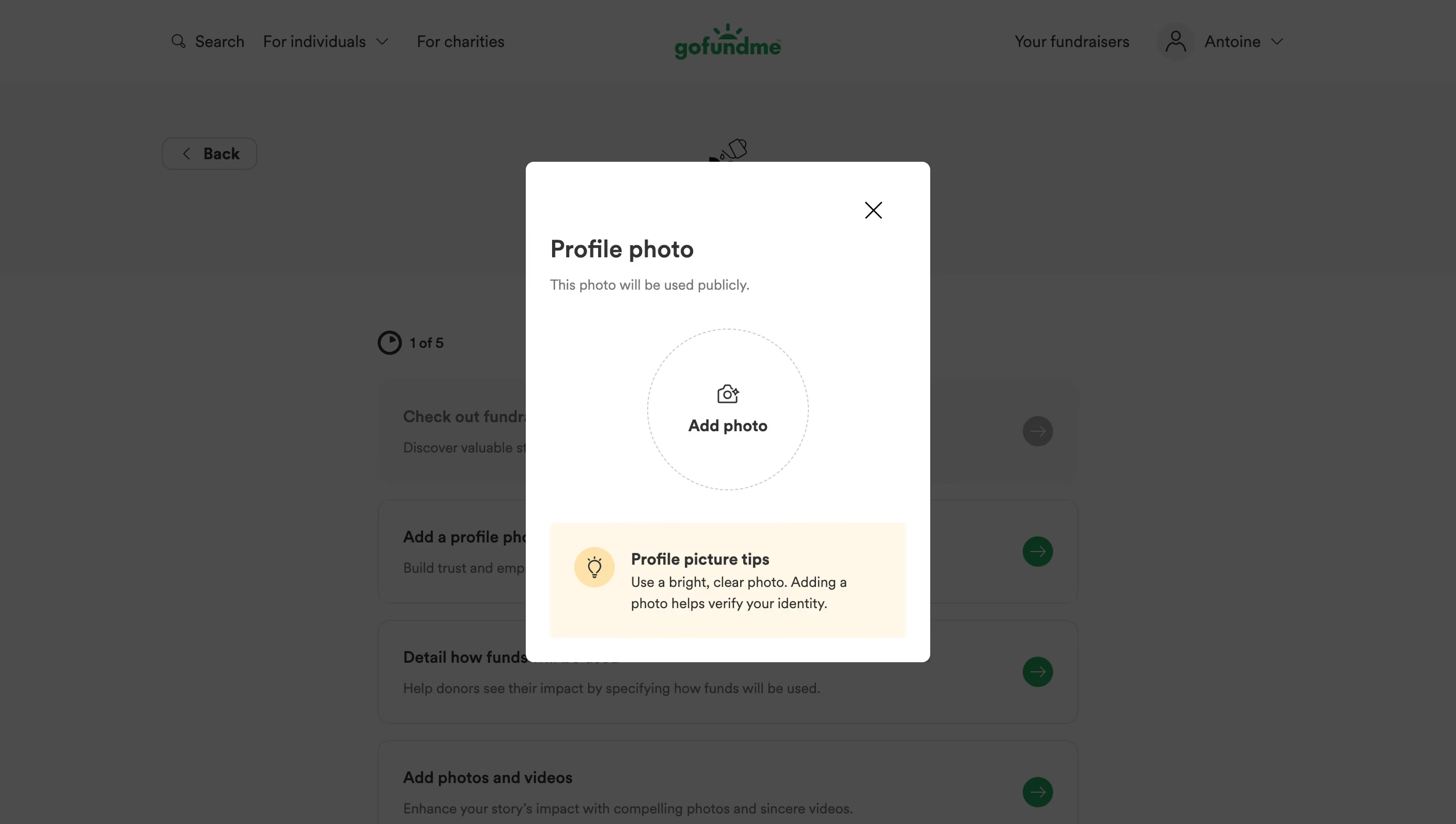
- **Character:** A simple public-profile photo dialog over a dimmed fundraising setup page.
- **Tone:** White surfaces, a large circular upload target and a warm cream advice block keep the task approachable.
### Page composition
- **Capture scale:** The source measures 2880 × 1630 pixels. A roughly 1440 × 815 CSS-pixel viewport at 2× scale is plausible but unverified.
- **Dialog:** A centered white panel around 400 × 495 estimated CSS pixels has small rounded corners and about 24-pixel inner padding.
- **Contents:** Close icon at upper right, Profile photo heading, public-use explanation, central circular Add photo target and lower tips panel.
- **Background:** A top navigation and stacked fundraising setup tasks remain recognizable under a dark gray scrim.
### Information hierarchy
- **Task:** Profile photo is the dominant heading.
- **Disclosure:** A short muted line directly beneath states that the photo will be public.
- **Action:** The large dashed circular target combines a camera icon and bold Add photo label.
- **Guidance:** The cream tips block uses a bulb icon, bold title and short explanatory copy. No separate save action is visible.
### Typography
- **Family:** A rounded sans serif is visible; exact identity is unverified.
- **Heading:** Approximately 24 estimated CSS pixels, bold.
- **Body:** Public-use and tip copy are around 14 pixels with 21-pixel line height.
- **Action/tip title:** Approximately 16 pixels, bold, with centered upload labeling and left-aligned tips.
### Colors & surfaces
- **Measured palette:** ICC-aware sRGB sampling yields white #FFFFFF, cream #FFF8E7 and dimmed background gray #4C4C4C/#4A4A49.
- **Foreground:** Dark gray/near-black text contrasts with light gray dashed upload outline. Deep green #00331A remains visible in the dimmed page.
- **Treatment:** The panel uses roughly 8-pixel estimated CSS corners; the tips block has small corners and a soft warm icon circle.
### Components
- **Upload target:** A roughly 160-pixel estimated CSS circle has a fine dashed border, camera symbol and two-line centered content.
- **Tip panel:** Approximately 352 × 114 pixels, with a yellow bulb circle at left and text to its right.
- **Close control:** A large thin X sits with ample inset from the upper-right panel edge.
- **Underlying setup:** Rounded task rows and circular arrow controls indicate a multi-step checklist beneath the overlay.
### Visual rhythm
- **Spacing:** A generous gap separates disclosure from the upload circle, followed by roughly 32 pixels before tips.
- **Alignment:** Title and tips share outer insets, while the upload target centers on the dialog axis.
- **Contrast:** The bright white dialog and warm advice panel stand clearly apart from the subdued page.
### Responsive
- **Recommendation:** Keep the panel within viewport margins and preserve a large upload target on phones.
- **Recommendation:** Allow vertical scrolling on short screens and retain the public-use disclosure beside the task heading. No mobile state is shown.
### Adaptation guidance
- **Preserve:** Retain the public visibility explanation, clear upload target and concise photo advice.
- **Implement:** Provide a labeled file input, keyboard access and useful upload/error feedback; behavior is not verifiable from the still.
- **Clarity:** Avoid adding a separate completion action unless the actual upload flow requires one.
Use this context to reproduce the reference's visual language: layout, typography, colors, spacing, borders, radii, and distinctive elements. The screenshot takes priority if descriptions conflict.
## Direction
{{preferences.fidelityInstructions}}
## Output
{{output.instructions}}
Deliver a polished, cohesive design with precise alignment, hierarchy, and spacing. Produce the requested visual artifact, not just a description. If unsupported, explain the limitation.
.webp)


.avif)