```html
Overall Style and Aesthetic
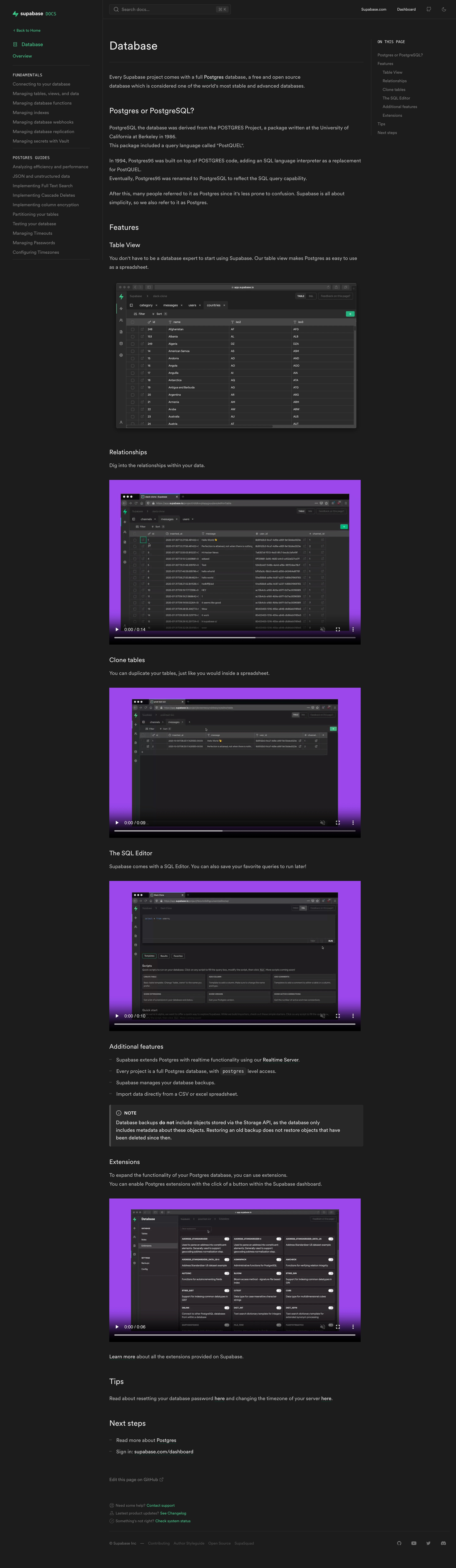
``` Supabase’s database documentation page showcases a distinctly modern, minimalist design. The generous whitespace, crisp lines, and subtle shadowing foster an approachable yet highly professional vibe. This focus on clarity makes the page welcoming and easy-to-navigate, appealing to both technical and non-technical users seeking straightforward information. ```html Layout and Structure
``` The layout emphasizes scannability and utility. A sticky vertical sidebar on the left presents a comprehensive, collapsible navigation for in-depth documentation, while the central content area retains attention through clear headings and logical progression. Above, a slim header offers global navigation—stripped of unnecessary ornamentation to keep users immersed in the content. There are no overbearing hero sections or conversion-focused elements, true to the intent of technical documentation. ```html Visual Elements
``` Visual interest comes from understated icons, simple SVG illustrations, and tidy code blocks—each rendered with soft drop shadows and light accents. Hover states and expandable sections are animated with smooth micro-interactions, subtly signaling interactivity without distracting from the reading experience. The lack of heavy photography keeps the content front-and-center. ```html Color Palette and Typography
``` Supabase employs a cool, trustworthy palette—dominantly white, deep charcoal for headers, and a signature green (echoing their brand identity) for links, accents, and highlights. Typography favors a modern sans-serif for clarity, with strong hierarchy through weight and size variances: large headers, clear subheads, and plenty of comfortable line height. ```html User Experience Patterns & Unique Choices
``` Navigation is exemplary—persistent, intuitive, and searchable. The page’s “copy to clipboard” code snippet buttons, in-line anchor links, and responsive sidebar all enhance usability. Notably, the minimalist approach avoids visual clutter, putting user needs and content comprehension above flashy distractions. The tone throughout the experience: confident, clear, and expertly crafted for developers who value precision and reliability in a SaaS product's design.


.avif)


.webp)