.avif)




1. Hero Section - The page starts with a Hero section which contains a header with the Shogun Logo and a navigation menu followed by a banner image with the title "Press Resources." This section also has a CTA button prompting visitors to "Contact Us" if they require any additional information. 2. Introduction - This section provides a brief introduction to what visitors can expect from the Press page. It has a sub-heading "Welcome to the Shogun Press Room" followed by a paragraph of text. 3. Media Coverage - This section showcases the media coverage that Shogun has received. It includes images or logos of media outlets that have covered Shogun. 4. Press Releases - This section is dedicated to press releases, with the most recent releases featured at the top. Each release has a heading and a brief description. Clicking "Read more" will take visitors to a separate page containing the detailed release. 5. Company Overview - This section provides a brief overview of Shogun's company's history and milestones. The timeline is arranged chronologically with dates and events, and includes a few images. 6. Brand Assets - This section provides access to Shogun's brand assets such as logos, brand guidelines, and marketing visuals. Visitors can download these assets for use in their publications. 7. Press Kit - This section contains a press kit with detailed information about the company, including an About Us section, team member bios, and various images. 8. Contact Information - This section provides Shogun's contact information for media inquiries. It includes an email address, and visitors can fill out a form to receive a reply. 9. Footer - The Footer section contains several links to other pages such as the homepage, pricing, and help center. It also contains the company's social media links and copyright information.
.webp)
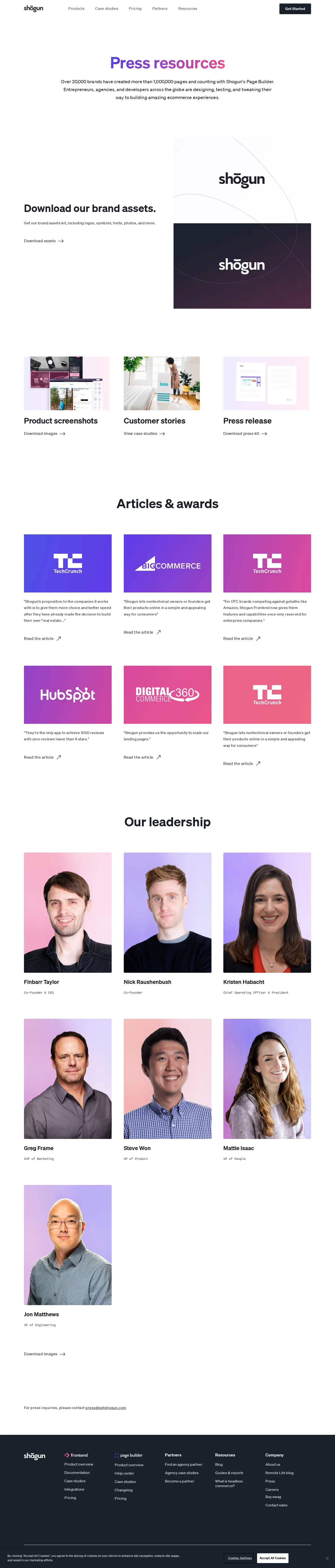

Shogun Press Page

Shogun
Build your store, your way.
Designed by
No items found.
Category
Patterns
No items found.
Tech Stack
Added on
October 21, 2020