Design with AI
Generate a new design based on this screen using your own content.
# Design from Reference: FlowMapp Signup Page
Create an original, high-fidelity visual design inspired by the reference. Prioritize composition, typography, colors, spacing, and component styling over technical implementation.
## Reference
- **Product:** FlowMapp
- **Category:** Signup
- **Screenshot:** https://cdn.prod.website-files.com/5e9dc792e1210c5325f7ebbc/6acad7a2fbf1299940aab6a8_6acad654d63d2caea65c5a9c_cms-55dce4b03177576c062209d8.webp
Analyze the screenshot first. If inaccessible, request it rather than guessing.
## Content
{{content.instructions}}
{{content.data}}
Preserve essential messaging and factual accuracy. Adapt structure and copy length for visual balance; never invent product claims.
## Visual Design
### Overall aesthetic
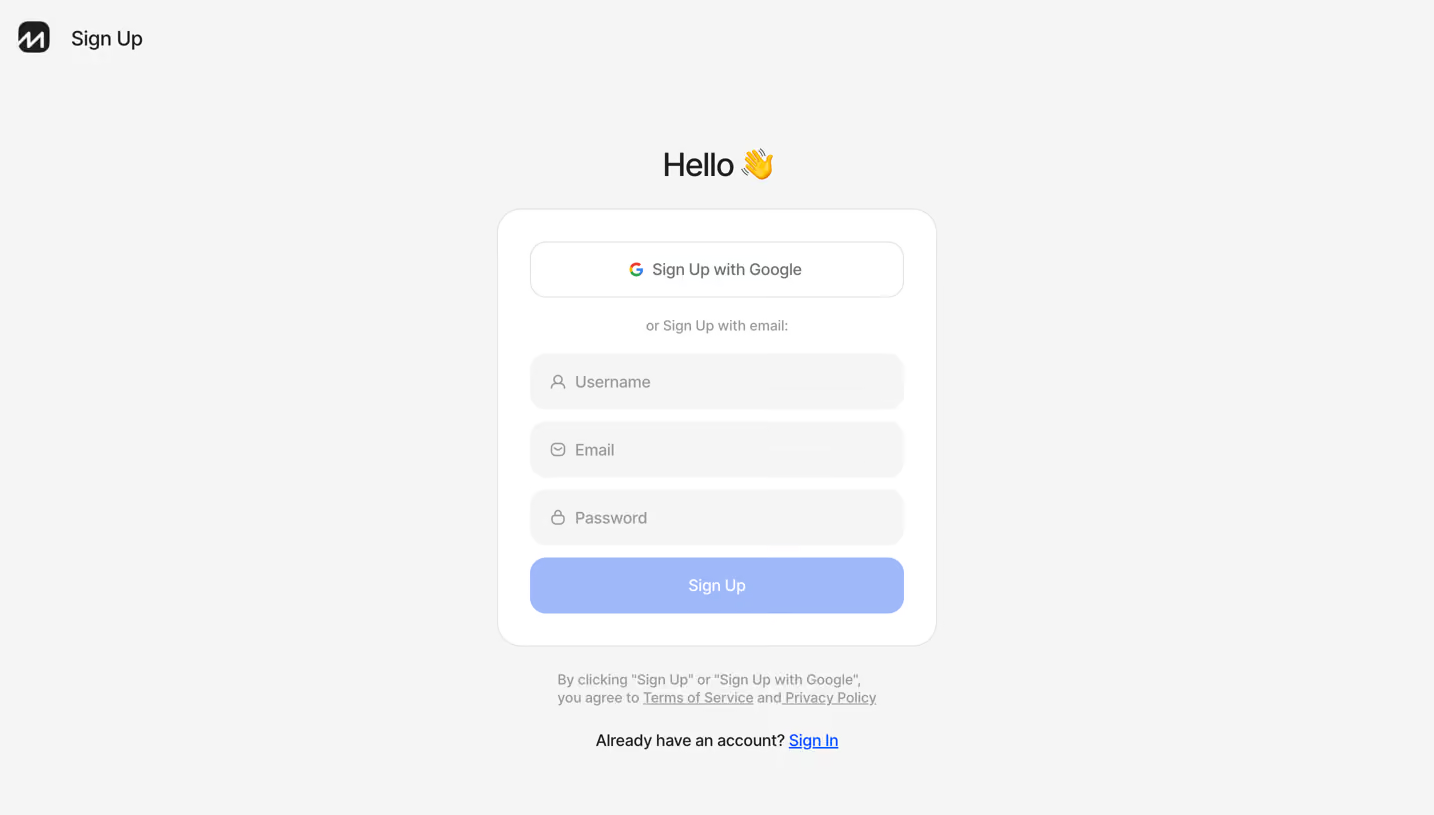
- **Character:** A soft, minimal signup screen with a rounded white card, pale gray field fills and a light blue primary action.
- **Tone:** A simple greeting and wave emoji provide friendliness without illustration or marketing content.
### Page composition
- **Capture scale:** The source measures 2880 × 1630 pixels. A roughly 1440 × 815 CSS-pixel viewport at 2× scale is plausible but unverified.
- **Top identity:** A small black rounded-square brand mark and Sign Up label sit at the upper left.
- **Centered group:** A Hello heading sits above a white card approximately 440 × 438 estimated CSS pixels.
- **Card contents:** Google signup, a centered email alternative label, three inputs and the main Sign Up button form one vertical stack.
- **Below card:** A two-line terms/privacy statement precedes an existing-account Sign In link.
### Information hierarchy
- **Greeting:** Hello with a wave emoji is the largest central text.
- **Authentication choices:** The outlined Google action appears first, followed by the quieter email alternative.
- **Form:** Username, Email and Password are empty and identified by icons/placeholders.
- **Completion and legal:** The light blue Sign Up action leads; muted legal copy and a blue underlined Sign In link sit outside the card.
### Typography
- **Family:** A neutral sans serif is visible; exact font identity is unverified.
- **Heading:** Approximately 32 estimated CSS pixels, medium weight.
- **Controls:** Google action, fields and Sign Up label are around 16 pixels with comfortable line height.
- **Secondary text:** Email alternative and legal statement are around 14 pixels in muted gray; the existing-account line is about 16 pixels.
### Colors & surfaces
- **Measured palette:** ICC-aware sRGB sampling yields background #F5F5F5, card #FFFFFF, pale blue action #99B9FF, border #E0E0E0, muted text #999999 and dark #1F1F1F.
- **Link accent:** A sampled saturated blue #0052FF appears in the link/accent family.
- **Surface geometry:** The outer card has roughly 24-pixel estimated CSS corners and a fine border; input/button corners are approximately 16 pixels, with no prominent shadow.
### Components
- **Google action:** A full-width white outlined button around 374 × 55 estimated CSS pixels combines a small multicolor Google mark and centered label.
- **Input stack:** Three pale gray controls of similar height include a user, email and lock icon at left.
- **Primary action:** A matching rounded blue rectangle sits immediately below the password field. Its pale appearance is observed; actual enabled state is unverified.
- **Legal links:** Terms of Service and Privacy Policy are underlined within small gray copy, while Sign In uses stronger blue underline.
### Visual rhythm
- **Padding:** The card uses approximately 32-pixel side/top/bottom padding.
- **Cadence:** Tight 12-pixel gaps unify inputs; larger gaps distinguish Google signup and the email alternative.
- **Alignment:** Greeting, card and legal block share a central axis; all fields have identical edges.
### Responsive
- **Recommendation:** Keep the card within viewport width minus 32 CSS pixels and reduce outer padding before reducing control size.
- **Recommendation:** Allow the legal statement to wrap naturally and keep Google/email actions equally usable on phones. No mobile state is shown.
### Adaptation guidance
- **Preserve:** Retain the quiet centered composition, rounded surfaces and clear Google-versus-email sequence.
- **Implement:** Use persistent accessible field labels, password autocomplete and explicit validation states.
- **Contrast:** Verify white text on the pale blue action and muted legal text against their backgrounds rather than assuming the captured contrast is sufficient.
Use this context to reproduce the reference's visual language: layout, typography, colors, spacing, borders, radii, and distinctive elements. The screenshot takes priority if descriptions conflict.
## Direction
{{preferences.fidelityInstructions}}
## Output
{{output.instructions}}
Deliver a polished, cohesive design with precise alignment, hierarchy, and spacing. Produce the requested visual artifact, not just a description. If unsupported, explain the limitation.
.webp)



.avif)