.webp)
Thank you! Your submission has been received!
Oops! Something went wrong while submitting the form.
Get SaaSFrame Pro
Monthly
$18
Quarterly
$48
Yearly
$180
Upgrade to access this feature
Browse all screens & flows
Filter and search screens & flows
Access Figma files
Access mobile versions
Bookmark screens & flows
Join now
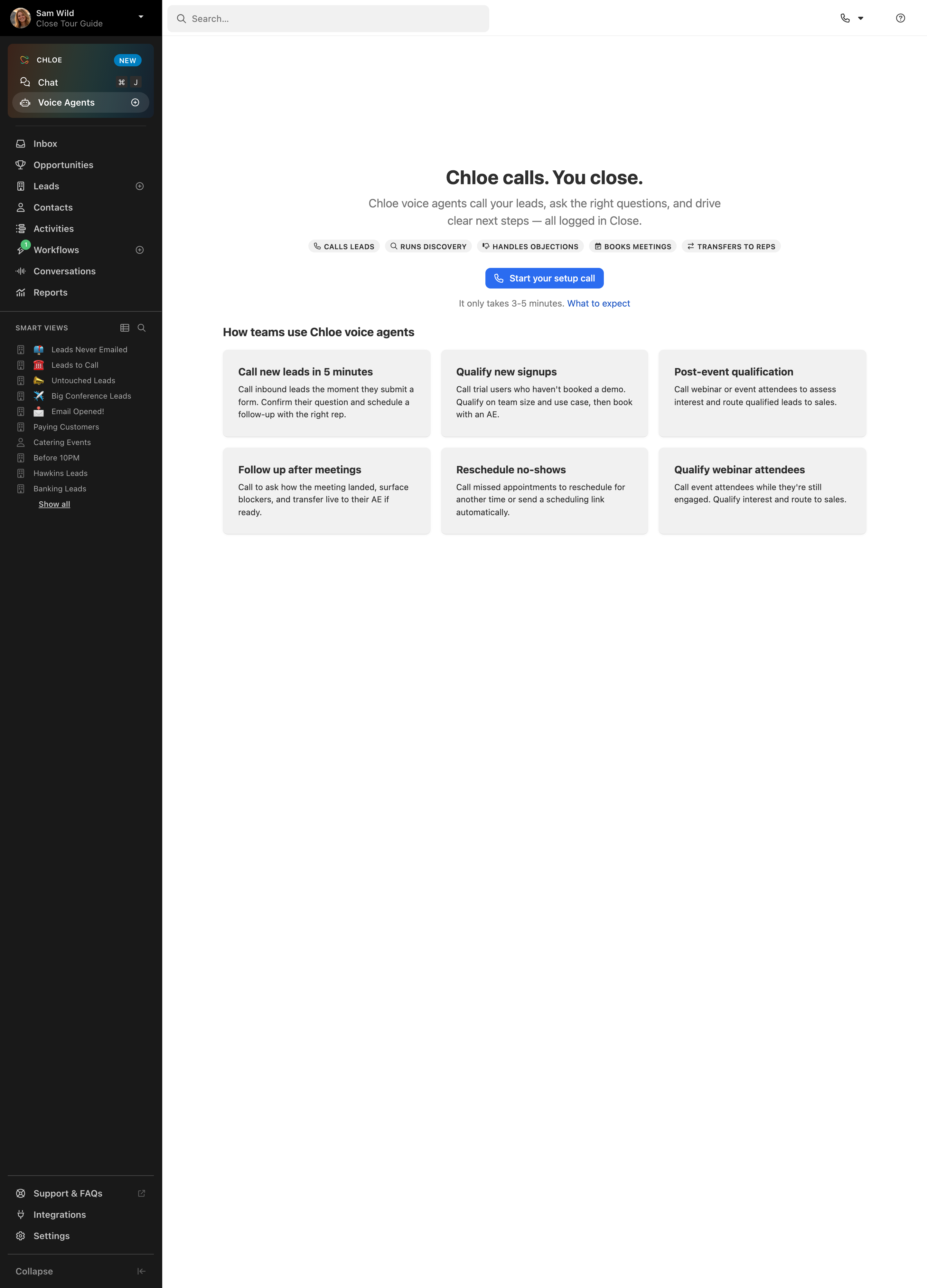
Close Call coaching overview

Close
Inside Sales Software
Designed by
No items found.

Bookmark
Bookmark

Design with AI
Thank you! Your submission has been received!
Oops! Something went wrong while submitting the form.
# Design from Reference: Close Call coaching overview
Create an original, high-fidelity visual design inspired by the reference. Prioritize composition, typography, colors, spacing, and component styling over technical implementation.
## Reference
- **Product:** Close
- **Category:** Empty State
- **Screenshot:** https://cdn.prod.website-files.com/5e9dc792e1210c5325f7ebbc/6acad09851f927271bf81eaf_6acad02ee575349288e37790_cms-c295854e217c035f99317b71.webp
Analyze the screenshot first. If inaccessible, request it rather than guessing.
## Content
{{content.instructions}}
{{content.data}}
Preserve essential messaging and factual accuracy. Adapt structure and copy length for visual balance; never invent product claims.
## Visual Design
### Overall aesthetic
- **Style:** A CRM application view contrasts a dark navigation rail with a spacious white feature-introduction canvas.
- **Character:** Compact gray cards, small capability chips and one blue setup action create a practical onboarding presentation.
### Page composition
- **Capture:** The original measures 2880 × 4000 pixels. Estimated CSS sizes below assume an unverified 2× capture.
- **Shell:** A roughly 252-pixel dark sidebar spans the unusually tall capture. A white top bar contains a wide search field and small call/help controls.
- **Sidebar:** Profile identity, a highlighted agent module, main CRM navigation, a long smart-view list and lower utility links form separate groups.
- **Main introduction:** A centered heading, two-line explanation, five capability chips, blue action and small reassurance line occupy the upper-middle.
- **Examples:** Six pale-gray use-case cards form a three-column, two-row grid below.
- **Lower area:** The rest of the main canvas is blank; lower sidebar utility links remain visible near the capture bottom.
### Information hierarchy
- **Feature heading:** A large bold sentence introduces the voice-agent feature.
- **Supporting copy:** Centered gray text explains the feature before a compact capability row.
- **Primary action:** The blue setup-call button is isolated above small expectation copy and a link.
- **Examples:** A bold section label introduces six cards with short titles and descriptions.
- **Navigation:** The selected Voice Agents item is brighter and rounded within the special agent module.
### Typography
- **Family:** Neutral sans serif; exact identity is unverified.
- **Main heading:** Approximately 30 pixels, bold.
- **Introduction:** Around 18 pixels with 26-pixel leading.
- **Card titles:** Approximately 16 pixels, bold; descriptions around 13–14 pixels with 20-pixel leading.
- **Navigation:** Around 14 pixels; small group labels and chips use uppercase 11–12-pixel text.
### Colors & surfaces
- **Measured base:** White #FFFFFF defines the main canvas; dark #191919 defines the rail.
- **Cards:** Light gray #F1F1F1 fills examples; darker #2E2E2E appears in sidebar surfaces.
- **Ink:** Black #000000 and dark gray supply main text, with muted gray helper copy.
- **Accent:** Bright blue marks the setup action and small badges; exact blue hex is unverified.
- **Depth:** Example cards have small radii and subtle lower shadows. The rest of the layout is largely flat.
### Components
- **Search:** A broad pale-gray rounded field spans the left portion of the top bar.
- **Agent module:** A rounded dark multitone panel contains a product label, New badge and two navigation rows.
- **Capability chips:** Five small gray capsules combine tiny icons and uppercase labels.
- **Setup action:** A compact blue rounded rectangle around 185 × 34 pixels includes a phone icon.
- **Use-case cards:** Approximately 322 × 136 pixels, with 24-pixel padding and roughly 8-pixel corners.
- **Smart views:** Small icons and muted labels repeat in a compact vertical list, ending with an underlined Show all.
- **Bottom utilities:** Support, integrations, settings and collapse controls are separated by fine rules.
### Visual rhythm
- **Whitespace:** The main introduction sits well below the top bar, with substantial blank space beneath the example grid.
- **Grid spacing:** Roughly 16-pixel gaps separate cards.
- **Alignment:** Centered hero content contrasts with left-aligned card text and navigation.
### Responsive
- **Evidence:** Only desktop is observed; setup calls and mobile behavior are unverified.
- **Recommended grid:** Reduce examples to two columns and then one.
- **Recommended shell:** Collapse the navigation and allow capability chips to wrap.
- **Accessibility:** Provide clear focus, labels for utility icons and readable contrast in the dark sidebar.
### Adaptation guidance
- **Preserve:** Keep the dark CRM shell, white introduction region and single blue setup action.
- **Scope:** The visible content introduces voice agents; no call-coaching interface or call result is shown.
- **Content:** Use supplied feature claims and examples without treating them as verified capabilities.
- **Behavior:** Setup, navigation and expectation links require explicit implementation.
Use this context to reproduce the reference's visual language: layout, typography, colors, spacing, borders, radii, and distinctive elements. The screenshot takes priority if descriptions conflict.
## Direction
{{preferences.fidelityInstructions}}
## Output
{{output.instructions}}
Deliver a polished, cohesive design with precise alignment, hierarchy, and spacing. Produce the requested visual artifact, not just a description. If unsupported, explain the limitation.

.avif)
Category
Patterns
Tech Stack




Added on
September 19, 2026
Similar screens




Upgrade to SaaSFrame Pro now to see similar examples.
Monthly
$18 /month
Billed $18 monthly
Browse all screens & flows
Filter and search screens & flows
Search text in screenshots
Access Figma files
Access mobile versions
Join now
Quarterly
$16 /month
Billed $48 quarterly
Browse all screens & flows
Filter and search screens & flows
Search text in screenshots
Access Figma files
Access mobile versions
Join now
Yearly
$15 /month
Billed $180 yearly
Browse all screens & flows
Filter and search screens & flows
Search text in screenshots
Access Figma files
Access mobile versions
Join now