.webp)
Thank you! Your submission has been received!
Oops! Something went wrong while submitting the form.
Get SaaSFrame Pro
Monthly
$18
Quarterly
$48
Yearly
$180
Upgrade to access this feature
Browse all screens & flows
Filter and search screens & flows
Access Figma files
Access mobile versions
Bookmark screens & flows
Join now
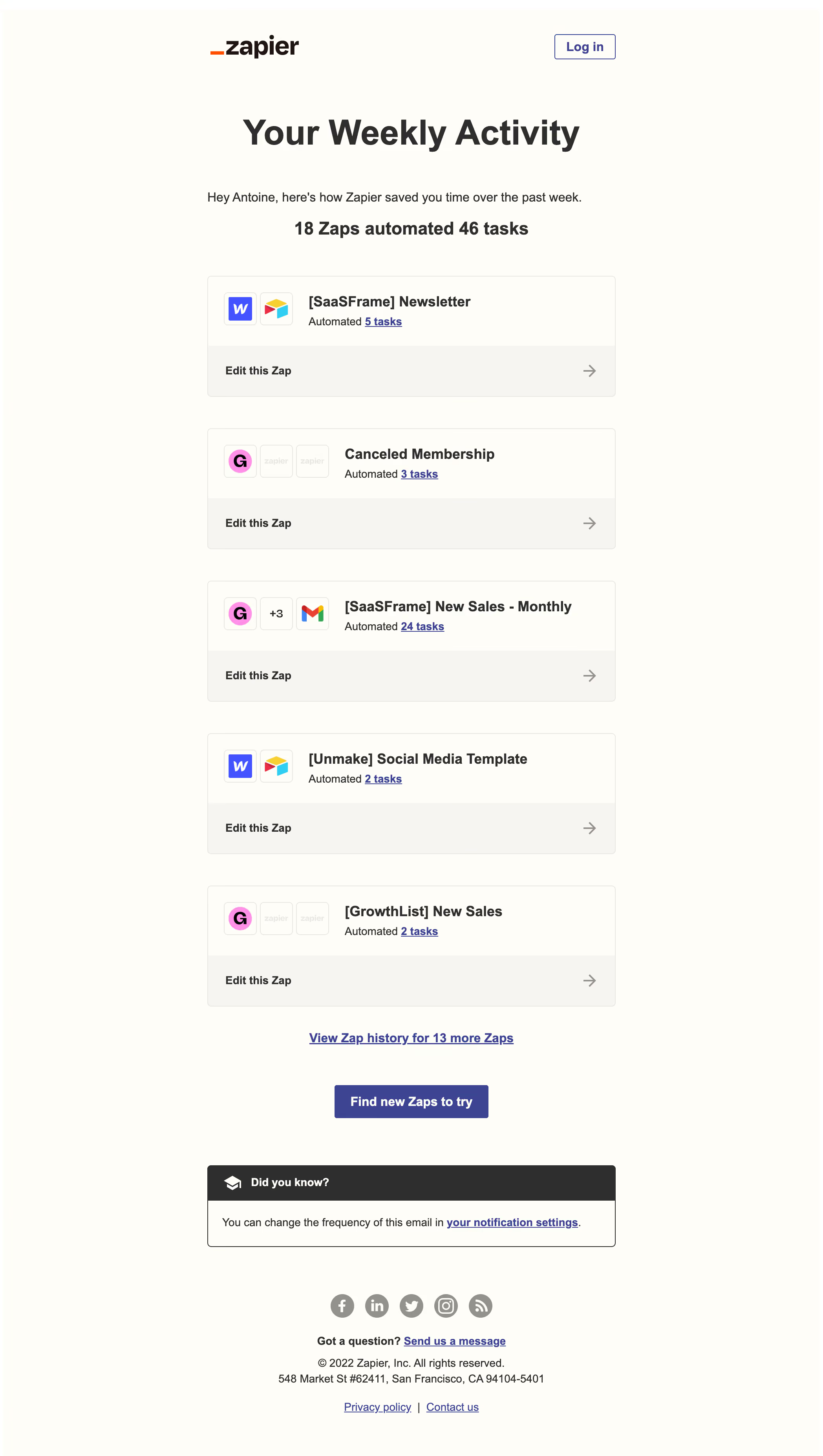
Zapier Activity Summary Email

Zapier
The easiest way to automate your work
Designed by
No items found.

Bookmark
Bookmark

Design with AI
Thank you! Your submission has been received!
Oops! Something went wrong while submitting the form.
# Design from Reference: Zapier Activity Summary Email
Create an original, high-fidelity visual design inspired by the reference. Prioritize composition, typography, colors, spacing, and component styling over technical implementation.
## Reference
- **Product:** Zapier
- **Category:** Activity Summary Email
- **Screenshot:** https://cdn.prod.website-files.com/5e9dc792e1210c5325f7ebbc/6acadc545c79bb17f221b088_6acadbb205865e2eb66b8f0d_cms-9abd90b5e8fd77660f835d4a.webp
Analyze the screenshot first. If inaccessible, request it rather than guessing.
## Content
{{content.instructions}}
{{content.data}}
Preserve essential messaging and factual accuracy. Adapt structure and copy length for visual balance; never invent product claims.
## Visual Design
### Overall aesthetic
- **Character:** Warm, restrained activity digest combining a cream canvas, dark sans-serif typography and indigo links with recognizable app icons.
- **Evidence scale:** The original image measures 2096 × 3706 pixels. Dimensions below refer to its 1400-pixel-wide inspection rendering; CSS dimensions and capture density are unverified.
### Page composition
- **Email column:** A centered column spans approximately x353–1047, about 694 inspection pixels, with generous outer margins.
- **Header and summary:** The Zapier wordmark sits left and an outlined Log in control right. A centered oversized activity heading precedes a greeting and bold aggregate automation count.
- **Body and footer:** Five workflow cards form a vertical list, followed by a history link, discovery button, bordered educational callout, social icons, support link, address and legal links.
### Information hierarchy
- **Primary message:** The large weekly heading anchors the page; a bold line reporting 18 Zaps and 46 automated tasks provides the principal result.
- **Workflow detail:** App tiles lead each card, followed by a bold workflow name and a smaller task-count sentence with an underlined count link.
- **Secondary actions:** Each card exposes an Edit this Zap strip. The centered history link and filled discovery button create successive actions before the subdued footer.
### Typography
- **Heading:** The main heading is approximately 58–60 inspection pixels, heavy weight, with a compact single-line treatment and roughly 1.1 line-height.
- **Summary and card titles:** The aggregate line is approximately 30 pixels bold; workflow titles are about 24–26 pixels bold with short line-height.
- **Supporting copy:** Body and links are approximately 20–22 pixels with 1.3–1.45 line-height; footer copy is around 18–20 pixels. The sans-serif family resembles Arial or Helvetica, but its identity is unverified.
### Colors & surfaces
- **Measured canvas:** ICC-to-sRGB sampling gives warm cream #FFFDF7 as the dominant background and #2D2E2E for dark foreground areas.
- **Measured supporting surfaces:** #F7F5F1 appears in pale card action strips; #E8E7E3 supplies subtle neutral separation and #94928C muted icon/arrow tones.
- **Measured accent:** Indigo #3B4597 supports links and the filled button. Bright pink #FF89EC appears within an app icon rather than as a general interface surface.
- **Surface treatment:** Cards rely on thin neutral outlines and near-flat fills; the callout uses a dark header band above a light body, without conspicuous shadows.
### Components
- **Workflow cards:** Approximately 694 pixels wide and 205 pixels tall, with about 28 pixels of upper content padding, a roughly 86-pixel action strip and a modest 5–7-pixel corner radius.
- **App tiles:** Roughly 56-pixel square outlined tiles use small rounded corners and 6-pixel gaps; one workflow includes a +3 count tile among its app marks.
- **Buttons:** The header control is about 104 × 42 pixels with a thin indigo outline. The central filled action is about 262 × 57 pixels with white bold text and a small radius.
- **Callout and footer:** A full-column outlined callout has a dark icon-and-label header and a padded message row. Five gray circular social symbols sit above centered support and legal text.
### Visual rhythm
- **Card cadence:** Repeated cards are separated by approximately 54 inspection pixels; their app rows, titles and action strips align consistently.
- **Section breathing room:** Large intervals separate header, heading, introduction and first card; the discovery button and callout also receive distinct open bands.
- **Micro spacing:** Card icons and titles use an approximately 28-pixel inset; title and task line sit close together, while the action strip adds clear vertical separation.
### Responsive
- **Observed scope:** Only one wide email rendering is supplied; mobile layouts, hover behavior and focus states are not visible.
- **Recommended email behavior:** Use a fluid column with a maximum width, retain at least 20–24 CSS pixels of mobile side padding and allow long workflow names to wrap.
- **Recommended compact treatment:** Reduce the oversized heading, keep action strips easy to tap, and allow icon/title groups to stack if their combined width becomes cramped. Preserve footer link legibility.
### Adaptation guidance
- **Reusable structure:** Lead with a concise usage result, show a small set of individually actionable workflow cards, then place history and discovery actions after the list.
- **Token translation:** Convert inspection measurements into a coherent CSS scale only after confirming capture density; preserve the relative hierarchy, cream/indigo palette and flat outlined cards.
- **Content fidelity:** Derive counts, app marks and workflow names from real activity data. Treat footer links and repeated action strips as functional navigation with accessible names and visible keyboard focus.
Use this context to reproduce the reference's visual language: layout, typography, colors, spacing, borders, radii, and distinctive elements. The screenshot takes priority if descriptions conflict.
## Direction
{{preferences.fidelityInstructions}}
## Output
{{output.instructions}}
Deliver a polished, cohesive design with precise alignment, hierarchy, and spacing. Produce the requested visual artifact, not just a description. If unsupported, explain the limitation.

.avif)
Category
Patterns
No items found.
Tech Stack




Added on
August 9, 2023
Similar screens





Upgrade to SaaSFrame Pro now to see similar examples.
Monthly
$18 /month
Billed $18 monthly
Browse all screens & flows
Filter and search screens & flows
Search text in screenshots
Access Figma files
Access mobile versions
Join now
Quarterly
$16 /month
Billed $48 quarterly
Browse all screens & flows
Filter and search screens & flows
Search text in screenshots
Access Figma files
Access mobile versions
Join now
Yearly
$15 /month
Billed $180 yearly
Browse all screens & flows
Filter and search screens & flows
Search text in screenshots
Access Figma files
Access mobile versions
Join now