
1. The page begins with a navigation bar at the top, which includes links to different sections of the webpage, as well as a search bar and a link to log in or sign up for Wistia. 2. The first section of the page is the hero section, which includes a large banner image showcasing Wistia's video hosting platform, accompanied by a short headline, subheadline, and a CTA button. 3. Following the hero section, there is a section titled "Host your videos," which contains information about Wistia's video hosting capabilities, including a list of features and benefits. There are also three CTA buttons that direct the user to sign up, view pricing, or explore Wistia's features. 4. The next section is titled "Customize your player," and it details Wistia's customizable video player. The section includes examples of different customizations, as well as a CTA button to explore the feature further. 5. The page then shifts focus to "Grow your business with video," with a section that explains how Wistia's video analytics can help businesses make data-driven decisions. This section also includes a CTA button to try Wistia's analytics features. 6. The next section is titled "Secure your videos," and it provides information on Wistia's video security measures, as well as a CTA button to learn more about Wistia's security features. 7. The page ends with a final section titled "Join the community," which includes testimonials from Wistia customers and links to Wistia's social media accounts. There is also a CTA button to sign up for Wistia's newsletter.

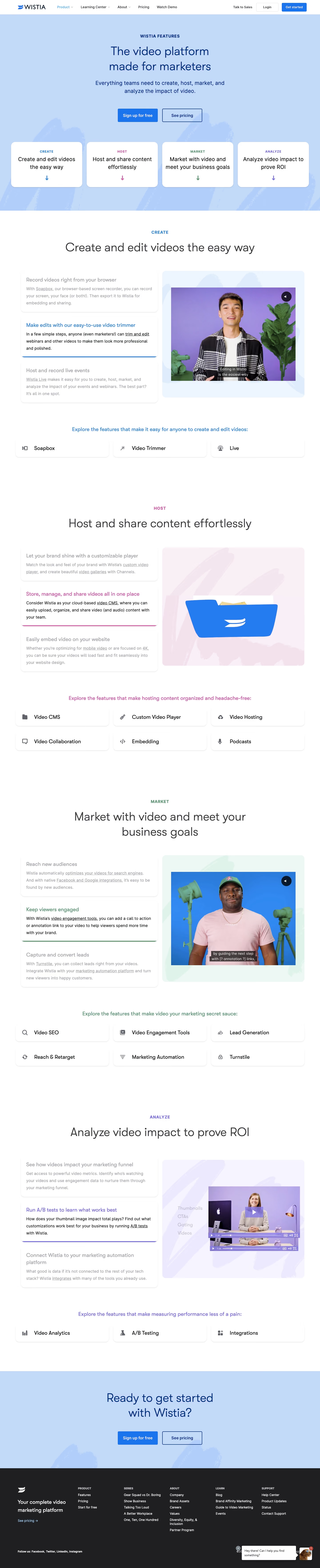

Wistia Features Page

Wistia
Video marketing software for business
Designed by
No items found.
Category
Patterns
No items found.
Tech Stack
Added on
March 16, 2023