Design with AI
Generate a new design based on this screen using your own content.
# Design from Reference: Userflow User Onboarding
Create an original, high-fidelity visual design inspired by the reference. Prioritize composition, typography, colors, spacing, and component styling over technical implementation.
## Reference
- **Product:** Userflow
- **Category:** User Onboarding
- **Screenshot:** https://cdn.prod.website-files.com/5e9dc792e1210c5325f7ebbc/6acbc94c1790037d3e059384_6acbc6654d71070f5fd6557f_cms-692b9e12d3e3415147294120.webp
Analyze the screenshot first. If inaccessible, request it rather than guessing.
## Content
{{content.instructions}}
{{content.data}}
Preserve essential messaging and factual accuracy. Adapt structure and copy length for visual balance; never invent product claims.
## Visual Design
### Overall aesthetic
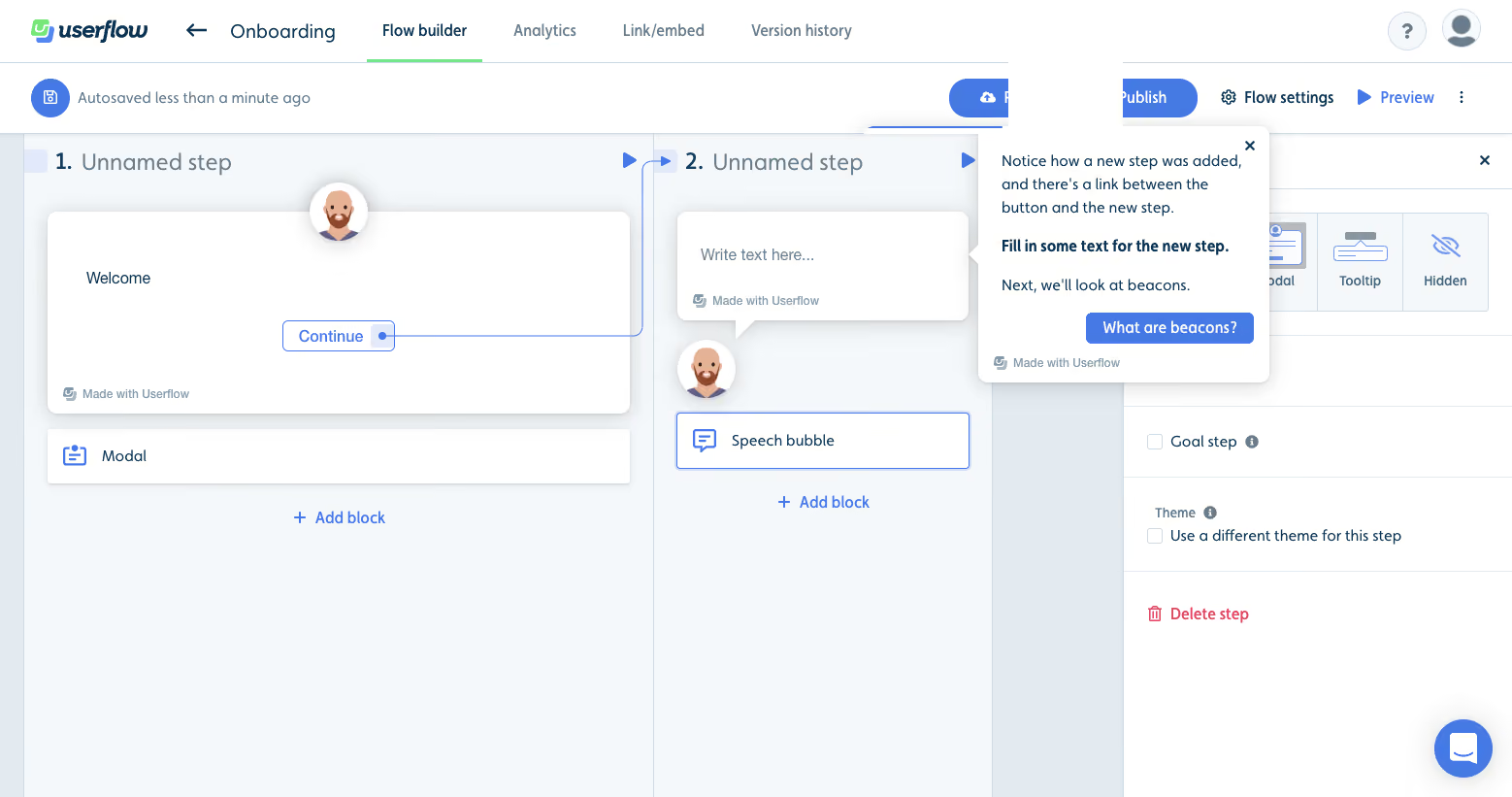
- **Character:** Visual onboarding builder with pale step columns, white nodes and a contextual help bubble.
### Page composition
- **Capture:** 1558 × 821 screenshot pixels; CSS scale unverified, approximately desktop scale.
- **Structure:** Product tabs/action toolbar, two linked step columns and right inspector; coachmark overlays the second step with explanatory copy and next lesson action.
### Information hierarchy
- **Priority:** Blue connector makes the new step relationship visible; bold instruction asks for text, then What are beacons? advances the tutorial.
### Typography
- **Family:** Sans serif; exact family unverified.
- **Estimated CSS sizes:** Step headings 20px, coachmark/body 14px with 22px line height and controls 14px.
### Colors & surfaces
- **Measured palette:** White #FFFFFF, canvas #F5F8FA, column #E4EBF0, blue #4579E4, subtle #F4F7F9 and near-white #FEFEFE.
### Components
- **Elements:** Modal/speech-bubble nodes, avatar circles, curved connector, Add block, selected node border, coachmark pointer/close and blue lesson action.
- **Estimated geometry:** Coachmark about 300px wide, 8px radius, 16px padding and soft shadow.
### Visual rhythm
- **Spacing:** Vertical step lanes and connected nodes structure the canvas; the help bubble stays close to its target.
### Responsive
- **Suggested adaptation:** Use a scrollable canvas and inspector sheet; reposition coachmark without hiding the selected step. Mobile behavior is not shown.
### Adaptation guidance
- **Transfer:** Preserve visible step relationships and a single contextual lesson/action.
Use this context to reproduce the reference's visual language: layout, typography, colors, spacing, borders, radii, and distinctive elements. The screenshot takes priority if descriptions conflict.
## Direction
{{preferences.fidelityInstructions}}
## Output
{{output.instructions}}
Deliver a polished, cohesive design with precise alignment, hierarchy, and spacing. Produce the requested visual artifact, not just a description. If unsupported, explain the limitation.
.webp)



.avif)