.webp)
Thank you! Your submission has been received!
Oops! Something went wrong while submitting the form.
Get SaaSFrame Pro
Monthly
$18
Quarterly
$48
Yearly
$180
Upgrade to access this feature
Browse all screens & flows
Filter and search screens & flows
Access Figma files
Access mobile versions
Bookmark screens & flows
Join now
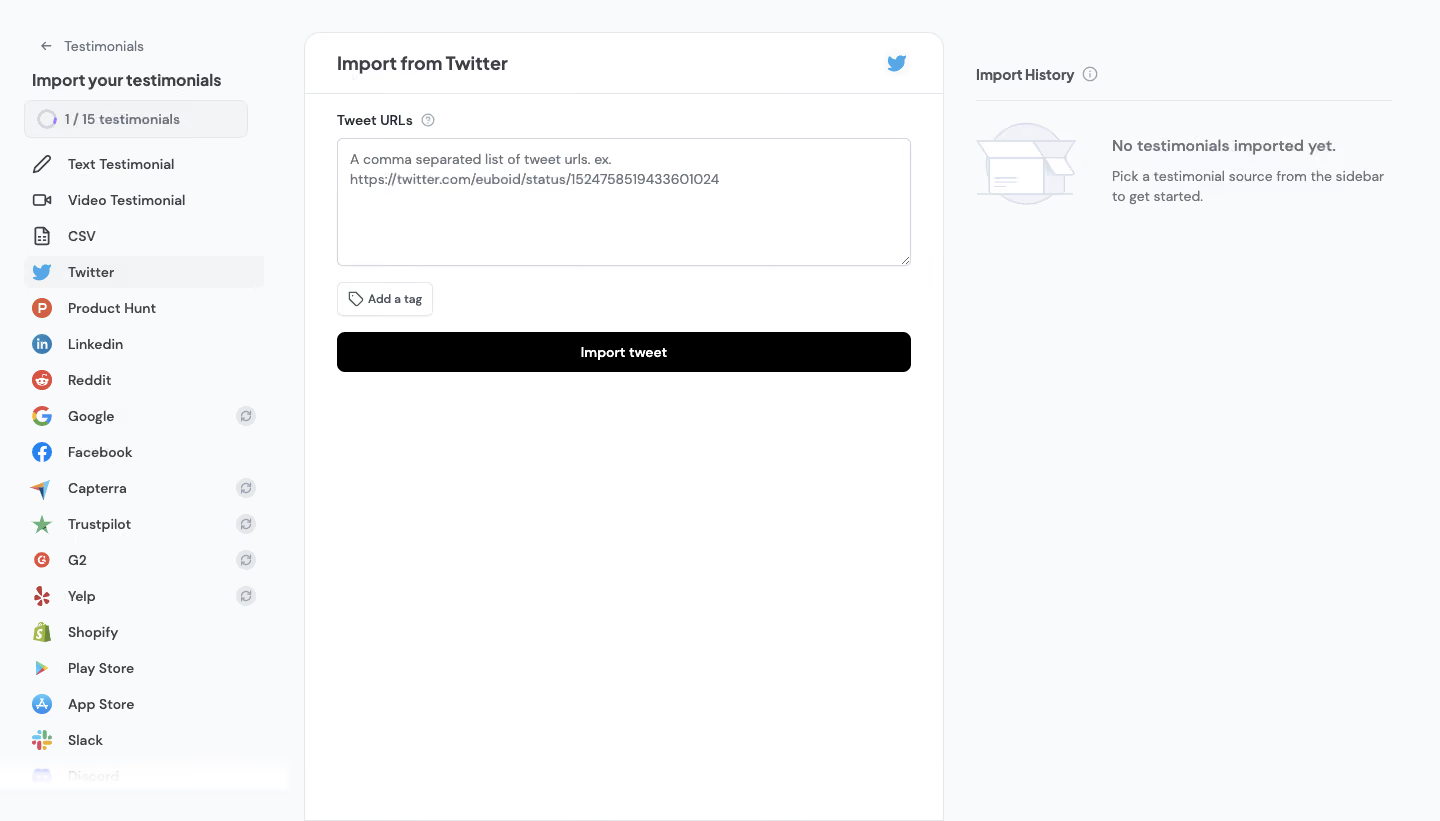
Senja Import From Twitter

Senja
Collect, Manage & Share Testimonials
Designed by
No items found.

Bookmark
Bookmark

Design with AI
Thank you! Your submission has been received!
Oops! Something went wrong while submitting the form.
# Design from Reference: Senja Import From Twitter
Create an original, high-fidelity visual design inspired by the reference. Prioritize composition, typography, colors, spacing, and component styling over technical implementation.
## Reference
- **Product:** Senja
- **Category:** Import & Export
- **Screenshot:** https://cdn.prod.website-files.com/5e9dc792e1210c5325f7ebbc/6acbbbebf023ce865170e149_6acbbb2febc8281d41ad1be0_cms-ff848adb9e80e50ec570e24c.webp
Analyze the screenshot first. If inaccessible, request it rather than guessing.
## Content
{{content.instructions}}
{{content.data}}
Preserve essential messaging and factual accuracy. Adapt structure and copy length for visual balance; never invent product claims.
## Visual Design
### Overall aesthetic
- **Character:** A light testimonial-import workspace uses three functional columns, pale gray backgrounds, a white central form, small provider logos, and a black primary button.
- **Tone:** The styling is practical and quiet, with thin borders, rounded controls, and very little decoration beyond an empty-state illustration.
- **Observed scale:** The source measures 1440 × 821 pixels. Dimensions below refer to approximate image pixels; CSS estimates assume an unverified 1× capture.
### Page composition
- **Left navigation:** A roughly 288-pixel source sidebar contains a back link, import heading, quota indicator, and a long list of testimonial sources.
- **Central panel:** A white bordered panel begins around x=304, spans roughly 640 pixels, and extends to the bottom of the capture. Its rounded upper corners distinguish it from the pale shell.
- **Panel header:** Import from Twitter appears at left, with a blue source icon at right and a divider beneath.
- **Import form:** A Tweet URLs label and help icon precede a large textarea. An Add a tag control and full-width Import tweet button follow.
- **Right column:** Import History begins near x=976, with an information icon and horizontal rule. An open-box illustration sits beside the no-imports message.
- **Lower space:** Most of the central and right columns remain empty beneath their compact upper content.
### Information hierarchy
- **Source selection:** Twitter is highlighted in the sidebar, connecting the navigation state to the central heading.
- **Quota context:** A small ring and 1/15 testimonial count sit above the source list.
- **Main task:** The textarea is the principal data-entry region. Its placeholder explains comma-separated URLs and shows an example.
- **Optional classification:** Add a tag is visually secondary and placed between input and submission.
- **Primary action:** The solid black Import tweet button provides the clearest continuation cue.
- **History state:** The right column explicitly shows no imported testimonials. No successful import or progress result is visible.
- **Example data:** The visible social URL is placeholder/sample content and should not be copied as a required destination.
### Typography
- **Typeface appearance:** A compact rounded neutral sans-serif is used throughout. Exact family is unverified.
- **Panel heading:** Approximately 20 pixels, semibold, with a line-height near 26 pixels.
- **Sidebar heading:** Around 16 pixels, semibold; source names are roughly 14 pixels with medium weight.
- **Form roles:** Label and textarea text are around 13–14 pixels, with placeholder lines around 20-pixel line-height.
- **History copy:** A bold status line around 15 pixels sits above smaller regular explanatory text.
- **Controls:** Add a tag and Import tweet use approximately 12–14-pixel semibold labels.
### Colors & surfaces
- **Measured shell:** #F9FAFB dominates the outer workspace; #FFFFFF forms the main panel and controls.
- **Measured neutral states:** #F3F4F6 appears in pale selected/quota surfaces; #E5E7EB supplies light boundary tones.
- **Measured text:** #3F3F46 appears in dark gray text, while #000000 supplies the primary action.
- **Additional pale tones:** #F1F3F9 and #D2D5DB occur in subtle interface/illustration detail.
- **Provider color:** Source logos retain familiar saturated colors; the active Twitter symbol is blue.
- **Flat depth:** Thin outlines define the panel, textarea, quota, and tag button. No prominent shadows or raised cards are visible.
### Components
- **Back link:** A small left arrow and Testimonials label sit above the sidebar title.
- **Quota indicator:** A pale outlined rounded rectangle contains a partial ring and compact count text.
- **Source rows:** Small icons precede Text Testimonial, Video Testimonial, CSV, Twitter, and numerous review/social platforms. Twitter has a pale rounded selected row.
- **Additional source cues:** Some rows have small circular refresh/sync-like symbols at right. The exact behavior of those symbols is unverified.
- **Textarea:** Approximately 575 × 128 pixels, white, lightly outlined, with a small radius and resize affordance at lower right.
- **Help icons:** Tiny circled question/information symbols accompany the form label and history heading.
- **Tag control:** A small outlined white button combines a tag icon and Add a tag label.
- **Import button:** Approximately 575 × 40 pixels, black, with corners around 7–8 pixels and centered white text.
- **History empty state:** A pale open-box drawing sits left of a bold no-imports label and two-line guidance.
- **Captured list extent:** The source list reaches a very pale partially visible Discord row at the bottom. Its exact disabled or scrolling state is not established.
- **Unshown states:** Entered URLs, tag selection, import errors, progress, completed history, and open help content are not visible.
### Visual rhythm
- **Three-column hierarchy:** Narrow source navigation, broad input panel, and medium history column keep selection, action, and outcome distinct.
- **Compact top content:** Labels and controls cluster near the top while large blank areas preserve focus.
- **Consistent row cadence:** Source icons and names align on shared baselines, with regular vertical spacing.
- **Shared form edges:** Textarea, tag control, and primary button align to the same left edge; textarea and button share width.
- **Low visual noise:** Subtle borders and neutral surfaces let provider logos and the black action stand out.
### Responsive
- **Evidence limit:** Only a desktop import workspace is captured. Mobile behavior and scrolling regions are unverified.
- **Recommended source navigation:** Convert the long sidebar to a source picker or drawer on narrow screens.
- **Recommended stacking:** Place the form first and history beneath it, preserving source context at the top.
- **Recommended textarea:** Use fluid width, readable text, and safe wrapping for long URLs.
- **Recommended history:** Keep status messages accessible and announce import progress/results programmatically.
- **Recommended controls:** Preserve clear focus states and sufficient hit areas for small source rows, tag actions, and help icons.
### Adaptation guidance
- **Preserve the workflow:** Separate source choice, URL entry, optional tagging, import action, and result history.
- **Use real validation:** Specify accepted URL patterns, multiple-entry rules, limits, and error handling from actual requirements.
- **Keep history honest:** Show empty, processing, success, and failure states based on real import outcomes rather than inferred activity.
- **Use accessible semantics:** Label the textarea, identify selected sources, provide descriptive icon labels, and make the source list keyboard navigable.
- **Avoid copying identifiers:** Replace the captured example URL and quota with approved sample or live account data.
- **Standardize the palette:** White panels, pale gray shell, dark text, thin outlines, and one black primary action provide the core visual system.
Use this context to reproduce the reference's visual language: layout, typography, colors, spacing, borders, radii, and distinctive elements. The screenshot takes priority if descriptions conflict.
## Direction
{{preferences.fidelityInstructions}}
## Output
{{output.instructions}}
Deliver a polished, cohesive design with precise alignment, hierarchy, and spacing. Produce the requested visual artifact, not just a description. If unsupported, explain the limitation.

.avif)
Category
Patterns
Tech Stack


Added on
February 24, 2023

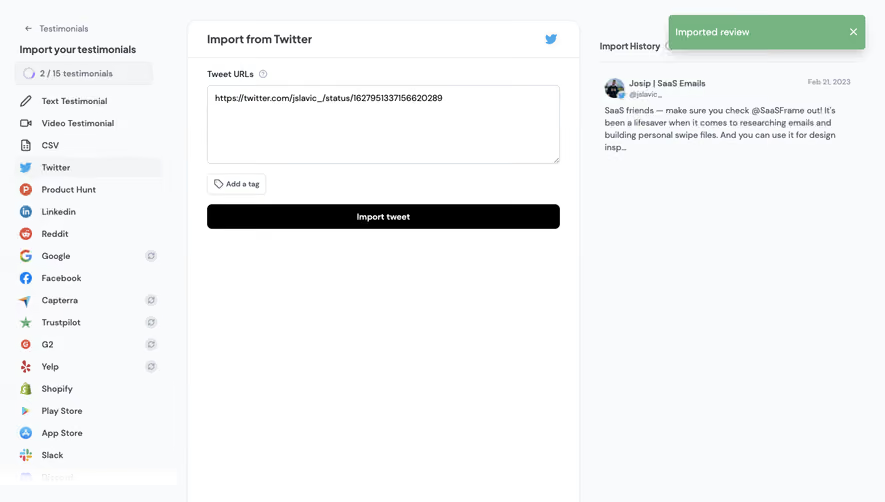
Similar screens





Upgrade to SaaSFrame Pro now to see similar examples.
Monthly
$18 /month
Billed $18 monthly
Browse all screens & flows
Filter and search screens & flows
Search text in screenshots
Access Figma files
Access mobile versions
Join now
Quarterly
$16 /month
Billed $48 quarterly
Browse all screens & flows
Filter and search screens & flows
Search text in screenshots
Access Figma files
Access mobile versions
Join now
Yearly
$15 /month
Billed $180 yearly
Browse all screens & flows
Filter and search screens & flows
Search text in screenshots
Access Figma files
Access mobile versions
Join now