Design with AI
Generate a new design based on this screen using your own content.
# Design from Reference: SavvyCal User Onboarding
Create an original, high-fidelity visual design inspired by the reference. Prioritize composition, typography, colors, spacing, and component styling over technical implementation.
## Reference
- **Product:** SavvyCal
- **Category:** User Onboarding
- **Screenshot:** https://cdn.prod.website-files.com/5e9dc792e1210c5325f7ebbc/6acb680fc08cd859ff8695f9_6acb6726baddc9f317dead37_cms-979e02a967b81b5a9b33441e.webp
Analyze the screenshot first. If inaccessible, request it rather than guessing.
## Content
{{content.instructions}}
{{content.data}}
Preserve essential messaging and factual accuracy. Adapt structure and copy length for visual balance; never invent product claims.
## Visual Design
### Overall aesthetic
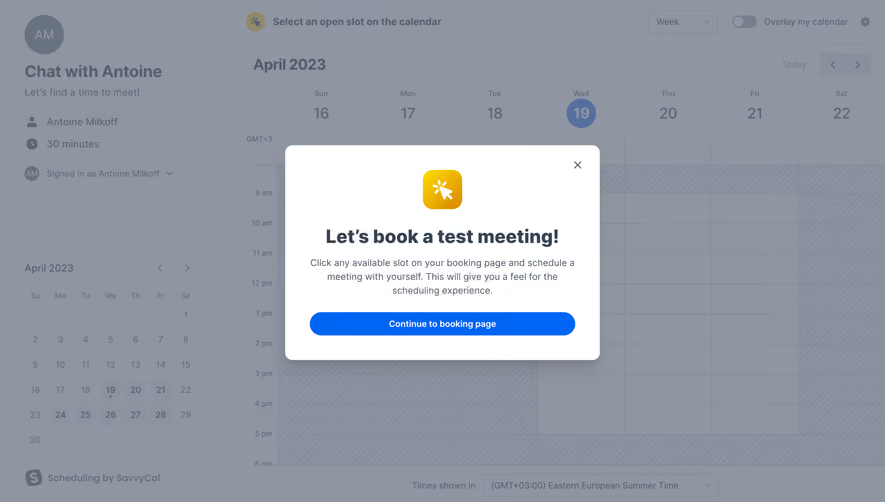
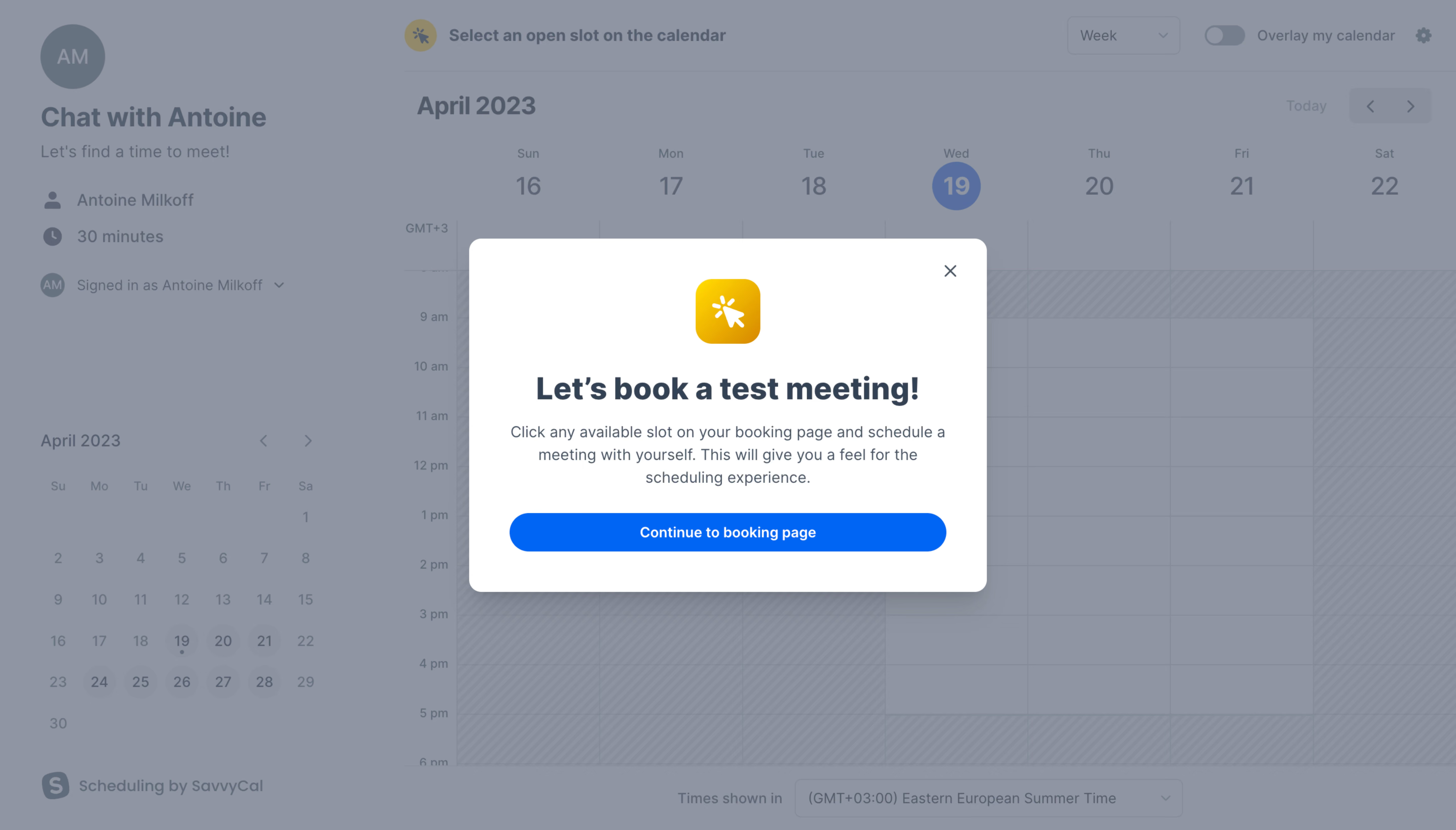
- **Style:** A friendly onboarding prompt presented as a white modal over a dimmed scheduling calendar.
- **Character:** A yellow brand icon and bright blue pill action add energy to an otherwise restrained instructional dialog.
### Page composition
- **Capture and scale:** The screenshot measures 5760 × 3284 pixels, consistent with an estimated 4× capture of a 1440 × 821 CSS viewport. Following sizes are estimated CSS pixels under that assumption.
- **Background:** The booking page has a left meeting-information rail and mini month calendar, with a large weekly time grid on the right. View, calendar-overlay, navigation, and timezone controls remain visible beneath the overlay.
- **Dialog:** A centered white modal is approximately 510 px wide and 350 px high. It contains a yellow icon tile, a bold one-line test-meeting heading, a centered three-line explanation, and a full-width continuation button. A close icon sits at top right.
### Information hierarchy
- **Focus:** The modal is the active visual layer; gray dimming reduces the calendar to context.
- **Instruction:** The heading introduces a test booking, and the paragraph explains scheduling with oneself to understand the experience.
- **Actions:** The blue continuation action dominates the lower dialog; the small close icon provides a less prominent dismissal control.
### Typography
- **Family:** A clear neutral sans serif is visible; exact family identity is unverified.
- **Heading:** Approximately 30 px CSS, weight 700, with around 36 px line-height and centered alignment.
- **Body and button:** Body copy is about 15–16 px with 22 px line-height. The button uses approximately 14 px semibold white text.
- **Background type:** Calendar dates, times, and meeting metadata are smaller and visually muted by the overlay; they should not compete with the dialog.
### Colors & surfaces
- **Surfaces:** Sampled sRGB #FFFFFF defines the dialog. Sampled overlay-composited grays include #8F95A1, #888E9B, #8D93A0, #8C929F, and #8E94A0; these are visible composites rather than confirmed underlying tokens.
- **Action:** Sampled blue #0065F4 fills the primary continuation button.
- **Icon and ink:** The icon tile uses a yellow-to-amber treatment with a white sparkle/pointer mark. Heading and paragraph use dark blue-gray; their precise hex values are unverified.
### Components
- **Dialog shell:** Use approximately 12 px corner radius, a broad soft shadow, and around 40 px side padding.
- **Brand tile:** A roughly 64 × 64 px yellow rounded square sits centered above the heading, with approximately 16–18 px corner radii.
- **Primary button:** Approximately 430 px wide and 38–40 px high, with fully rounded ends. It sits below the explanation with comfortable separation.
- **Close control:** A small dark-gray X aligns inside the upper-right inset. No additional modal fields or progress controls are visible.
### Visual rhythm
- **Spacing:** Allow approximately 30 px top padding, 28–32 px between icon and heading, 14–18 px before explanatory copy, and 24 px before the action.
- **Balance:** Keep the text and button on a single center axis, with similar horizontal insets and adequate lower padding.
### Responsive
- **Observed state:** Only the wide desktop booking page is evidenced.
- **Recommended reflow:** Use viewport margins of 16–20 px and a fluid dialog. Permit the heading to wrap, keep the action full width, and constrain modal height with scrolling if necessary.
- **Context:** The calendar may simplify behind the dialog on mobile; the onboarding instruction should remain self-contained.
### Adaptation guidance
- **Preserve:** Retain the dimmed real-workflow backdrop, friendly icon, concise test-task explanation, single strong continuation action, and visible dismissal control.
- **Adapt:** Replace the test-booking instruction with a genuine low-risk first task appropriate to the new product.
- **Avoid:** Do not reuse the reference's account identity or calendar data, and do not invent subsequent onboarding steps.
Use this context to reproduce the reference's visual language: layout, typography, colors, spacing, borders, radii, and distinctive elements. The screenshot takes priority if descriptions conflict.
## Direction
{{preferences.fidelityInstructions}}
## Output
{{output.instructions}}
Deliver a polished, cohesive design with precise alignment, hierarchy, and spacing. Produce the requested visual artifact, not just a description. If unsupported, explain the limitation.
.webp)



.avif)