.webp)
Thank you! Your submission has been received!
Oops! Something went wrong while submitting the form.
Get SaaSFrame Pro
Monthly
$18
Quarterly
$48
Yearly
$180
Upgrade to access this feature
Browse all screens & flows
Filter and search screens & flows
Access Figma files
Access mobile versions
Bookmark screens & flows
Join now
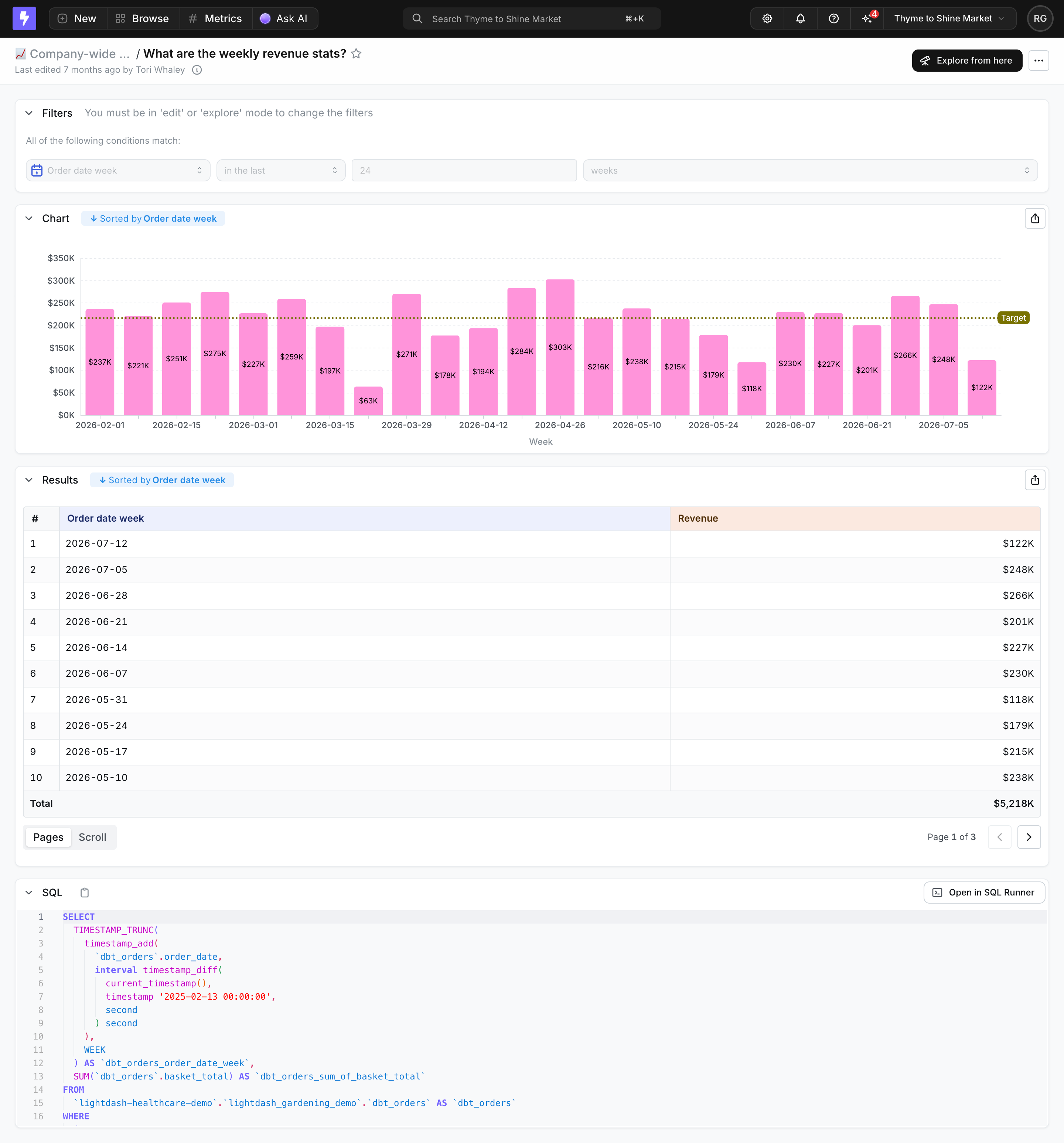
Lightdash Metric Analytics

Lightdash
The open-source AI native BI platform
Designed by


Bookmark
Bookmark

Design with AI
Thank you! Your submission has been received!
Oops! Something went wrong while submitting the form.
# Design from Reference: Lightdash Metric Analytics
Create an original, high-fidelity visual design inspired by the reference. Prioritize composition, typography, colors, spacing, and component styling over technical implementation.
## Reference
- **Product:** Lightdash
- **Category:** Analytics
- **Screenshot:** https://cdn.prod.website-files.com/5e9dc792e1210c5325f7ebbc/6acad12cb2165b6c7fffad11_6acad0b9d5603a17eba4da54_cms-4e8632fe67745978abc20d0a.webp
Analyze the screenshot first. If inaccessible, request it rather than guessing.
## Content
{{content.instructions}}
{{content.data}}
Preserve essential messaging and factual accuracy. Adapt structure and copy length for visual balance; never invent product claims.
## Visual Design
### Overall aesthetic
- **Style:** Dense analytical report with a black global toolbar, pale-gray canvas and white bordered modules.
- **Character:** Pink revenue bars, blue metadata chips and syntax-colored SQL distinguish data views within a restrained business interface.
- **Capture:** The image measures 2880 × 3094 pixels. CSS estimates assume a 2× capture, equivalent to approximately 1440 × 1547 CSS pixels; actual scale and font identities are unverified.
### Page composition
- **Global toolbar:** Product mark, creation/browsing/metrics/AI controls and search occupy the black top bar, with workspace utilities right.
- **Report header:** Breadcrumb, report question, edit metadata and an exploration action sit below.
- **Filters:** A wide white panel displays a single date-range condition in four aligned controls.
- **Chart:** A large white module contains a weekly revenue bar chart with a target line and export control.
- **Results:** A second module shows ten dated rows, revenue values, total and pagination.
- **SQL:** A lower expanded module displays line-numbered syntax-highlighted query text and a runner action.
### Information hierarchy
- **Report identity:** A bold question-style title leads the content.
- **Mode restriction:** The filter header explains that editing requires another mode; controls appear muted.
- **Visual analysis:** Pink bars and numeric labels dominate the chart, with an olive dotted target line providing a reference.
- **Data detail:** The results table supports the chart with dates, right-aligned revenue and a bold total.
- **Technical transparency:** SQL is available below the business-facing visualization and results.
- **State scope:** The report is populated, with page one of three selected; no exploration or filter-edit state is open.
### Typography
- **Family:** A neutral UI sans-serif is visible; exact identity is unverified.
- **Report title:** Approximately 16-pixel CSS size, semibold.
- **Module headings:** Approximately 14 pixels, medium-to-semibold.
- **Body/table:** Approximately 13–14 pixels with compact line height.
- **Chart labels:** Approximately 11–12 pixels; internal bar values are small dark text.
- **Metadata:** Approximately 12 pixels in muted gray.
- **SQL:** Small monospace text around 12 pixels with roughly 18-pixel line spacing.
### Colors & surfaces
- **Measured base:** White #FFFFFF supports modules; #F8F9FA fills the workspace.
- **Measured supporting surfaces:** #FBFBFC and #F0F1F4 appear in table/code/control regions.
- **Measured chart:** Pink #FF94DA fills revenue bars.
- **Measured toolbar:** Near-black #141414 and #202020 support the header/control family.
- **Measured date header:** Pale blue-lavender #EDF0FD distinguishes the date column.
- **Accent roles:** Blue marks sort/filter metadata; pale peach distinguishes the revenue header; olive marks the target.
- **SQL palette:** Purple, blue, magenta, green and red distinguish query syntax.
### Components
- **Toolbar controls:** Compact dark segmented groups combine icons and labels; search includes a shortcut hint.
- **Exploration action:** A black rounded button sits beside a small overflow control.
- **Filter row:** Date dimension, relative condition, numeric period and unit share one horizontal row.
- **Module frames:** White rounded rectangles use fine cool-gray borders and subtle shadows.
- **Bar chart:** Twenty-four weekly bars show internal revenue labels, a currency y-axis, date x-axis and dotted horizontal target.
- **Sort chips:** Pale-blue labels above chart/results indicate ordering by week.
- **Results table:** Three columns include row index, date and revenue; alternating pale rows and thin rules support scanning.
- **Pagination:** Pages/Scroll segmented controls sit left; page count and previous/next arrows sit right.
- **SQL panel:** A copy icon, line numbers, colored query and Open in SQL Runner control provide technical access.
- **State scope:** The SQL continues below the visible crop; no additional query content is inferred.
### Visual rhythm
- **Outer inset:** Approximately 20 CSS pixels frame the report modules.
- **Module gaps:** Roughly 16 pixels separate filters, chart, results and SQL.
- **Chart density:** Even bar spacing and light dotted gridlines maintain a regular weekly rhythm.
- **Table cadence:** Compact approximately 35-pixel rows contrast with the larger chart region.
- **Hierarchy flow:** Filter context leads visualization, then exact values and underlying query.
- **Alignment:** Module titles, export controls and content edges repeat consistently.
### Responsive
- **Recommendation — toolbar:** Collapse lower-priority global controls while preserving search and report context.
- **Recommendation — filters:** Wrap condition controls without losing their sequence.
- **Recommendation — chart:** Support readable horizontal chart scrolling or fewer date labels rather than shrinking values excessively.
- **Recommendation — table/code:** Allow controlled horizontal scrolling for data and SQL.
- **Recommendation — actions:** Keep export and runner controls accessible. No mobile layout is evidenced.
### Adaptation guidance
- **Preserve analytical order:** Show filters, chart, results and query in that sequence.
- **Keep chart/table agreement:** Maintain consistent metric naming, dates and ordering across views.
- **Reuse module tokens:** Standardize thin borders, small radii, header spacing and export placement.
- **Use color semantically:** Reserve pink for the metric and a distinct reference treatment for the target.
- **Define modes clearly:** Keep view-only versus edit/explore affordances explicit.
- **Avoid treating sample values as live data:** The screenshot's revenue and dates are captured report content.
Use this context to reproduce the reference's visual language: layout, typography, colors, spacing, borders, radii, and distinctive elements. The screenshot takes priority if descriptions conflict.
## Direction
{{preferences.fidelityInstructions}}
## Output
{{output.instructions}}
Deliver a polished, cohesive design with precise alignment, hierarchy, and spacing. Produce the requested visual artifact, not just a description. If unsupported, explain the limitation.

.avif)
Category
Tech Stack

Added on
July 15, 2026
Similar screens





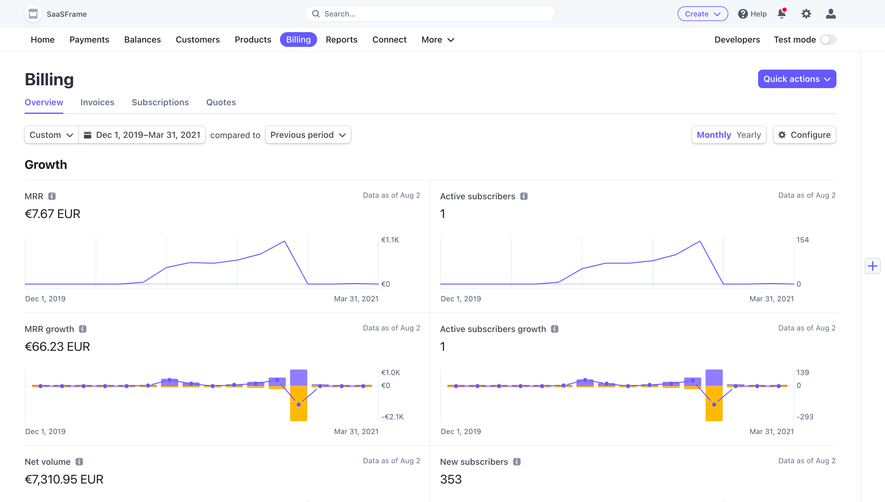

Upgrade to SaaSFrame Pro now to see similar examples.
Monthly
$18 /month
Billed $18 monthly
Browse all screens & flows
Filter and search screens & flows
Search text in screenshots
Access Figma files
Access mobile versions
Join now
Quarterly
$16 /month
Billed $48 quarterly
Browse all screens & flows
Filter and search screens & flows
Search text in screenshots
Access Figma files
Access mobile versions
Join now
Yearly
$15 /month
Billed $180 yearly
Browse all screens & flows
Filter and search screens & flows
Search text in screenshots
Access Figma files
Access mobile versions
Join now