Design with AI
Generate a new design based on this screen using your own content.
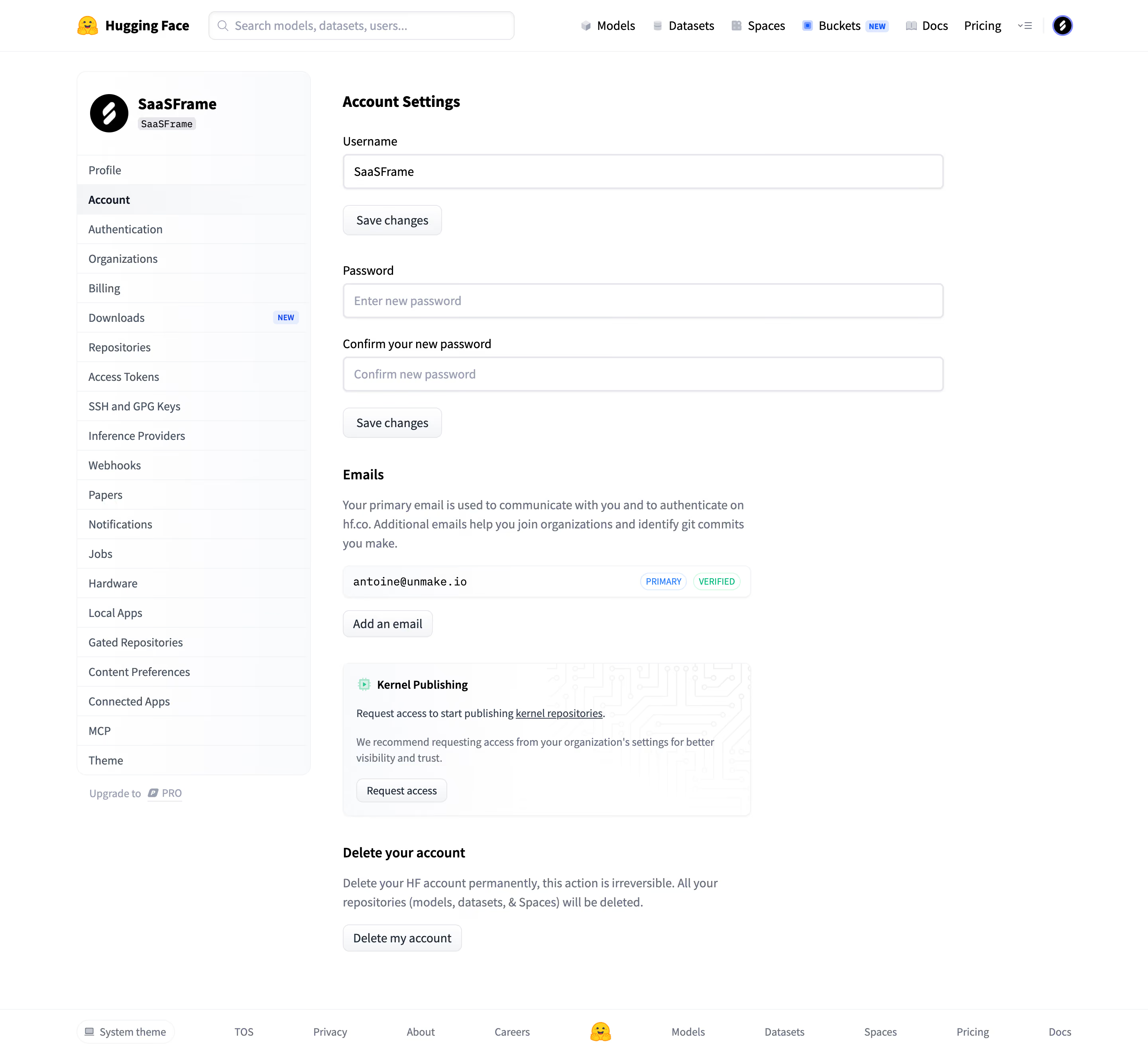
# Design from Reference: Hugging Face Account settings
Create an original, high-fidelity visual design inspired by the reference. Prioritize composition, typography, colors, spacing, and component styling over technical implementation.
## Reference
- **Product:** Hugging Face
- **Category:** Settings
- **Screenshot:** https://cdn.prod.website-files.com/5e9dc792e1210c5325f7ebbc/6acad0dc5af75170c4bbe1dc_6acad07a688a61abb9d999b2_cms-875b0213e2b064cd31467fef.webp
Analyze the screenshot first. If inaccessible, request it rather than guessing.
## Content
{{content.instructions}}
{{content.data}}
Preserve essential messaging and factual accuracy. Adapt structure and copy length for visual balance; never invent product claims.
## Visual Design
### Overall aesthetic
- **Character:** A sparse white account-settings page with a tall pale navigation card, conventional form groups and understated utility buttons.
- **Evidence scale:** Original 2880 × 2658 pixels. CSS estimates assume an unverified 2× capture scale; color samples are converted sRGB.
### Page composition
- **Header:** Global brand/search/product navigation with small account avatar at right.
- **Sidebar:** Approximately 294 px rounded settings list with workspace identity at top, Account selected and many evenly divided rows.
- **Main:** Approximately 754 px wide form region begins to the right, containing username, password/confirmation, email management, a publishing-access card and an account-deletion section.
- **Footer:** Full-width thin divider above theme selection, legal/company links, small central brand mark and product links.
### Information hierarchy
- **Page title:** Bold Account Settings heads the main column.
- **Form grouping:** Username has its own save action; password and confirmation share another action.
- **Email state:** A bordered email row carries small PRIMARY and VERIFIED badges, followed by an add-email button.
- **Secondary feature:** A pale circuit-pattern card introduces publishing access.
- **Destructive region:** A separate bold deletion heading and warning copy precede a neutral outlined delete control.
### Typography
- **Page/workspace headings:** Unverified sans-serif around 20 px bold, 26 px line height.
- **Section headings:** Approximately 16 px bold.
- **Labels/values:** Around 14–16 px regular with 20–24 px line height.
- **Supporting copy:** Approximately 14 px muted blue-gray, 24 px line height.
- **Badges:** Around 10–11 px uppercase; email value uses a monospaced treatment.
### Colors & surfaces
- **Canvas:** White #FFFFFF.
- **Sidebar/control family:** Pale #FAFBFC and nearby cool whites create soft separation.
- **Headings:** Black/dark slate type contrasts with muted gray-blue explanatory copy.
- **Status accents:** Blue PRIMARY and green VERIFIED outlined pills; blue NEW badge remains in the sidebar.
- **Feature artwork:** Very pale mint icon and fine gray circuit lines add decoration to the publishing card.
### Components
- **Identity panel:** Circular black avatar and bold workspace name above a compact tag; pale rounded sidebar shell with fine row dividers.
- **Text fields:** Approximately 754 × 44 px, thin cool-gray border, 5 px radius and subtle shadow/inset edge.
- **Save/add/delete controls:** Small white-to-light-gray outlined rounded buttons, approximately 34–38 px tall.
- **Email row:** Approximately 512 × 40 px rounded bordered strip, monospaced value left and two compact status pills right.
- **Publishing card:** Approximately 512 × 192 px pale rounded panel with icon/title, short explanatory copy and request-access button; circuit motif occupies the right/background.
- **Deletion group:** Unboxed heading and two-line warning above a compact outlined button; no confirmation dialog is visible.
- **Footer utility:** Small rounded theme pill with screen icon.
### Visual rhythm
- **Main spacing:** Approximately 36–40 px separates username, password, emails, publishing and deletion groups.
- **Field cadence:** Labels sit about 8 px above fields; roughly 24 px separates password inputs.
- **Alignment:** Main headings, labels and buttons share one left edge; narrower email/feature cards sit within the wider form column.
- **Sidebar:** Compact roughly 37 px rows contrast with the looser main form spacing.
### Responsive
- **Observed limit:** Desktop only; mobile settings navigation and field layout are unverified.
- **Recommendation:** Collapse the sidebar and let all form/card regions fill a single column within comfortable gutters.
- **Email handling:** Wrap badges or truncate long addresses while preserving access to the complete value.
### Adaptation guidance
- **Retain:** Separate independent account changes into clear groups with local save controls.
- **Implement:** Use light borders, explicit labels and compact status badges without overloading the form with cards.
- **Verify:** Confirm fonts, scale and action semantics separately; no account, password, email, publishing access or deletion operation was performed.
Use this context to reproduce the reference's visual language: layout, typography, colors, spacing, borders, radii, and distinctive elements. The screenshot takes priority if descriptions conflict.
## Direction
{{preferences.fidelityInstructions}}
## Output
{{output.instructions}}
Deliver a polished, cohesive design with precise alignment, hierarchy, and spacing. Produce the requested visual artifact, not just a description. If unsupported, explain the limitation.
.webp)



.avif)