Design with AI
Generate a new design based on this screen using your own content.
# Design from Reference: Hotjar Activation Emails
Create an original, high-fidelity visual design inspired by the reference. Prioritize composition, typography, colors, spacing, and component styling over technical implementation.
## Reference
- **Product:** Hotjar
- **Category:** Activation Emails
- **Screenshot:** https://cdn.prod.website-files.com/5e9dc792e1210c5325f7ebbc/6acbc98bf9eac5af75463af5_6acbc70bc7093021f22c885c_cms-49db2f653b060c696dad9b3d.webp
Analyze the screenshot first. If inaccessible, request it rather than guessing.
## Content
{{content.instructions}}
{{content.data}}
Preserve essential messaging and factual accuracy. Adapt structure and copy length for visual balance; never invent product claims.
## Visual Design
### Overall aesthetic
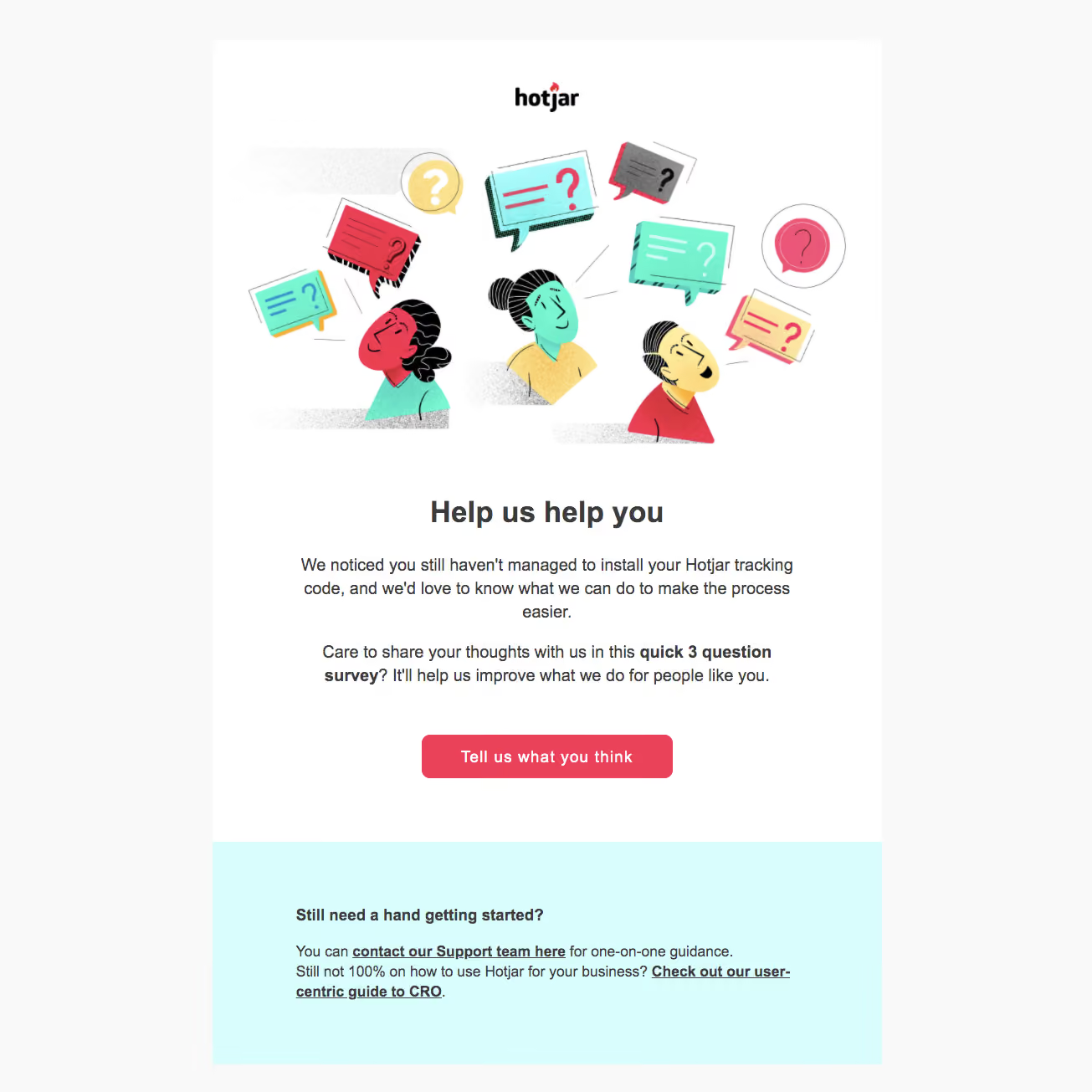
- **Character:** A friendly reactivation email with hand-drawn people and question bubbles, a coral survey action and a pale-cyan support block.
- **Evidence scale:** Original 1305 × 1305 pixels. Sizes below are image-pixel estimates; email-client zoom and CSS scale are unverified.
### Page composition
- **Outer frame:** Light-gray canvas surrounds an approximately 800 px white message column beginning around x254, y48.
- **Opening:** Small centered Hotjar wordmark above a large colorful illustration occupying roughly 700 × 370 px.
- **Message:** Centered bold heading followed by two centered paragraphs in an approximately 610 px text measure.
- **Action:** A coral rounded survey button sits centered beneath the copy.
- **Support:** A full-width cyan block at the bottom contains a left-aligned bold heading and two lines of help/resource links.
### Information hierarchy
- **Illustration:** Three people and floating question bubbles make feedback the immediate visual theme.
- **Heading:** A short bold request leads the textual message.
- **Emphasis:** The short survey-length phrase is bold within otherwise regular body copy.
- **Actions:** One solid coral button is primary; bold underlined support/resource links form the secondary path.
### Typography
- **Heading:** Unverified sans-serif, approximately 36 px bold with 44 px line height.
- **Body:** Approximately 20 px regular, 28 px line height, centered.
- **Button:** Approximately 20 px bold, white and centered.
- **Support:** Around 18 px regular with 24 px line height; the support heading and links are bold.
- **Tracking:** Neutral, with hierarchy driven by size, weight and alignment.
### Colors & surfaces
- **Canvas/card:** Measured #F9F9F9 outer background and #FFFFFF content.
- **Support block:** Pale cyan #D9FDFD fills the lower region.
- **Action:** Coral #E94259 marks the button and illustration accents.
- **Text:** Dark gray #3C3C3C anchors heading and support text.
- **Illustration:** Mint, yellow, coral, black outlines and grainy gray textures provide a lively editorial palette.
### Components
- **Illustration:** Flat cutout-style characters, offset speech bubbles, question marks and textured shadows; no enclosing card border.
- **Survey button:** Approximately 300 × 52 px with 10 px radius and generous horizontal padding.
- **Support region:** Approximately 800 × 266 px cyan rectangle with roughly 100 px side padding and 72 px top padding.
- **Links:** Bold underlined phrases embedded in body copy rather than additional buttons.
### Visual rhythm
- **Opening:** Clear separation between logo, illustration and headline.
- **Copy spacing:** Roughly 24 px separates the two paragraphs, with about 56 px before the primary button.
- **Section break:** A large white interval after the button creates a distinct support section.
- **Alignment:** Centered promotional content changes to left alignment for practical help.
### Responsive
- **Observed limit:** Only one email rendering is provided.
- **Recommendation:** Use a fluid message width, proportional illustration scaling and mobile gutters of at least 20 px.
- **Text handling:** Keep body readable without shrinking the full email; let support links wrap naturally.
### Adaptation guidance
- **Retain:** Pair a concise feedback request with reassuring imagery, one survey action and a practical help alternative.
- **Implement:** Use a coral action against white and a distinct cyan support region.
- **Verify:** Confirm email fonts and link targets separately. The screenshot's tracking-installation message is captured content, not a verified account status.
Use this context to reproduce the reference's visual language: layout, typography, colors, spacing, borders, radii, and distinctive elements. The screenshot takes priority if descriptions conflict.
## Direction
{{preferences.fidelityInstructions}}
## Output
{{output.instructions}}
Deliver a polished, cohesive design with precise alignment, hierarchy, and spacing. Produce the requested visual artifact, not just a description. If unsupported, explain the limitation.