Design with AI
Generate a new design based on this screen using your own content.
# Design from Reference: Help Scout Onboarding Emails
Create an original, high-fidelity visual design inspired by the reference. Prioritize composition, typography, colors, spacing, and component styling over technical implementation.
## Reference
- **Product:** Help Scout
- **Category:** Onboarding Email
- **Screenshot:** https://cdn.prod.website-files.com/5e9dc792e1210c5325f7ebbc/6acbc0787ce271b12870b73c_6acbbfd0436a6cc27afe989f_cms-488b61e04114c5ce0be6e5b8.webp
Analyze the screenshot first. If inaccessible, request it rather than guessing.
## Content
{{content.instructions}}
{{content.data}}
Preserve essential messaging and factual accuracy. Adapt structure and copy length for visual balance; never invent product claims.
## Visual Design
### Overall aesthetic
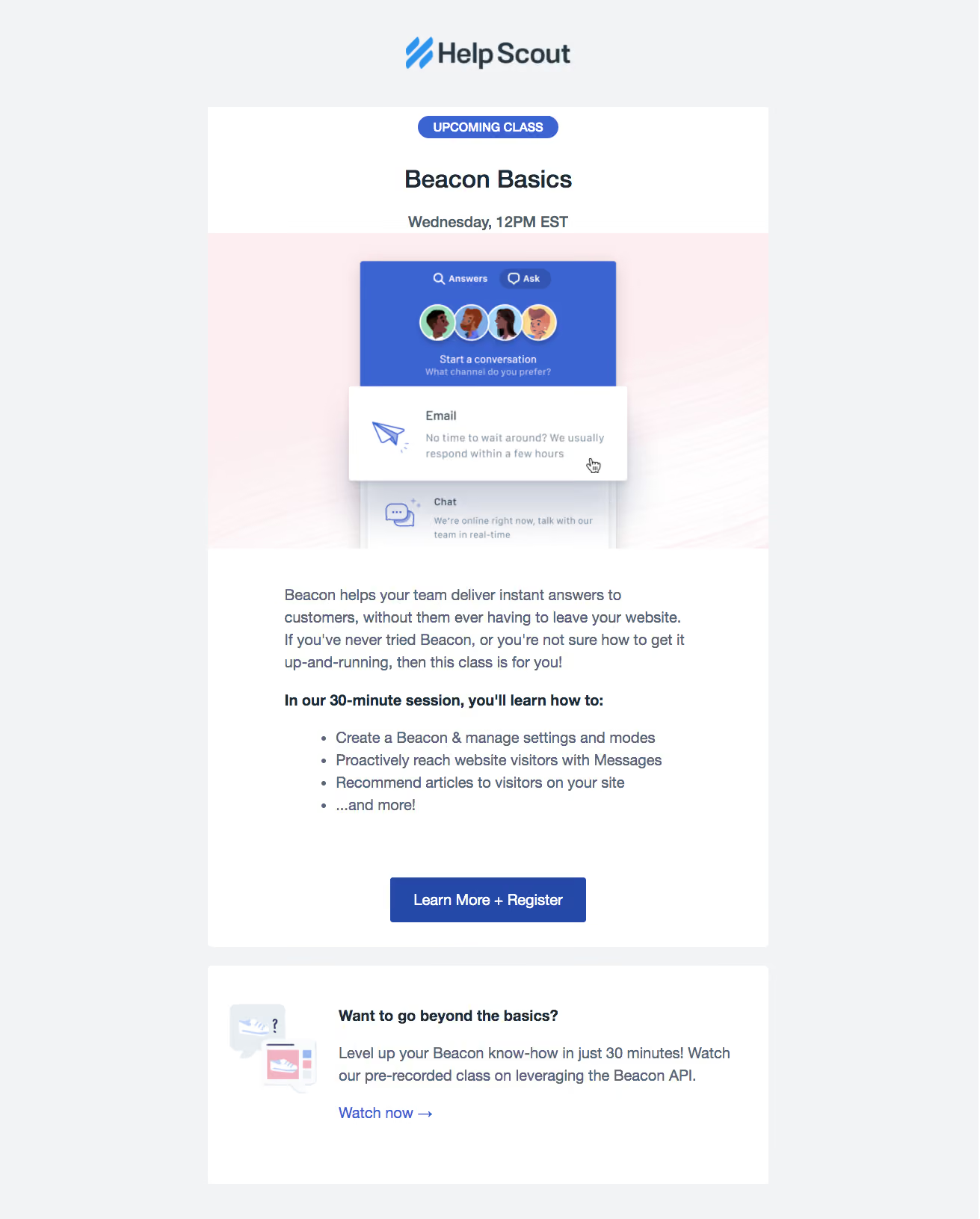
- **Character:** A class-invitation email uses a white central card, pale gray surround and blue education/conversion accents.
- **Imagery:** A large product illustration on a blush background presents a layered support-widget interface with friendly avatar artwork.
### Page composition
- **Capture:** The source is 1311 × 1631 image pixels, inspected throughout. Sizes describe image pixels; email CSS scale and zoom are unverified.
- **Column:** A centered approximately 750-pixel-wide stack sits below the brand logo.
- **Main card:** A class badge, title and schedule precede a full-width illustration, explanatory paragraph, bold learning introduction, four bullets and registration button.
- **Secondary card:** A separate white panel pairs a small illustration with advanced-class copy and a blue text link.
### Information hierarchy
- **Event framing:** A blue upcoming-class capsule introduces the class title and bold schedule.
- **Learning value:** Explanatory copy leads into a bold sentence and bullet list before the main action.
- **Actions:** The filled registration button is strongest; the advanced-class text link remains secondary.
### Typography
- **Family:** A conventional sans serif is used; exact identity is unverified.
- **Title:** Approximately 34 pixels, bold, centered; schedule is around 22 pixels and bold.
- **Reading copy:** Approximately 20 pixels with 30-pixel leading; the learning introduction uses heavier weight.
- **Controls:** Registration label is about 20 pixels; the small badge uses bold uppercase white text around 16 pixels.
### Colors & surfaces
- **Measured foundation:** Pale gray #F1F3F5 surrounds white #FFFFFF cards.
- **Measured illustration:** Blush #FCEEF1 supports the large product graphic.
- **Measured blues:** #3B64D2 and deeper #2549A8 appear in the illustration/action palette.
- **Measured text:** Slate #556575 supports body copy against white; stronger headings are darker.
### Components
- **Event badge:** A compact blue capsule centers above the title.
- **Hero graphic:** A wide blush panel contains a blue support-widget top section, overlapping white email card and lower chat option with soft shadows.
- **Bullet list:** Four left-aligned bullets use consistent indentation and body-sized text.
- **Primary CTA:** An approximately 262 × 61-pixel dark-blue rectangle has a small radius and centered white label.
- **Secondary panel:** A small image sits left of a bold heading, short description and blue arrow link; no filled secondary button is visible.
### Visual rhythm
- **Card spacing:** A roughly 25-pixel gap separates the two white panels.
- **Insets:** Body content uses approximately 100-pixel side padding, narrower than the edge-to-edge illustration.
- **Vertical pacing:** Large gaps separate illustration, reading section and registration action; bullet lines remain compact and regular.
### Responsive
- **Observed state:** Only a wide email rendering is supplied; mobile layout is unverified.
- **Recommended sizing:** Use a fluid column, proportional illustration and reduced inner padding on small screens.
- **Recommended secondary card:** Stack its icon and text if needed, preserving a clear relationship and readable link.
### Adaptation guidance
- **Preserve sequence:** Keep event details, product illustration, learning outcomes and registration action together.
- **Use color selectively:** Reserve strong blue for class identity and actions, leaving body surfaces neutral.
- **Email resilience:** Use client-compatible layout and meaningful image alternatives; do not depend on the graphic's small interface text.
- **Content fidelity:** Treat schedule and class details as captured content rather than a current event announcement.
Use this context to reproduce the reference's visual language: layout, typography, colors, spacing, borders, radii, and distinctive elements. The screenshot takes priority if descriptions conflict.
## Direction
{{preferences.fidelityInstructions}}
## Output
{{output.instructions}}
Deliver a polished, cohesive design with precise alignment, hierarchy, and spacing. Produce the requested visual artifact, not just a description. If unsupported, explain the limitation.
.webp)


.avif)