Design with AI
Generate a new design based on this screen using your own content.
# Design from Reference: Frame Product Tour
Create an original, high-fidelity visual design inspired by the reference. Prioritize composition, typography, colors, spacing, and component styling over technical implementation.
## Reference
- **Product:** Frame
- **Category:** Product Tour
- **Screenshot:** https://cdn.prod.website-files.com/5e9dc792e1210c5325f7ebbc/6acad9c5a43009b06fe6bfe6_6acad95094f34fb45f83aec1_cms-b05c61493eb44a30f53a2058.webp
Analyze the screenshot first. If inaccessible, request it rather than guessing.
## Content
{{content.instructions}}
{{content.data}}
Preserve essential messaging and factual accuracy. Adapt structure and copy length for visual balance; never invent product claims.
## Visual Design
### Overall aesthetic
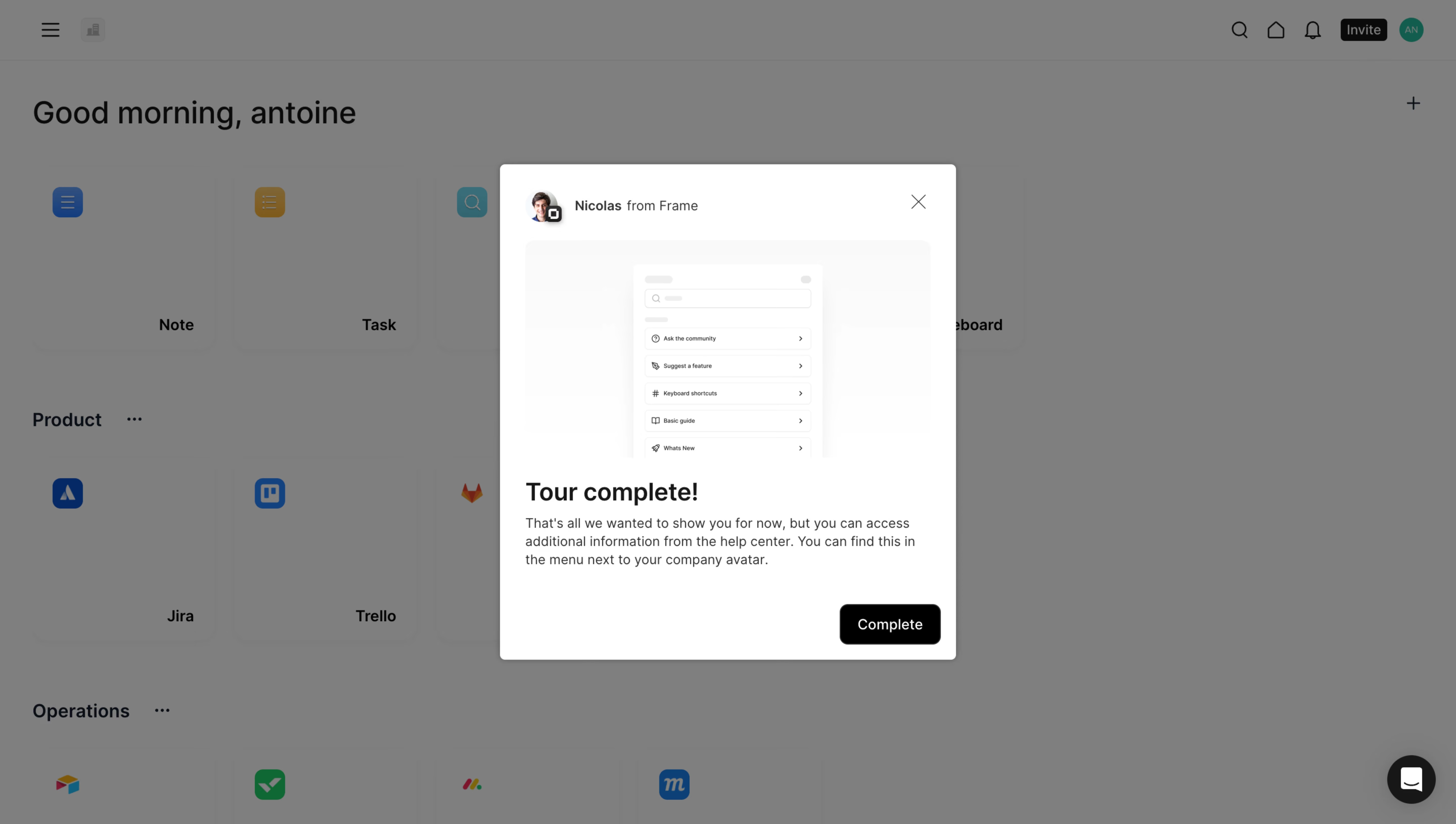
- **Character:** Friendly tour-completion dialog above a dimmed app launcher.
### Page composition
- **Canvas:** 5760 × 3260 screenshot px. Centered white modal overlays a greeting, utility header, and categorized app tiles.
### Information hierarchy
- **Priority:** Sender/avatar row precedes help-center illustration, Tour complete heading, short guidance, and black Complete action.
### Typography
- **Scale:** Capture-to-CSS ratio unverified. At 1440 px desktop width, heading would be about 24 px and body 14 px; sans serif family unverified.
### Colors & surfaces
- **Palette:** Sampled sRGB overlay #7F7F7F/#7E7E7E, white #FFFFFF, and pale illustration #FAFAFA. Black supplies primary action.
### Components
- **Details:** Modal roughly 31% of screenshot width, small rounded corners, soft shadow, close icon, pale illustration panel, and right-aligned rounded Complete button.
### Visual rhythm
- **Spacing:** Generous illustration height contrasts with compact body copy and 24–32 px estimated desktop padding.
### Responsive
- **Adaptation:** Mobile is not shown. Fit dialog to viewport and preserve access to completion and dismissal.
### Adaptation guidance
- **Transfer:** Retain concise completion guidance and a single finishing action. Use an accurate help destination and target product illustration.
Use this context to reproduce the reference's visual language: layout, typography, colors, spacing, borders, radii, and distinctive elements. The screenshot takes priority if descriptions conflict.
## Direction
{{preferences.fidelityInstructions}}
## Output
{{output.instructions}}
Deliver a polished, cohesive design with precise alignment, hierarchy, and spacing. Produce the requested visual artifact, not just a description. If unsupported, explain the limitation.
.webp)



.avif)