Design with AI
Generate a new design based on this screen using your own content.
# Design from Reference: Bonsai Sign Up Flow
Create an original, high-fidelity visual design inspired by the reference. Prioritize composition, typography, colors, spacing, and component styling over technical implementation.
## Reference
- **Product:** Bonsai
- **Category:** Account Setup
- **Screenshot:** https://cdn.prod.website-files.com/5e9dc792e1210c5325f7ebbc/6acbc68dedc235600abc9269_6acbc0f479661806cce54b2b_cms-03a435c3c67f1333335dc50b.webp
Analyze the screenshot first. If inaccessible, request it rather than guessing.
## Content
{{content.instructions}}
{{content.data}}
Preserve essential messaging and factual accuracy. Adapt structure and copy length for visual balance; never invent product claims.
## Visual Design
### Overall aesthetic
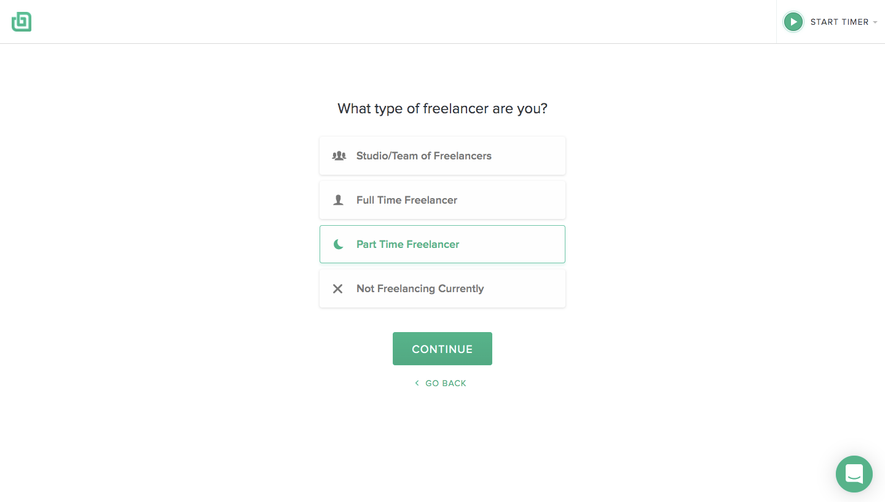
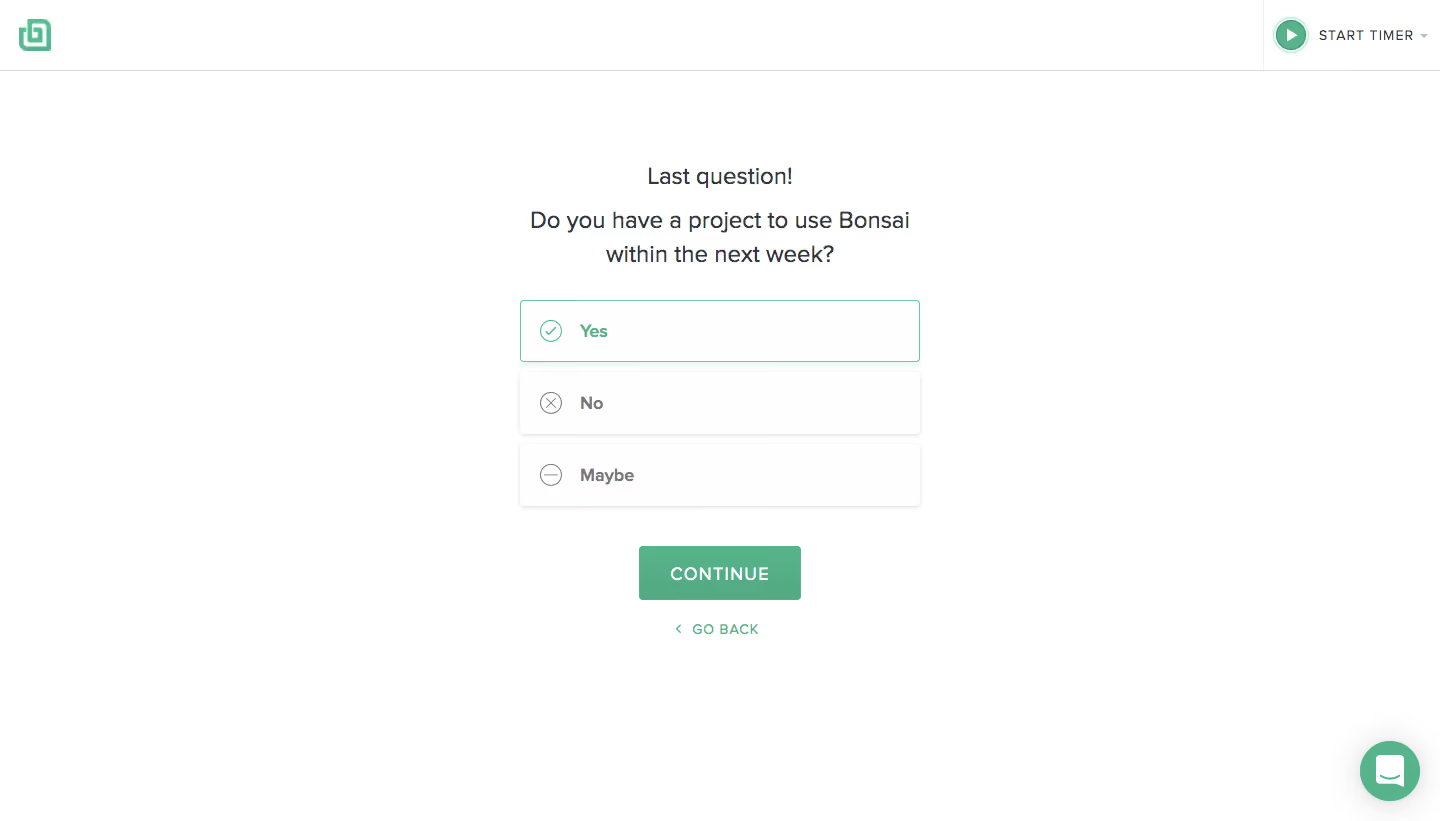
- **Character:** A minimal onboarding question uses a white canvas, a narrow centered option stack, mint-green selection cues, and one green continuation action.
- **Evidence:** The original screenshot is 1440 × 821 image pixels, inspected at 1400 px width. Measurements below are approximate source pixels; CSS scale is unverified.
- **Tone:** Plain text and small circular symbols keep the screen calm and direct.
### Page composition
- **Header:** A small green brand symbol sits at upper left; a timer control occupies the upper-right corner behind a light divider.
- **Question:** A short final-question label and two-line question are centered above the options.
- **Choices:** Three equal-width white rows display Yes, No, and Maybe with leading circular symbols.
- **Actions:** A green Continue button sits below the choices; a smaller green Go back link with chevron follows.
- **Support:** A green circular chat launcher sits at lower right.
### Information hierarchy
- **Question:** Two centered lines establish the project-timing decision.
- **Selected option:** Yes has a thin green outline, green label, and checked circle.
- **Other options:** No and Maybe use gray labels and outlined cross/minus symbols on neutral rows.
- **Progression:** The filled Continue control is stronger than the small back link. No additional fields or errors are visible.
### Typography
- **Family:** A neutral sans serif is used; exact identity is unverified.
- **Question:** Approximately 23–24 px regular with 33 px line-height.
- **Option labels:** Approximately 17–18 px semibold.
- **Primary action:** Approximately 18 px uppercase, medium weight, with slight tracking.
- **Secondary controls:** Back and timer labels are small uppercase text around 13–14 px with modest tracking.
### Colors & surfaces
- **Measured source colors:** Samples include white #FFFFFF, near-white #FEFEFE, green #57B38A, pale #FBFBFB and #F7F7F7, and dark gray #34373C.
- **Semantic use:** Green identifies selected state, brand, continuation, back navigation, and chat.
- **Neutral states:** Gray supports unselected choices and the question text.
- **Depth:** Choice rows have soft lower shadows; the selected row adds a fine mint border and pale green shadow.
### Components
- **Choice rows:** Approximately 400 × 62 px, with 4–5 px corner radii and about 10 px vertical gaps.
- **Leading symbols:** Small circles around 21 px contain check, cross, or minus marks.
- **Continue:** Approximately 162 × 53 px, green, with small corner radii and centered white text.
- **Back link:** A small left chevron and text sit centered below the button.
- **Timer:** A circular green play icon precedes a tracked text label and small dropdown chevron.
- **Chat:** A green circle approximately 60 px in diameter contains a white message icon and soft shadow.
### Visual rhythm
- **Centering:** Question, option stack, button, and back link share the same horizontal center.
- **Spacing:** A large gap separates header from content; roughly 32 px separates question and choices, and 38–40 px separates choices from Continue.
- **Internal alignment:** Choice symbols and labels share consistent left offsets.
- **Whitespace:** The compact interaction leaves wide empty sides and a substantial lower margin.
### Responsive
- **Observed limit:** Only desktop is shown; actual responsive rules and next-step behavior are unverified.
- **Recommended layout:** Use a fluid maximum-width option stack with 20–24 CSS px gutters.
- **Recommended text:** Allow the question to wrap naturally and maintain comfortable option hit areas.
- **Recommended utilities:** Keep timer and chat controls from colliding with content on short or narrow screens.
### Adaptation guidance
- **Preserve:** Keep a single focused question, clear selected/unselected states, and one primary progression action.
- **Implement:** Use an accessible mutually exclusive choice group with keyboard selection and visible focus.
- **State design:** Preserve the displayed Yes-selected state as a reference, with independent focus/hover/loading states.
- **Validate:** Confirm fonts, true CSS dimensions, narrow-screen spacing, timer access, and progression behavior. The screenshot shows no completed onboarding result.
Use this context to reproduce the reference's visual language: layout, typography, colors, spacing, borders, radii, and distinctive elements. The screenshot takes priority if descriptions conflict.
## Direction
{{preferences.fidelityInstructions}}
## Output
{{output.instructions}}
Deliver a polished, cohesive design with precise alignment, hierarchy, and spacing. Produce the requested visual artifact, not just a description. If unsupported, explain the limitation.
.webp)



.avif)