Session Management
5
Security controls for viewing, revoking, or managing active login sessions and devices.
.webp)
Session management UX gives people visibility and control over the places where their SaaS account remains signed in. It includes active-session lists, individual and bulk sign-out actions, timeout communication, remembered-device controls, and recovery after access is revoked. The core question is practical: can someone recognize their own access and end access they no longer trust?
Mercury’s security settings and Cal.com’s password settings illustrate two parts of this pattern. Mercury separates several categories of access in one page; Cal.com exposes a session-timeout setting beside password controls. The screenshots show their visible organization, not the effectiveness of server-side revocation.
A session represents an authenticated interaction with a product. A device is the hardware or client environment associated with access. A remembered device may be trusted to reduce repeated authentication challenges. An API key or connected integration can authorize access through a separate mechanism. These objects may overlap, but they are not interchangeable.
That distinction should shape the interface. Signing out a browser session does not necessarily remove a remembered-device decision, revoke an API token, or disconnect an integration. If one action covers several categories, explain that scope. If it covers only one, do not label it as ending every kind of account access.
Start the design with the actual account model. Identify what can be listed, what can be revoked, who can perform each action, and how quickly the result takes effect. A visually comprehensive device list is misleading if it omits the access routes users expect it to control.
Mercury’s capture places active sessions in their own table with browser, country, recent activity, and IP address information. It labels the current session and provides an action for logging out other sessions. Further down, remembered devices have a separate section explaining that two-factor authentication has been remembered for 30 days.
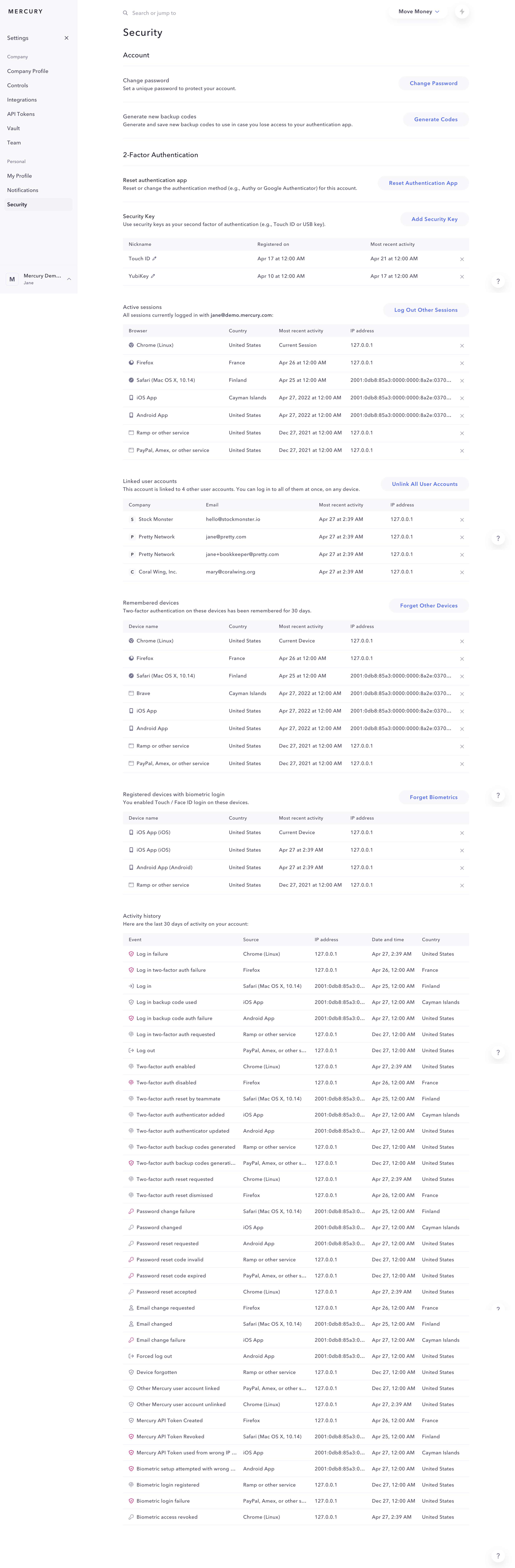
This separation avoids a common ambiguity: someone removing a trust decision may still need to end an active session, while someone signing out may still encounter a remembered authentication setting on their next visit. Make the relationship explicit for your own implementation.
The 30-day duration in the capture is product-specific. It is evidence that the duration can be communicated near the relevant device list, rather than a default every SaaS product should adopt. A remembered-device policy needs its own review and an understandable way to remove that trust.
Browser or client name, operating system, approximate location, and recent activity can help people identify a session. Prioritize the cues your audience can interpret. An IP address alone is rarely enough for a nontechnical person to decide whether access is familiar.
Location information can be approximate, affected by network routing, VPNs, or travel. Explain uncertainty where needed and avoid presenting a city or country as proof of a physical location. Device names can also be generic. A list should support an informed decision rather than imply certainty it cannot provide.
Mark the current session prominently. That helps someone avoid revoking the browser they are using while investigating another device. If timestamps are relative, make exact time and timezone available when they matter. Distinguish recent activity from initial sign-in so people understand what the date represents.
Individual revocation is useful when one old device is recognizable. Bulk sign-out is useful when the person cannot confidently identify suspicious access or no longer uses several sessions. Mercury visibly offers a bulk action scoped to other sessions, alongside controls on session rows.
Choose labels that state the target. “Sign out this session,” “Sign out other sessions,” and “Sign out all sessions” create different expectations. Do not use them interchangeably. A bulk action should explain whether the current session will remain available and whether the person needs to sign in again.
Confirmation should match the consequence. A routine sign-out of one known session may need less interruption than ending every session during an account-security incident. If confirmation is used, include the object and effect, then make the resulting status clear. Avoid a generic warning that does not explain what will be disconnected.
The interface should communicate whether revocation succeeded, is pending, or failed. Removing a row optimistically without confirming the result can leave someone believing access was ended when it was not. Give a failure a retry route and preserve enough context to identify the affected session.
OWASP’s session-management guidance distinguishes idle and absolute timeouts and requires server-side session invalidation. It also recommends visible logout controls and capabilities to inspect and remotely terminate active sessions. The UX should reflect those server-enforced outcomes rather than relying on a local display change.
Test what the revoked session sees on its next request, including an already-open tab or mobile app. Explain whether unsaved work is preserved and whether reconnecting requires fresh authentication. A security setting is not complete until the affected client reaches the intended state.
Cal.com’s capture places a session-timeout setting below its password-change form. The supporting text says the session can be invalidated after a period of time. The screenshot shows a toggle, but not the enabled state’s duration controls or behavior.
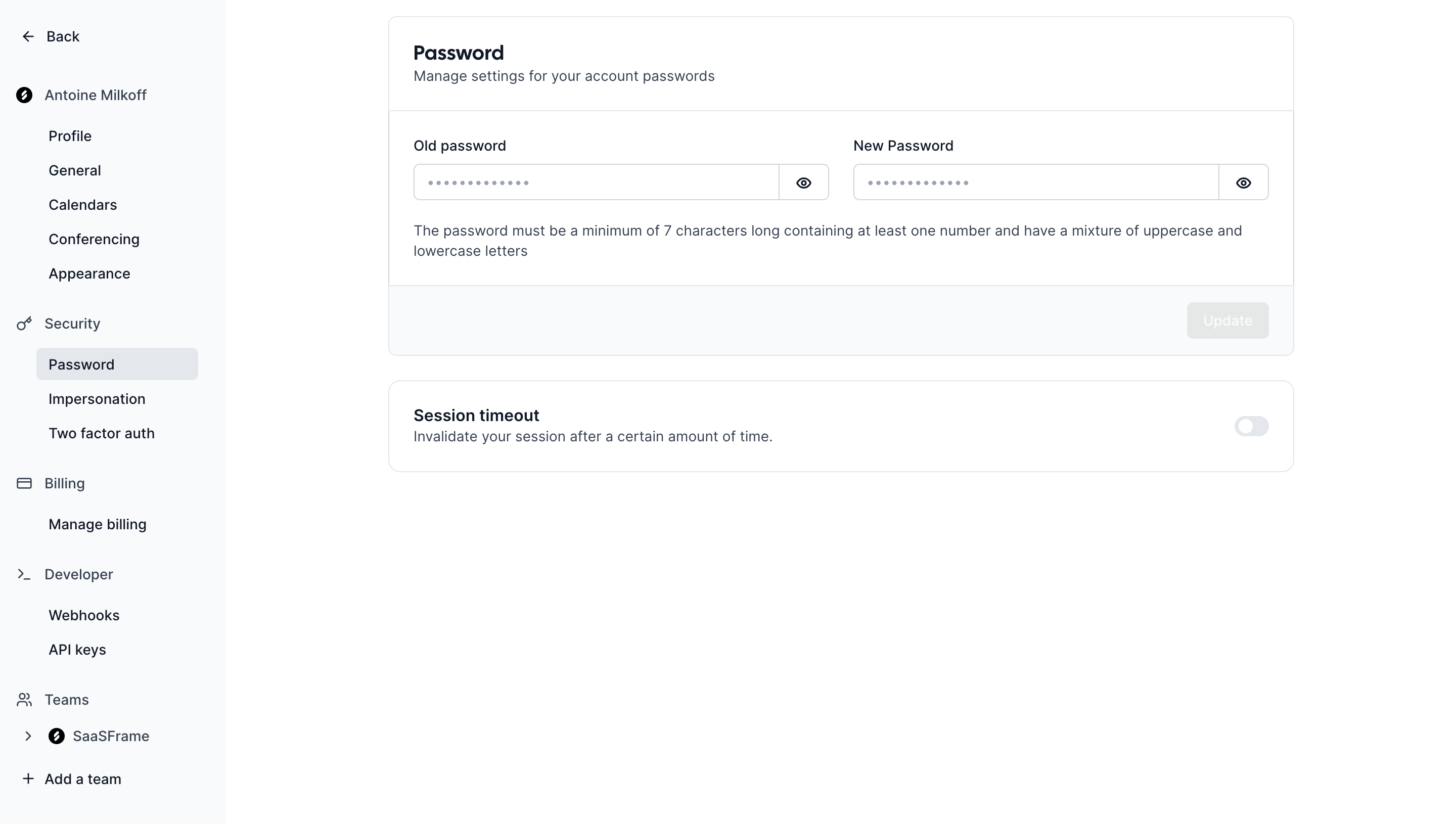
In your own product, distinguish inactivity from maximum session duration. Someone actively working may still reach an absolute limit. Someone reading a long document may appear inactive even though they have not left. The interface and policy should account for those cases.
If people can configure a duration, label the unit and trigger. “After 30 minutes of inactivity” is clearer than an unexplained “30 minutes.” Explain whether the setting affects the current session, future sessions, or the whole organization. If an administrator enforces the policy, show that constraint rather than suggesting every user can change it.
An unexpected timeout can erase work and confuse someone who was completing a form. Where appropriate, provide a perceivable warning and a simple way to continue. Preserve a safe draft or restore the task after reauthentication if the product supports it.
W3C’s timing-adjustable guidance addresses ways to turn off, adjust, or extend content-imposed limits, with defined exceptions. A security-related timeout is not automatically outside that guidance. Review the applicable policy and accessibility requirements rather than assuming a countdown alone resolves the issue.
Warnings need deliberate focus and announcement behavior. Do not trap a keyboard user in a dialog without an understandable choice. Do not show a timer that updates so noisily that assistive technology repeatedly interrupts the task. After expiry, explain that sign-in is required instead of leaving the form’s save action to fail mysteriously.
After a password reset or suspected compromise, people may need to end existing sessions. Explain the policy as part of that recovery journey. If the product invalidates sessions automatically, confirm the scope. If it offers a choice, state what will happen on other devices.
Remembered authentication, connected accounts, and API access may need separate actions. Mercury’s page illustrates that distinction by giving linked accounts, remembered devices, biometric registrations, and activity history their own sections. The arrangement can help users review related security objects without claiming one sign-out action handles all of them.
Provide a support route when the person recognizes access they cannot remove or believes activity continues after revocation. Do not imply that changing a visible preference alone resolves an account-security incident.
A personal session list answers “Where am I signed in?” An administrator view may answer “Which users can access this organization?” Those views need different permissions, privacy decisions, and action scopes. Make the active identity and organization clear before offering bulk administrative actions.
A person leaving a workspace may lose organizational access while retaining their overall account. A user signed out of one product client may remain authenticated to an identity provider. Describe the product-controlled result accurately instead of promising global sign-out across unrelated systems.
Audit information can support investigation, but it should not overwhelm the immediate controls. Put the actions people need to recognize and end access near the relevant session list, with history available for deeper review.
No. A remembered device can affect later authentication requirements, while an active session represents current authenticated access. Design their controls according to the actual implementation.
The product can support either scope, but its label and confirmation should make the choice clear. Ending other sessions can preserve the person’s ability to continue reviewing account security.
Do not assume so. They can use separate authorization mechanisms and need separate controls unless the implementation explicitly connects them.
Compare Password Reset for access recovery, Multi-Factor Authentication for remembered-factor decisions, API Key for programmatic access, and Audit Log for investigating account activity.
Review OWASP’s session-management guidance and W3C’s timing-adjustable guidance alongside the interface. A session list is useful when its labels and actions faithfully represent the access your product can control.