.webp)
Thank you! Your submission has been received!
Oops! Something went wrong while submitting the form.
Get SaaSFrame Pro
Monthly
$18
Quarterly
$48
Yearly
$180
Upgrade to access this feature
Browse all screens & flows
Filter and search screens & flows
Access Figma files
Access mobile versions
Bookmark screens & flows
Join now
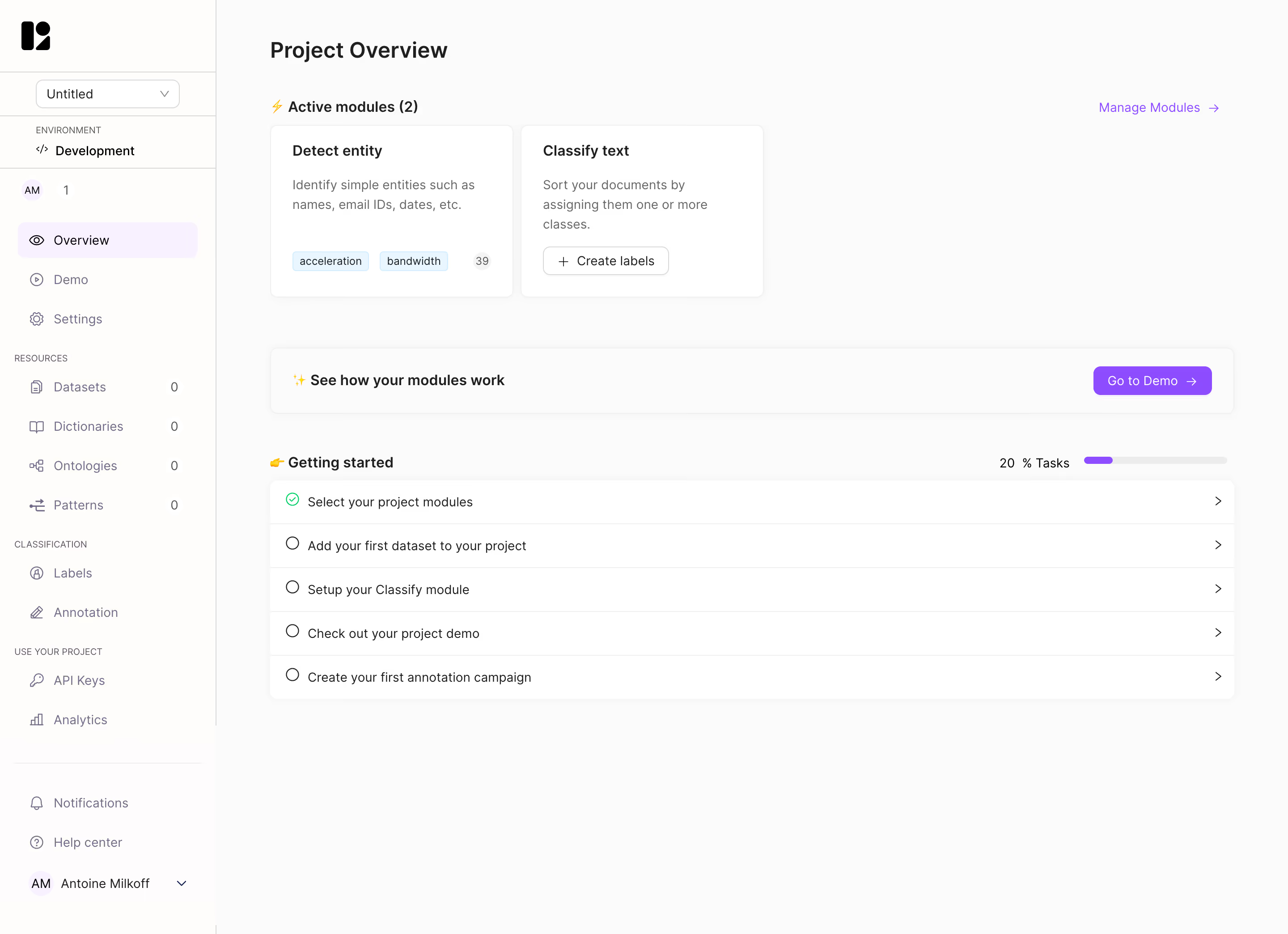
Lettria Project Overview

Lettria
The no-code AI platform for text
Designed by
No items found.

Bookmark
Bookmark

Design with AI
Thank you! Your submission has been received!
Oops! Something went wrong while submitting the form.
# Design from Reference: Lettria Project Overview
Create an original, high-fidelity visual design inspired by the reference. Prioritize composition, typography, colors, spacing, and component styling over technical implementation.
## Reference
- **Product:** Lettria
- **Category:** Add & Edit
- **Screenshot:** https://cdn.prod.website-files.com/5e9dc792e1210c5325f7ebbc/6acb6e932837b9f3168fb2df_6acb6c941a5e5fba58c6abb1_cms-2f1fe9efd94ecc170925c99d.webp
Analyze the screenshot first. If inaccessible, request it rather than guessing.
## Content
{{content.instructions}}
{{content.data}}
Preserve essential messaging and factual accuracy. Adapt structure and copy length for visual balance; never invent product claims.
## Visual Design
### Overall aesthetic
- **Character:** A restrained project dashboard uses a pale near-white workspace, white cards, subtle borders/shadows, and purple navigation/action accents.
- **Evidence:** Source dimensions are 2880 × 2088 px, inspected at 1400 px width. Measurements below are approximate CSS-scale estimates assuming a 1440 px layout at 2× capture; ratio is unverified.
- **Purpose:** Module summaries, a demo prompt, and a five-step getting-started checklist dominate the page.
### Page composition
- **Sidebar:** An approximately 242 CSS px rail contains brand, project selector, environment, project navigation, grouped resources, and bottom account/help controls.
- **Main header:** Project Overview appears near the upper-left of the workspace.
- **Modules:** An active-modules label sits above two compact cards. A purple Manage Modules link aligns at the far right.
- **Demo strip:** A wide shallow bordered panel pairs a short prompt with a purple Go to Demo action.
- **Checklist:** A getting-started heading and progress indicator precede five stacked white task rows, with one completed and four incomplete.
### Information hierarchy
- **Overview:** The bold page title establishes context, followed by active-module count and individual module names.
- **Module detail:** Each card contains a bold name, short gray description, and either chips/count or a small creation button.
- **Progress:** The visible 20% task indicator matches one completed row out of five. A green check distinguishes the completed item.
- **Navigation:** The selected Overview row has a pale-purple background; grouped small uppercase labels separate resource categories.
### Typography
- **Family:** A neutral interface sans serif is used; exact identity is unverified.
- **Title:** Approximately 25–26 CSS px semibold with about 32 px line-height.
- **Sections and cards:** Labels and module titles are around 16–17 px semibold.
- **Descriptions:** About 14–15 px with 22 px leading, in medium gray.
- **Rows and sidebar:** Approximately 14 px regular; group captions are around 10–11 px uppercase.
### Colors & surfaces
- **Measured source colors:** Samples include #FBFBFB, white #FFFFFF, warm near-white #FEFDFB, pale #FEFCFD, #FAFAFA, and #F9F9F9.
- **Semantic accents:** Purple marks selected navigation, demo action, manage link, and progress fill. Green marks the completed checklist state.
- **Text and icons:** Main text is near-black; secondary labels and sidebar icons use muted gray-purple.
- **Depth:** Thin outlines and soft shadows define cards and the checklist without strong elevation.
### Components
- **Module cards:** Approximately 272 × 192 CSS px, with 7–8 px radii, subtle borders, and around 24 px padding.
- **Module chips:** Small pale-blue outlined tags sit along the bottom of one card, followed by a circular count. The other card has a white outlined Create labels action.
- **Demo strip:** Roughly 1075 × 74 px, rounded about 8 px, with text left and a compact purple button right.
- **Checklist:** Five approximately 49 px-high rows share thin dividers; leading status circles and trailing chevrons bookend each label.
- **Progress bar:** A short pale-gray track near the section heading has purple fill covering about one fifth.
- **Sidebar controls:** A compact project dropdown, environment area, selected navigation row, resource counts, and avatar/account control share consistent icon/text spacing.
### Visual rhythm
- **Main gutters:** Content begins roughly 60 CSS px beyond the sidebar and retains a similar right gutter.
- **Upper density:** Two module cards occupy only the left part of the wide module region, leaving deliberate white space.
- **Section spacing:** Around 50–55 px separates module cards, demo strip, and checklist groups.
- **Rows:** Consistent leading icons, labels, and chevrons create a clean repeated task rhythm.
### Responsive
- **Observed limit:** Only desktop is visible; actual mobile navigation and card behavior are unverified.
- **Recommended layout:** Collapse the sidebar, stack module cards when needed, and let the demo strip's text/action wrap.
- **Recommended checklist:** Allow long task labels to wrap without colliding with status icons or chevrons.
- **Recommended progress:** Keep numerical completion and visual bar together, with an accessible text equivalent.
### Adaptation guidance
- **Preserve:** Keep module summaries, the clear demo bridge, and a task checklist with matching numerical and visual progress.
- **Implement:** Use reusable module and checklist components, with completion state represented semantically.
- **Navigation:** Provide accessible dropdowns and named icon controls, clear focus, and predictable keyboard order.
- **Validate:** Confirm fonts, actual CSS sizing, card wrapping, empty resource states, and task navigation. No expanded module or clicked checklist state is shown.
Use this context to reproduce the reference's visual language: layout, typography, colors, spacing, borders, radii, and distinctive elements. The screenshot takes priority if descriptions conflict.
## Direction
{{preferences.fidelityInstructions}}
## Output
{{output.instructions}}
Deliver a polished, cohesive design with precise alignment, hierarchy, and spacing. Produce the requested visual artifact, not just a description. If unsupported, explain the limitation.

.avif)
Category
Patterns
Tech Stack


Added on
April 28, 2023


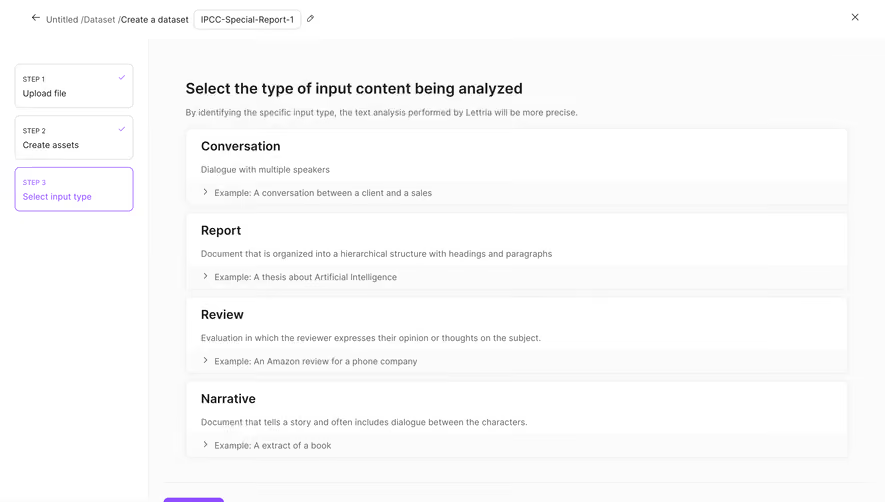


Similar screens



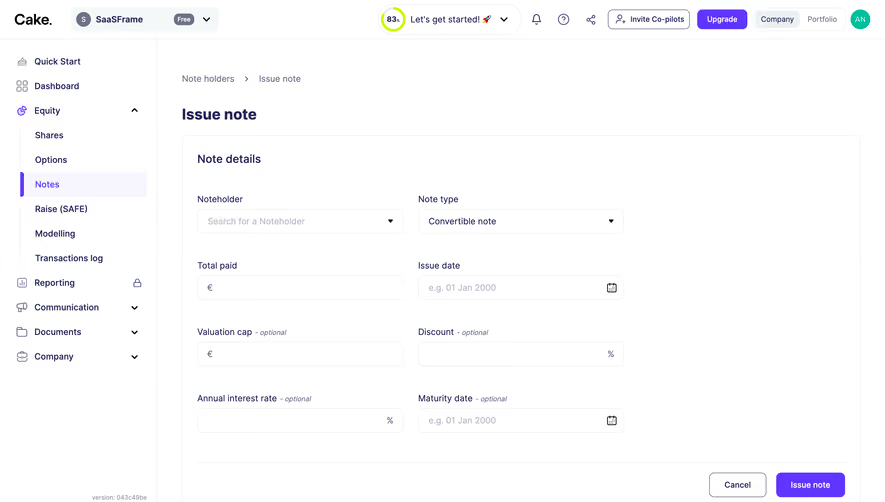

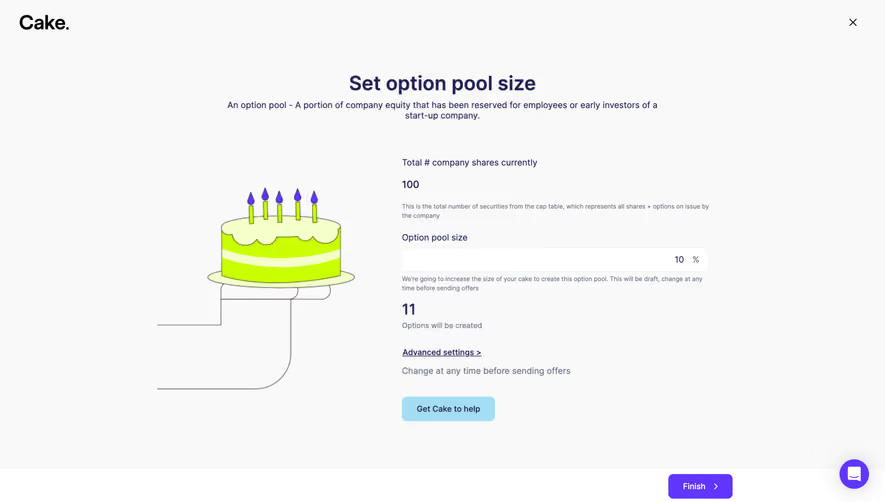
Upgrade to SaaSFrame Pro now to see similar examples.
Monthly
$18 /month
Billed $18 monthly
Browse all screens & flows
Filter and search screens & flows
Search text in screenshots
Access Figma files
Access mobile versions
Join now
Quarterly
$16 /month
Billed $48 quarterly
Browse all screens & flows
Filter and search screens & flows
Search text in screenshots
Access Figma files
Access mobile versions
Join now
Yearly
$15 /month
Billed $180 yearly
Browse all screens & flows
Filter and search screens & flows
Search text in screenshots
Access Figma files
Access mobile versions
Join now