Generate a new design based on this screen using your own content.
Thank you! Your submission has been received!
Oops! Something went wrong while submitting the form.
# Design from Reference: Hume AI Voice Design
Create an original, high-fidelity visual design inspired by the reference. Prioritize composition, typography, colors, spacing, and component styling over technical implementation.
## Reference
- **Product:** Hume AI
- **Category:** Add & Edit
- **Screenshot:** https://cdn.prod.website-files.com/5e9dc792e1210c5325f7ebbc/6acad407c910b3adf9e48bd0_6acad193b2165b6c7fffce92_cms-dc0ddf5982c9b628bb043458.webp
Analyze the screenshot first. If inaccessible, request it rather than guessing.
## Content
{{content.instructions}}
{{content.data}}
Preserve essential messaging and factual accuracy. Adapt structure and copy length for visual balance; never invent product claims.
## Visual Design
Use this context to reproduce the reference's visual language: layout, typography, colors, spacing, borders, radii, and distinctive elements. The screenshot takes priority if descriptions conflict.
## Direction
{{preferences.fidelityInstructions}}
## Output
{{output.instructions}}
Deliver a polished, cohesive design with precise alignment, hierarchy, and spacing. Produce the requested visual artifact, not just a description. If unsupported, explain the limitation.
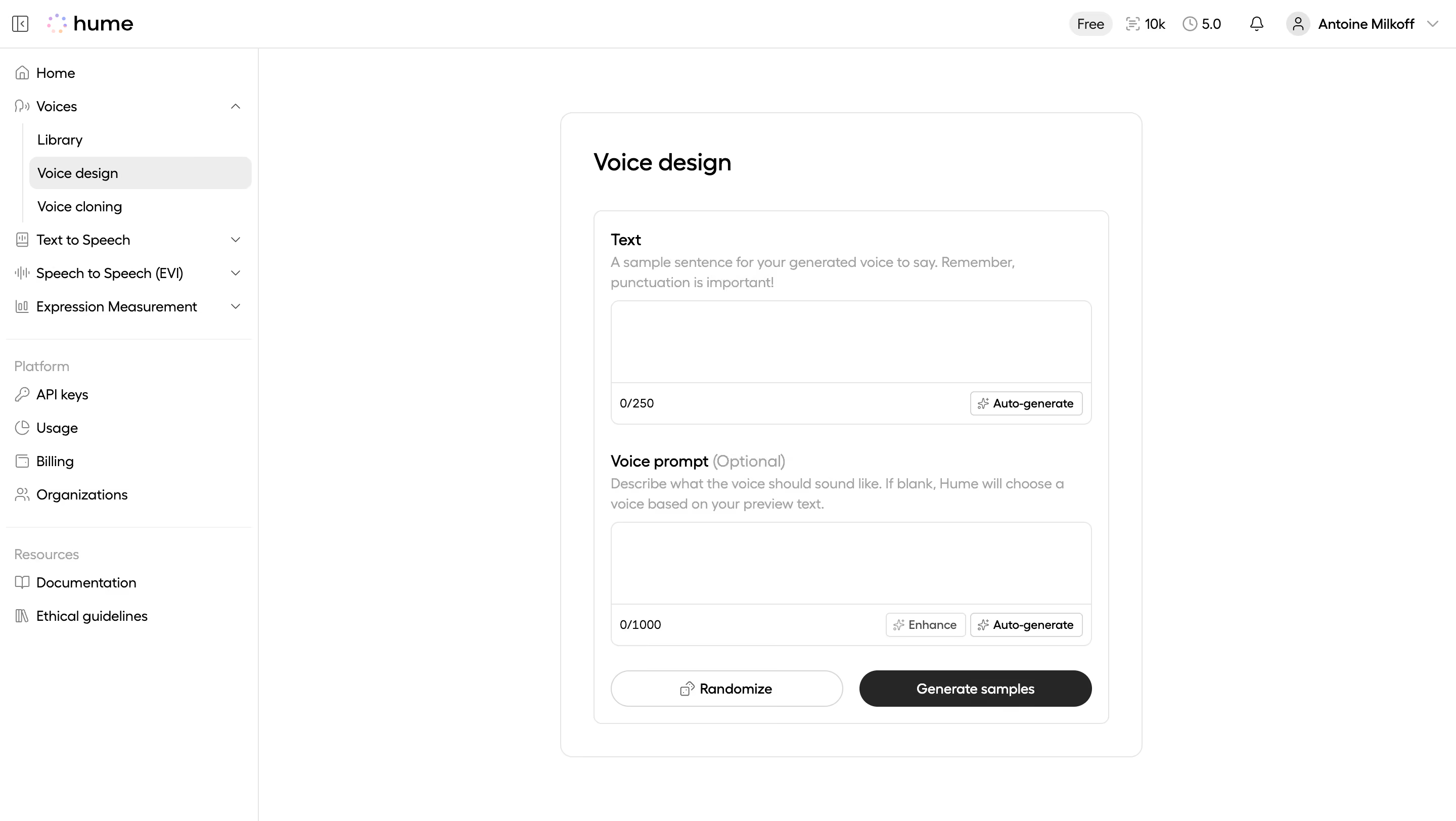
Hume's Voice Design page is almost aggressively minimal. White space dominates. The whole interface feels like a blank canvas waiting for input, which is exactly right for a generative tool. Two text areas stacked vertically, clear labels, character counts tucked in the corners. Nothing fights for attention.
Smart Hierarchy Without Trying Hard
The bold "Voice design" heading anchors you instantly. Below that, the Text and Voice Prompt sections use a simple pattern: label, helper text, input field. The helper copy is genuinely useful too. "Remember, punctuation is important!" is a small touch that does real work. The optional tag on Voice Prompt is set in a lighter weight, quietly deprioritizing it.
The Button Pairing is Chef's Kiss
That bottom row nails it. "Randomize" in a ghost button, "Generate samples" in solid black. Primary vs secondary action, zero ambiguity. The auto-generate and enhance chips inside the fields are a smart pattern. They surface AI features without cluttering the layout. Monochrome palette throughout. No color distractions. Just structure and intent.
.webp)



.avif)