Design with AI
Generate a new design based on this screen using your own content.
# Design from Reference: Fellow Sign Up Flow
Create an original, high-fidelity visual design inspired by the reference. Prioritize composition, typography, colors, spacing, and component styling over technical implementation.
## Reference
- **Product:** Fellow
- **Category:** Loading Screen
- **Screenshot:** https://cdn.prod.website-files.com/5e9dc792e1210c5325f7ebbc/6acbc8656b0a1061299babb1_6acbc602681d3a08a1ee2ed1_cms-f4237d0271da70aa5e16de89.webp
Analyze the screenshot first. If inaccessible, request it rather than guessing.
## Content
{{content.instructions}}
{{content.data}}
Preserve essential messaging and factual accuracy. Adapt structure and copy length for visual balance; never invent product claims.
## Visual Design
### Overall aesthetic
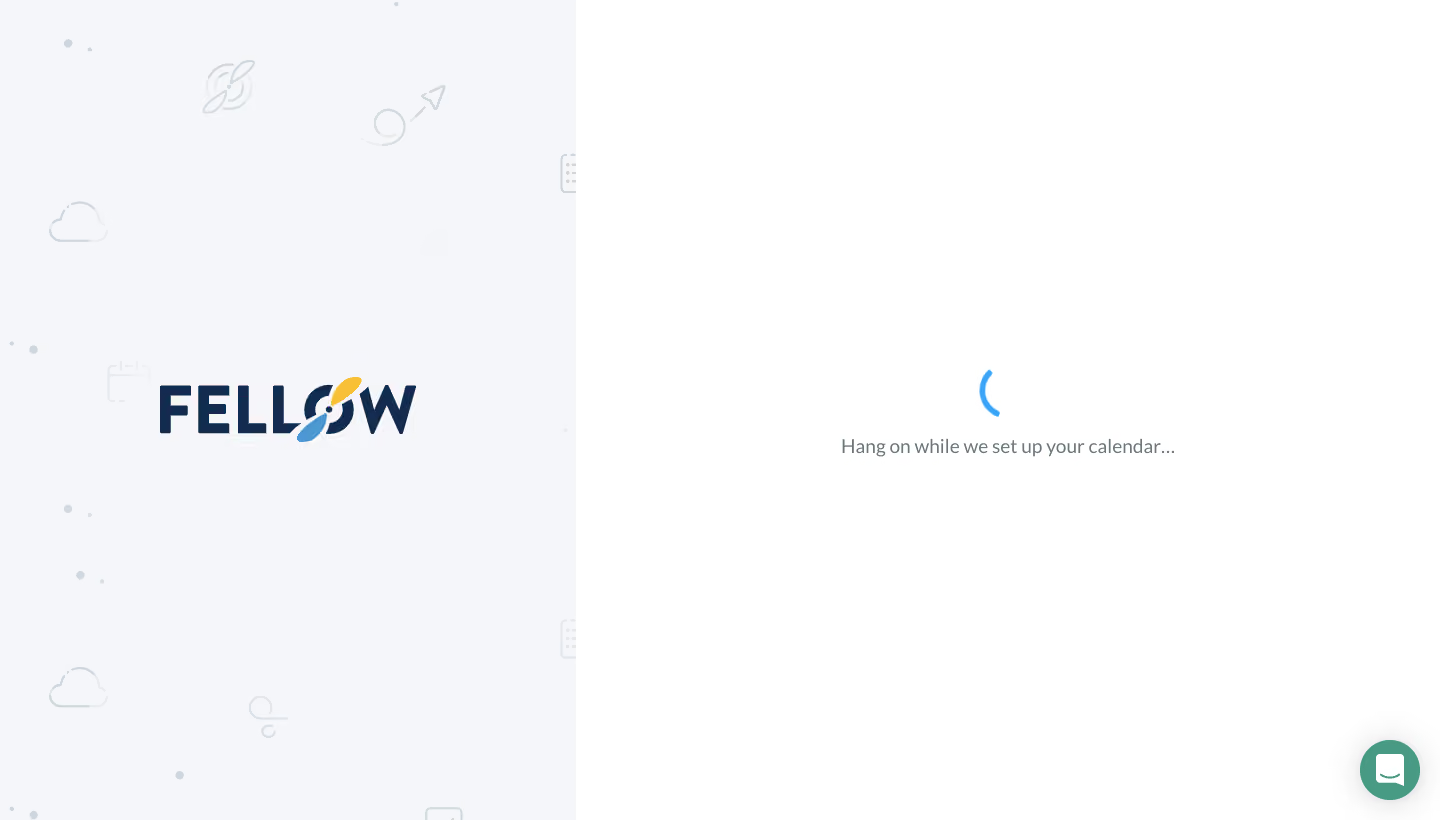
- **Character:** Quiet onboarding waiting screen with a large illustrated brand panel and an almost empty white status area.
- **Evidence and scale:** Screenshot measures 1440 × 820 image pixels. Approximate sizes refer to image pixels; a 1× CSS capture is plausible but unverified. Font identity is unverified.
### Page composition
- **Split canvas:** A pale decorative panel occupies approximately 576px, or 40% of the width, and runs the full height. The remaining 864px forms the white working area.
- **Brand region:** A large dark wordmark is centered in the left panel, surrounded by very faint space-themed line illustrations and scattered small marks.
- **Status region:** A compact blue partial-ring loading indicator sits above one centered gray status line near the middle of the right panel. A circular support control anchors the lower-right corner.
### Information hierarchy
- **Brand versus task:** The oversized wordmark carries visual recognition; the small spinner and calendar-setup message provide the only task-status content.
- **Low distraction:** No form fields, progress steps or primary navigation appear in this captured state.
- **Secondary support:** The floating chat control has a stronger colored fill than surrounding content but remains spatially separate from the status message.
### Typography
- **Wordmark:** Large heavy navy uppercase lettering spans much of the left panel; a small yellow-and-blue propeller-like detail creates a distinctive accent.
- **Status copy:** Approximately 18px neutral sans-serif text, regular weight, with a single-line treatment and moderate line height near 24–28px.
- **Type restraint:** The screen uses essentially two typographic roles. Exact font family, letter spacing and computed weight cannot be established from the raster.
### Colors & surfaces
- **Measured backgrounds:** White #FFFFFF fills the status area; pale cool gray #F5F6F9 dominates the illustrated panel, with related #F5F6FA and #F6F6FA pixels.
- **Measured brand/support colors:** Navy #132B4F appears in the brand lettering; green-teal #499A85 appears in the support control.
- **Status accent:** A small blue ring contrasts with muted gray text. Decorative line art stays close to the panel ground in value, avoiding competition.
### Components
- **Loading indicator:** Approximately 40px circular partial stroke, centered above the status copy. Movement cannot be confirmed from a static screenshot.
- **Status stack:** Spinner and message form a compact vertical unit with roughly 20–28px separation and ample surrounding whitespace.
- **Support control:** Approximately 48px round teal button near the bottom/right margins, with a white chat glyph and subtle shadow.
- **Illustrated panel:** Background motifs are thin, low-contrast outlines with no card boundaries, controls or visible interactions.
### Visual rhythm
- **Large-scale balance:** The 40/60 split creates an asymmetrical frame while each panel's content remains centered within its own region.
- **Whitespace:** Most of the white panel is intentionally unoccupied; the status occupies only a small central footprint.
- **Anchoring:** Centered brand and status units establish two stable focal points, while the corner support button adds a peripheral utility anchor.
### Responsive
- **Observed limit:** This is one desktop waiting state; narrower layouts and loading transitions are not shown.
- **Recommended adaptation:** On small screens, reduce the illustrated panel to a short brand header or omit its decorative artwork, keeping the status centered in the available viewport.
- **Recommended resilience:** Let the message wrap with comfortable side padding and preserve a clear touch target for support without covering status copy.
### Adaptation guidance
- **Preserve simplicity:** Keep the waiting state to brand recognition, one truthful status message and a small progress indicator.
- **Reuse proportions:** Build the desktop frame with a flexible 40/60 split and a low-contrast illustrated background; keep the active status surface plain white.
- **Implementation:** Provide accessible live status text, respect reduced-motion preferences and define timeout/error handling separately. Those behaviors are recommendations, not observable features of this screenshot.
Use this context to reproduce the reference's visual language: layout, typography, colors, spacing, borders, radii, and distinctive elements. The screenshot takes priority if descriptions conflict.
## Direction
{{preferences.fidelityInstructions}}
## Output
{{output.instructions}}
Deliver a polished, cohesive design with precise alignment, hierarchy, and spacing. Produce the requested visual artifact, not just a description. If unsupported, explain the limitation.
.webp)



.avif)