Design with AI
Generate a new design based on this screen using your own content.
# Design from Reference: Daybridge User Onboarding
Create an original, high-fidelity visual design inspired by the reference. Prioritize composition, typography, colors, spacing, and component styling over technical implementation.
## Reference
- **Product:** Daybridge
- **Category:** User Onboarding
- **Screenshot:** https://cdn.prod.website-files.com/5e9dc792e1210c5325f7ebbc/6acbbc646325e7e23e4c94ce_6acbbbbe4d71070f5fd2e722_cms-2f69e6350d62dc243ea38c3b.webp
Analyze the screenshot first. If inaccessible, request it rather than guessing.
## Content
{{content.instructions}}
{{content.data}}
Preserve essential messaging and factual accuracy. Adapt structure and copy length for visual balance; never invent product claims.
## Visual Design
### Overall aesthetic
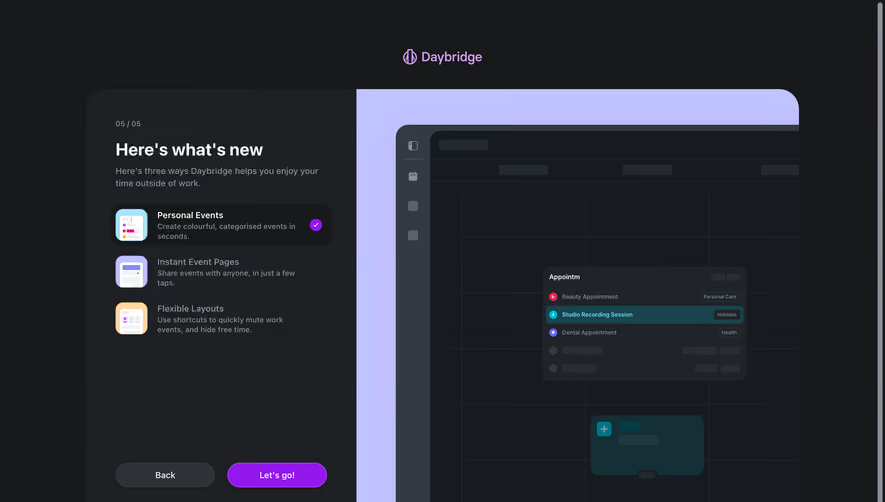
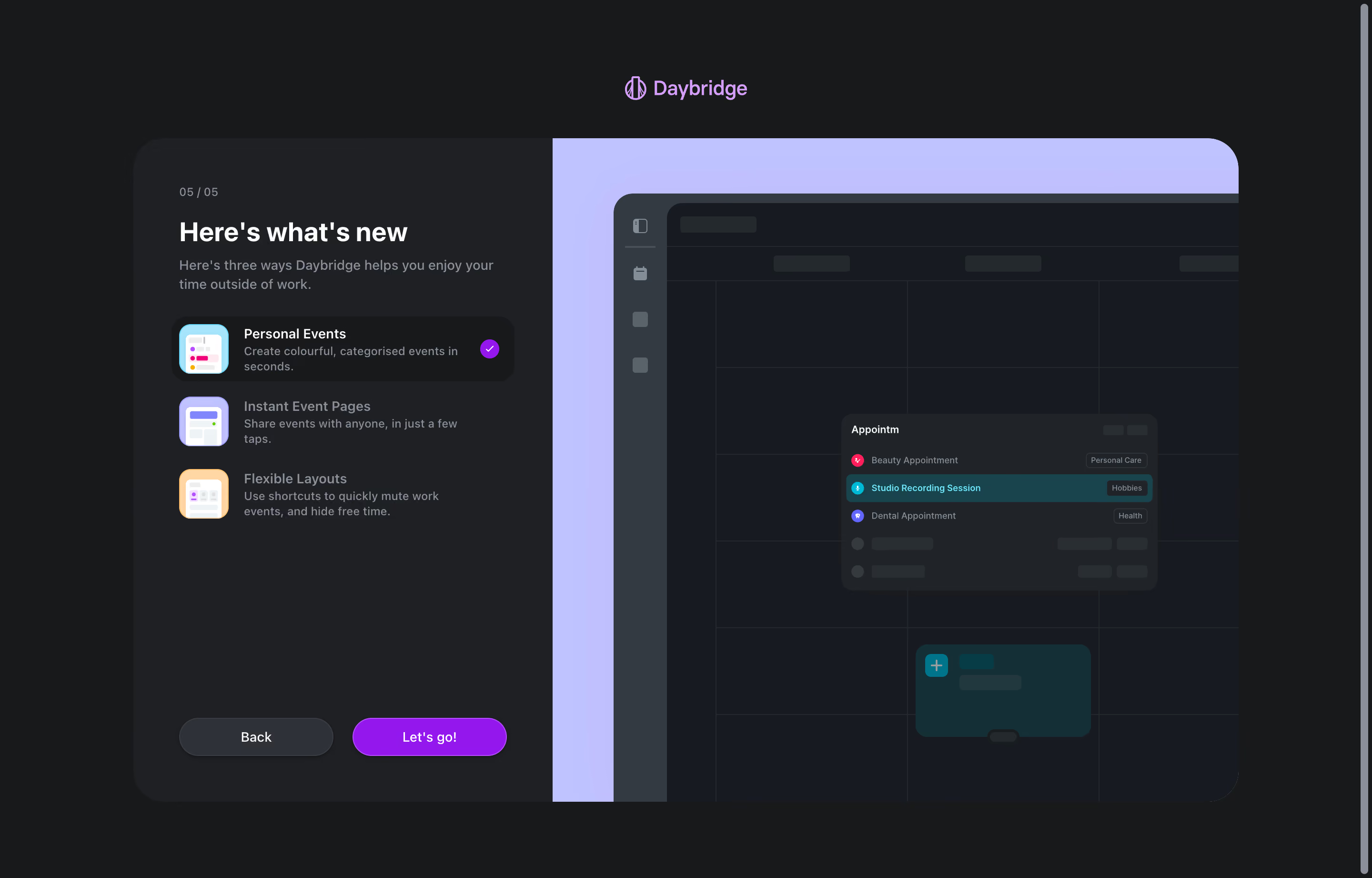
- **Character:** Dark onboarding feature showcase with a charcoal explanation panel, lavender illustration stage and vivid purple completion action.
- **Evidence and scale:** Screenshot measures 2880 × 1842 image pixels. Sizes estimate a 1440px CSS canvas at 2× capture scale; actual DPR and typeface are unverified.
### Page composition
- **Brand:** Centered lavender wordmark sits above a large rounded split panel.
- **Left pane:** Roughly 440px CSS wide, with 05/05 progress, bold heading, short explanation, three feature choices and bottom Back/Let's go actions.
- **Right pane:** Large lavender stage contains a cropped dark calendar illustration with event-search popup and selected event block.
- **Viewport:** A scrollbar is visible along the right edge; no footer is shown.
### Information hierarchy
- **Final step:** Small 05/05 cue identifies the captured onboarding position.
- **Feature list:** Personal Events is selected on a darker rounded row with purple check; remaining items use muted labels.
- **Primary action:** Bright purple Let's go pill contrasts with the gray Back pill.
- **Illustration:** Calendar mockup supports the selected feature; no live calendar interaction is established.
### Typography
- **Heading:** Approximately 28px CSS bold sans-serif.
- **Feature titles:** Around 14px medium; descriptions around 12px with 16px leading.
- **Intro:** Around 14px muted with 20px leading.
- **Utilities:** Progress around 12px; actions around 14px. Exact family, weight and tracking remain unverified.
### Colors & surfaces
- **Measured darks:** #18191B outer ground, #1F2024 left pane and #171B21 illustration canvas.
- **Measured raised layers:** #202429 and #343A41 support mockup/controls.
- **Measured lavender:** #BFC3FF and #BFC0FD form the large illustration stage.
- **Measured accents:** Purple #9418ED fills active/check/action details; pale #D29EF8 supports branding, with teal #00748A in selected mockup content.
### Components
- **Split shell:** Approximately 1160 × 696px CSS, outer radius near 32px, charcoal left and lavender right.
- **Feature choices:** Small colorful square icons, two-line text and active check circle; selected row around 360 × 68px with 16px radius.
- **Actions:** Two wide pill buttons around 162 × 40px, gray Back and purple Let's go, with thin brighter edge/shadow.
- **Calendar artwork:** Dark grid, side rail and floating search popup, with category chips and a teal selected result.
- **Event block:** Small dark-teal calendar card with plus icon and muted skeleton-like text.
### Visual rhythm
- **Pane padding:** Approximately 48px inside the left explanation area.
- **Feature cadence:** Three compact rows with consistent icon/text alignment and moderate vertical gaps.
- **Bottom anchoring:** Actions sit far below the feature list, creating stable progression controls.
- **Illustration crop:** Oversized mockup extends beyond the stage edges, contrasting with the tightly aligned text pane.
### Responsive
- **Observed limit:** Desktop final onboarding step only; feature switching, completion and mobile behavior are unobserved.
- **Recommended stacking:** Prioritize explanation/actions and reduce or move illustration below on narrow screens.
- **Recommended sizing:** Keep feature descriptions readable and allow panel height to grow rather than shrinking the entire composition.
- **Recommended controls:** Preserve accessible selected state and comfortable action targets.
### Adaptation guidance
- **Preserve focus:** Summarize a few capabilities at the end of onboarding and offer one clear completion action.
- **Keep illustration subordinate:** Use a cropped product mockup to reinforce the selected feature without adding more instructions.
- **Implementation:** Provide keyboard-accessible feature choices, progress semantics and visible focus. Calendar examples are illustrative captured content, not scheduled events or verified interactions.
Use this context to reproduce the reference's visual language: layout, typography, colors, spacing, borders, radii, and distinctive elements. The screenshot takes priority if descriptions conflict.
## Direction
{{preferences.fidelityInstructions}}
## Output
{{output.instructions}}
Deliver a polished, cohesive design with precise alignment, hierarchy, and spacing. Produce the requested visual artifact, not just a description. If unsupported, explain the limitation.
.webp)



.avif)