Design with AI
Generate a new design based on this screen using your own content.
# Design from Reference: Avocode Upgrading Page
Create an original, high-fidelity visual design inspired by the reference. Prioritize composition, typography, colors, spacing, and component styling over technical implementation.
## Reference
- **Product:** Avocode
- **Category:** Upgrading
- **Screenshot:** https://cdn.prod.website-files.com/5e9dc792e1210c5325f7ebbc/6acbd623ec4801bb972215b4_6acbd344d69dbc5db101d78f_cms-45138f5ef94f79169fb28bc6.webp
Analyze the screenshot first. If inaccessible, request it rather than guessing.
## Content
{{content.instructions}}
{{content.data}}
Preserve essential messaging and factual accuracy. Adapt structure and copy length for visual balance; never invent product claims.
## Visual Design
### Overall aesthetic
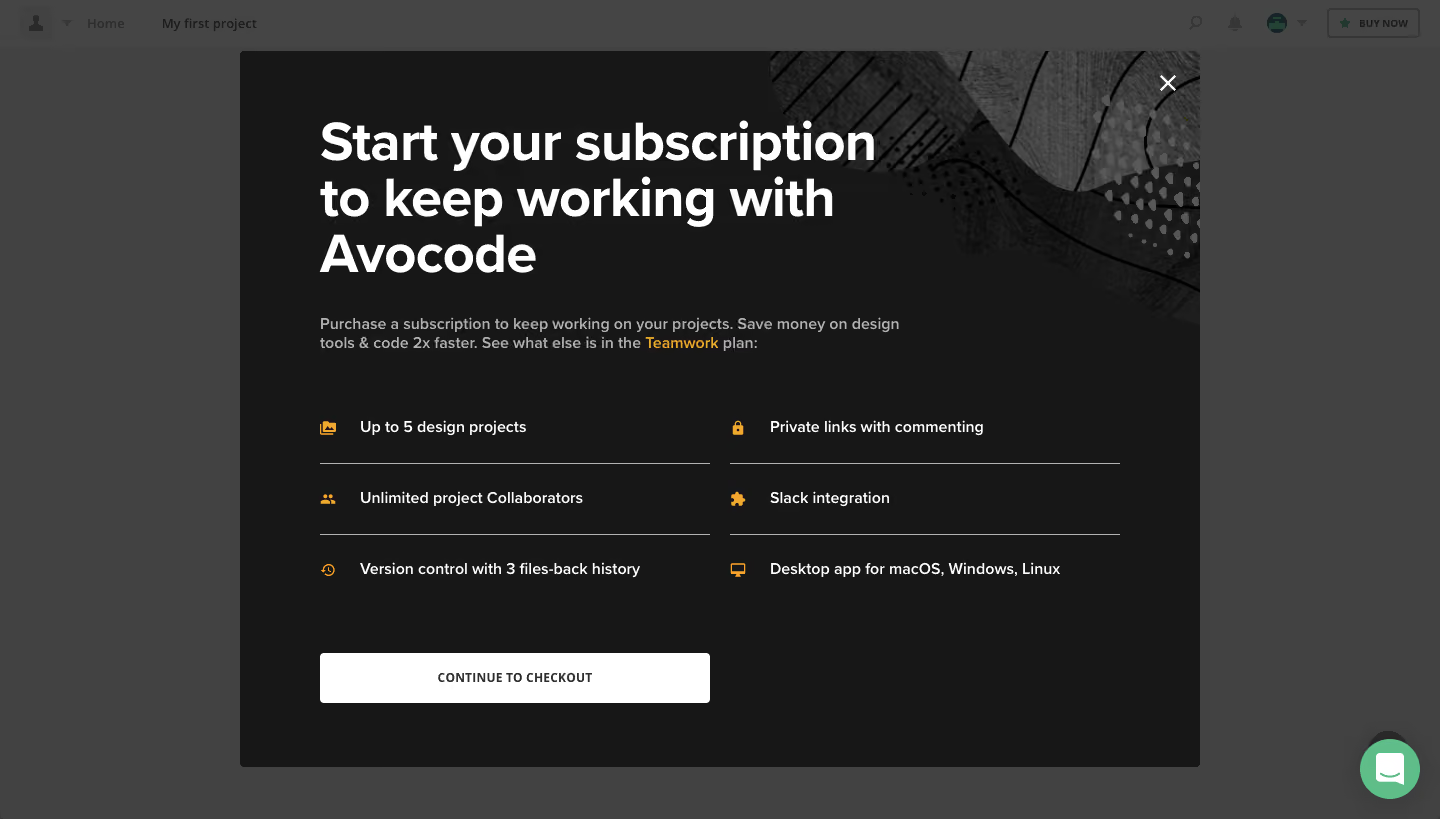
- **Character:** A dark subscription modal uses oversized white typography and small amber feature icons to create a direct upgrade prompt.
- **Atmosphere:** A monochrome abstract texture in the upper-right adds depth while the rest of the panel stays flat and highly legible.
### Page composition
- **Capture:** The source is 1440 × 819 pixels. Measurements refer to approximate image pixels; CSS scale is unverified.
- **Dialog:** A centered approximately 960 × 715-pixel dark rectangle overlays a dimmed project interface.
- **Content:** A three-line headline and short supporting paragraph sit above a two-column, three-row feature list.
- **Closing action:** A white checkout button occupies the lower-left column; an X appears in the upper-right corner. A green support bubble remains outside the dialog at bottom right.
### Information hierarchy
- **Primary message:** The large headline dominates the upper-left area and explains the subscription requirement.
- **Supporting detail:** Muted introductory copy leads to six equally weighted feature statements; the plan name receives amber emphasis.
- **Action:** The broad white button is the strongest actionable surface against the dark panel.
### Typography
- **Family:** A clean sans serif is visible; exact family is unverified.
- **Headline:** Approximately 52 pixels, bold, with roughly 56-pixel leading and a constrained width that creates three lines.
- **Body and features:** Around 16 pixels, regular or medium weight, with approximately 20-pixel paragraph leading.
- **Button:** A compact uppercase label around 13 pixels uses bold weight and slightly expanded tracking.
### Colors & surfaces
- **Measured foundation:** The dialog is near-black #171717; dimmed surrounding areas include #424242 and #454545.
- **Measured contrast:** White #FFFFFF is used for the heading and primary action surface.
- **Accent relationship:** Amber icons and the emphasized plan name punctuate the neutral layout; supporting text and dividers use subdued gray.
### Components
- **Feature grid:** Six statements are grouped into two columns of roughly 390 pixels, with small leading amber icons and thin rules between rows.
- **CTA:** Approximately 390 × 50 pixels, white with a small radius and centered dark label.
- **Dismissal:** A simple white X sits over the textured upper-right area.
- **Dialog surface:** Small corner radii and a dark overlay separate the upgrade prompt from the project breadcrumb and toolbar behind it.
### Visual rhythm
- **Padding:** Approximately 80-pixel horizontal insets align headline, paragraph, grid and button.
- **Vertical gaps:** Roughly 60 pixels separates the paragraph from the feature list; feature rows use about 70-pixel intervals.
- **Balance:** The feature columns share a baseline and consistent icon/text offsets; the lower-right area remains empty.
### Responsive
- **Observed state:** Only the desktop modal is shown; narrower behavior is unverified.
- **Recommended layout:** Stack feature columns on small screens and allow dialog scrolling while keeping the close control reachable.
- **Recommended type:** Reduce headline size and padding before compressing feature copy or the button's tap area.
### Adaptation guidance
- **Preserve emphasis:** Keep the large white headline, amber feature markers and white checkout action as the visual hierarchy.
- **Texture restraint:** Confine abstract artwork to the corner so it does not compromise copy contrast.
- **State fidelity:** Reproduce the visible upgrade prompt without inventing pricing, payment fields or checkout results.
- **Accessibility:** Maintain visible keyboard focus, an accessible dialog label and sensible focus containment.
Use this context to reproduce the reference's visual language: layout, typography, colors, spacing, borders, radii, and distinctive elements. The screenshot takes priority if descriptions conflict.
## Direction
{{preferences.fidelityInstructions}}
## Output
{{output.instructions}}
Deliver a polished, cohesive design with precise alignment, hierarchy, and spacing. Produce the requested visual artifact, not just a description. If unsupported, explain the limitation.
.webp)



.avif)