Design with AI
Generate a new design based on this screen using your own content.
# Design from Reference: Narrative BI Analytics
Create an original, high-fidelity visual design inspired by the reference. Prioritize composition, typography, colors, spacing, and component styling over technical implementation.
## Reference
- **Product:** Narrative BI
- **Category:** Analytics
- **Screenshot:** https://cdn.prod.website-files.com/5e9dc792e1210c5325f7ebbc/6acbbec539e7f22db4028922_6acbbe0a8892d3072b71620d_cms-5f982a3db4205dbb4e9a5680.webp
Analyze the screenshot first. If inaccessible, request it rather than guessing.
## Content
{{content.instructions}}
{{content.data}}
Preserve essential messaging and factual accuracy. Adapt structure and copy length for visual balance; never invent product claims.
## Visual Design
### Overall aesthetic
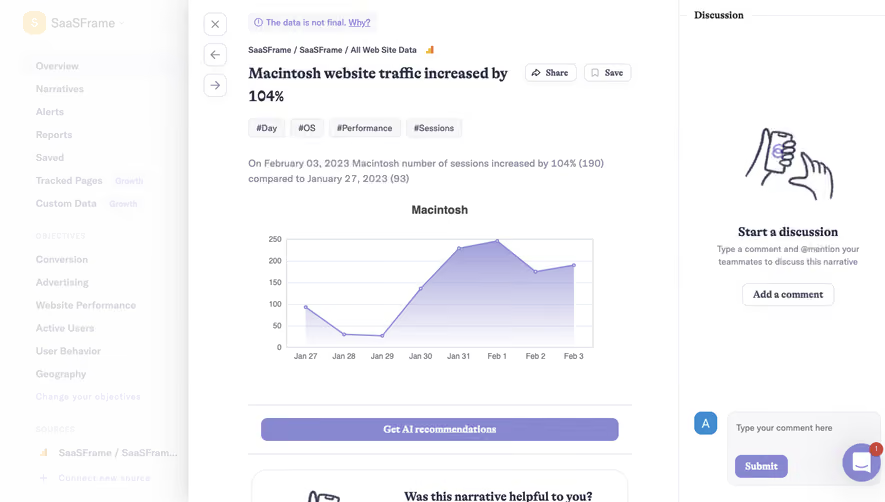
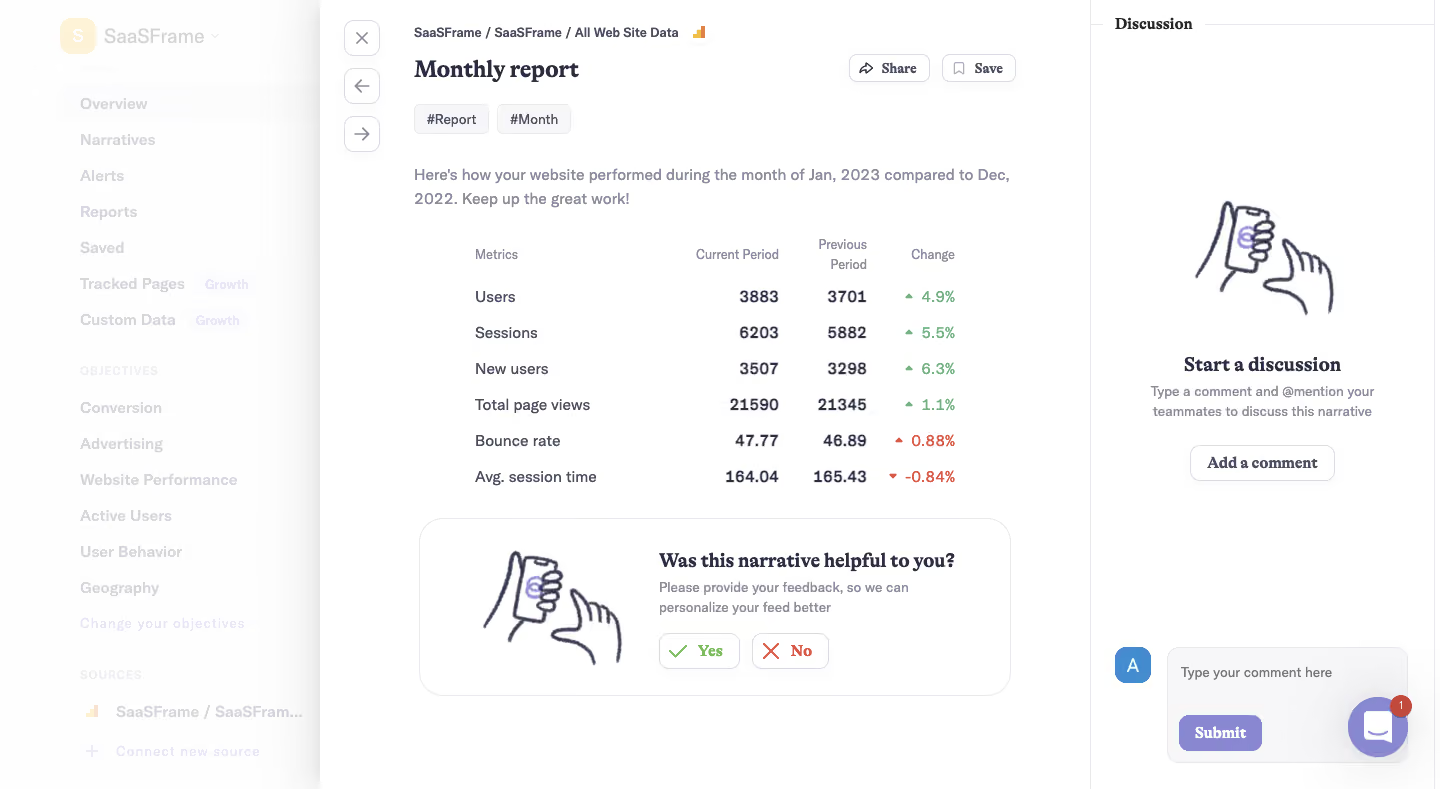
- **Style:** A quiet analytics narrative overlays a faded application sidebar, combining a white report, serif editorial headings and a separate discussion rail.
- **Scale:** Source screenshot is 1440 × 789px. All sizes are screenshot-pixel estimates; CSS/device scale is unverified.
### Page composition
- **Background:** A roughly 320px sidebar is washed out behind the open report, preserving workspace navigation, objectives and data-source context.
- **Report:** The main reading region spans approximately x320–1090. A narrow vertical strip contains close/back/forward controls; report content begins around x414.
- **Discussion:** A roughly 350px right rail is separated by a fine vertical rule. Its empty-state illustration and explanation occupy the upper middle, with a composer near the bottom.
### Information hierarchy
- **Header:** Small workspace/source breadcrumbs precede Monthly report. Share and Save controls align right; Report and Month chips sit below the title.
- **Report body:** A short introductory sentence leads to six metrics with Current Period, Previous Period and Change columns.
- **Feedback:** A large outlined panel below the table asks whether the narrative was helpful, pairing an illustration with Yes/No actions. The discussion rail offers both Add a comment and a lower input/Submit area.
### Typography
- **Families:** Bold serif headings contrast with compact sans-serif data and explanatory text; exact font identities are unverified.
- **Roles:** Estimated report heading 26px bold; feedback/discussion headings 20px bold; body and metric values 15–16px/24px; column headings around 13px.
- **Emphasis:** Metric values are medium-to-bold, supporting explanations muted, and percentage changes colored with small directional triangles.
### Colors & surfaces
- **Sampled palette:** ICC-aware sRGB samples include white #FFFFFF, near-white #FEFEFE and #FDFDFD, subtle lavender-gray #F7F6F9 and pale #F9F9F9.
- **Semantic accents:** Green marks favorable changes and Yes; red marks unfavorable changes and No. Soft lavender highlights tags, illustration details and the Submit action.
- **Layer treatment:** A soft shadow separates the report from the faded sidebar; thin pale borders define the discussion rail, buttons and feedback box.
### Components
- **Metrics:** Six borderless rows show Users, Sessions, New users, Total page views, Bounce rate and Avg. session time. Labels align left; numeric columns align right.
- **Feedback panel:** Approximately 590 × 178px, with around 24px corners, pale outline, an outlined hand/phone illustration at left and text/actions at right.
- **Discussion state:** A matching hand/phone illustration sits above centered text and an outlined Add a comment button. The lower composer combines a blue initial avatar, pale rounded text area and purple Submit button.
- **Utility controls:** Small outlined rounded-square navigation buttons stack vertically. Share/Save are compact outlined actions with icons; a circular chat widget with unread badge overlaps the lower-right area.
### Visual rhythm
- **Table cadence:** Rows repeat on approximately 36px centers, with compact headings and no strong grid lines.
- **Whitespace:** A generous gap separates the report introduction from the metrics. The feedback card fills the lower reading region while the discussion rail retains broad empty space.
### Responsive
- **Recommended adaptation:** Only desktop is observed. Move discussion into a drawer or below the report on narrow screens; make metric columns horizontally scrollable if needed.
- **Feedback:** Stack the illustration and text, retain readable Yes/No targets, and prevent the chat widget from covering the composer.
### Adaptation guidance
- **Preserve:** Keep the narrative introduction, comparative metric table, semantic change indicators and explicit feedback/discussion areas.
- **Adapt:** Use actual periods and values. Assign favorable/unfavorable coloring according to metric meaning rather than simply whether a value increased.
Use this context to reproduce the reference's visual language: layout, typography, colors, spacing, borders, radii, and distinctive elements. The screenshot takes priority if descriptions conflict.
## Direction
{{preferences.fidelityInstructions}}
## Output
{{output.instructions}}
Deliver a polished, cohesive design with precise alignment, hierarchy, and spacing. Produce the requested visual artifact, not just a description. If unsupported, explain the limitation.
.webp)



.avif)