.webp)
Thank you! Your submission has been received!
Oops! Something went wrong while submitting the form.
Get SaaSFrame Pro
Monthly
$18
Quarterly
$48
Yearly
$180
Upgrade to access this feature
Browse all screens & flows
Filter and search screens & flows
Access Figma files
Access mobile versions
Bookmark screens & flows
Join now
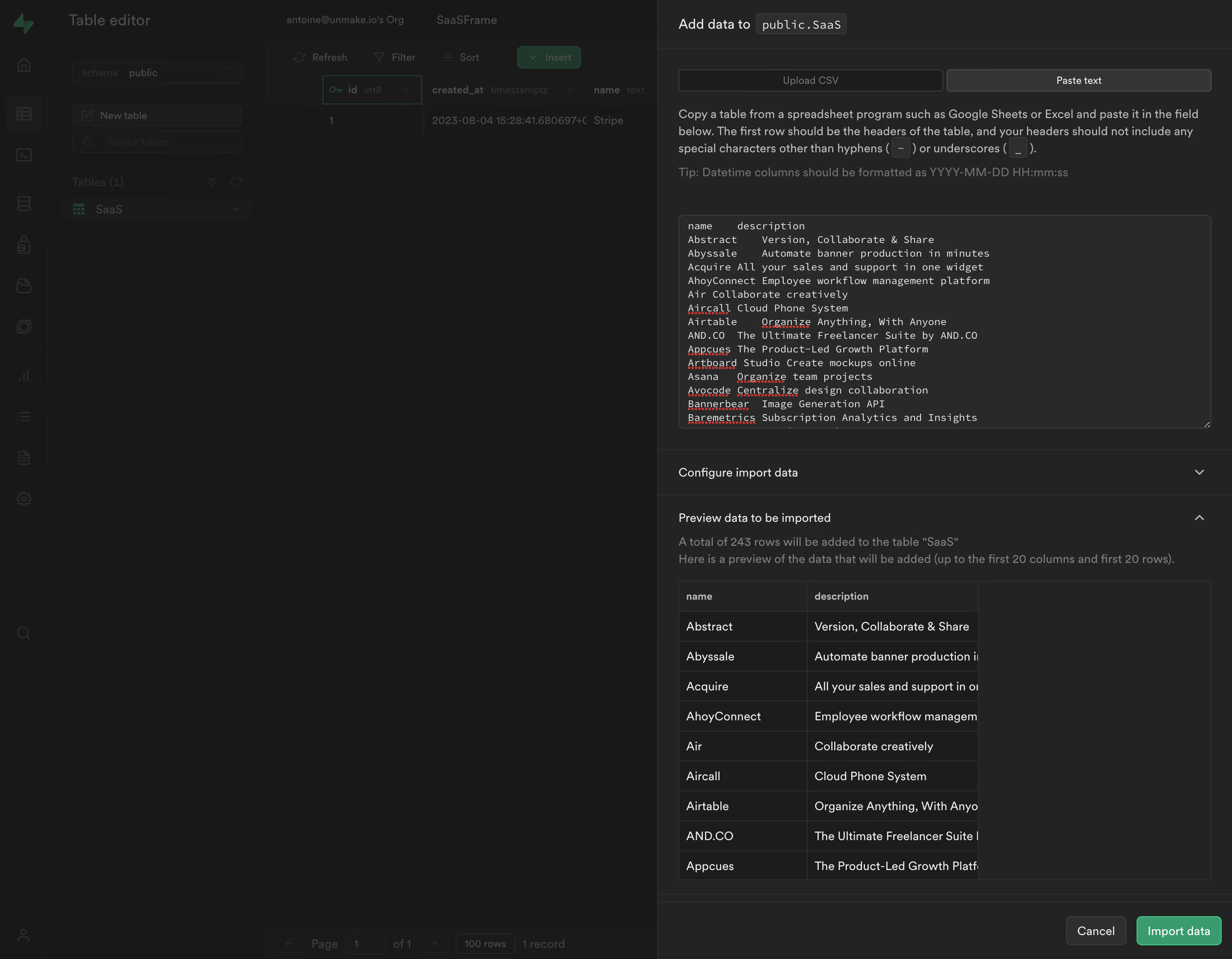
Supabase Copy Paste Import

Supabase
The Open Source Firebase Alternative
Designed by
No items found.

Bookmark
Bookmark

Design with AI
Thank you! Your submission has been received!
Oops! Something went wrong while submitting the form.
# Design from Reference: Supabase Copy Paste Import
Create an original, high-fidelity visual design inspired by the reference. Prioritize composition, typography, colors, spacing, and component styling over technical implementation.
## Reference
- **Product:** Supabase
- **Category:** Import & Export
- **Screenshot:** https://cdn.prod.website-files.com/5e9dc792e1210c5325f7ebbc/6acadcbd8c9a73ab05f13345_6acadc233ce5f4104ec0880b_cms-c8e796ccd021bb07feb546ad.webp
Analyze the screenshot first. If inaccessible, request it rather than guessing.
## Content
{{content.instructions}}
{{content.data}}
Preserve essential messaging and factual accuracy. Adapt structure and copy length for visual balance; never invent product claims.
## Visual Design
### Overall aesthetic
- **Character:** A dark database workspace presents a right-side import drawer above a strongly dimmed table editor.
- **Tone:** Grayscale surfaces, fine borders and compact typography support a technical data-entry workflow. Green is reserved for the import action and background database accents.
### Page composition
- **Capture scale:** The source measures 2880 × 2242 image pixels. CSS estimates below assume a 2× capture; device-pixel ratio is unverified.
- **Background shell:** A narrow icon rail, table-navigation panel and data grid remain visible at the left beneath a dark overlay.
- **Import drawer:** The right panel occupies approximately 670 px CSS, slightly under half the viewport. A short header identifies the destination using a monospace-style table token.
- **Form sequence:** Two import-mode tabs lead into instructions, a datetime-format tip and a large populated multiline text field.
- **Review region:** A collapsed configuration row precedes an expanded preview section with explanatory copy and a compact two-column table.
- **Bottom actions:** A separated footer aligns Cancel and the green Import data button to the lower right.
### Information hierarchy
- **Active mode:** Paste text is emphasized against the quieter Upload CSV tab, establishing the current input method.
- **Input priority:** The large textarea dominates the upper panel, while instructions explain the expected header/data structure.
- **Review before action:** The expanded preview and row-count sentence sit between input and import, making the parsed result visible.
- **Modal emphasis:** The dimmed background recedes substantially; the brighter drawer text and green action establish the active task.
### Typography
- **Family:** General UI copy uses a neutral sans serif; the destination token and textarea use a monospace style. Exact families are unverified.
- **Header and body:** The drawer title is approximately 16 px CSS. Instructions and preview copy are around 14 px with 20 px line height.
- **Data input:** Monospaced text is approximately 12–13 px with compact 16 px leading, preserving the pasted column structure.
- **Table roles:** Preview headers are small and semibold; data rows use approximately 14 px text. Muted tips and supporting text are lower contrast.
### Colors & surfaces
- **Measured dark layers:** ICC-aware sRGB sampling yields #181818, #232323, #292929 and #1C1C1C across the dimmed workspace, drawer and input surfaces.
- **Measured borders:** #2E2E2E and #343434 define controls, section rules and grid boundaries.
- **Measured text:** Light #EDEDED appears in prominent text, with gray supporting labels and instructions.
- **Accent:** A saturated green import button and brighter green border provide the clearest color signal. Red spelling underlines are visible inside the pasted text.
### Components
- **Mode tabs:** Two equal-width rectangular controls span the drawer, with thin gray outlines, subtle radii and a lighter filled active state.
- **Textarea:** A roughly 620 × 250 px CSS field has a dark fill, fine border, approximately 6 px radius and a visible resize handle at the lower-right edge.
- **Accordion rows:** Full-width horizontal sections use labels on the left and chevrons on the right, separated by thin rules. Configuration is collapsed; preview is expanded.
- **Preview grid:** A two-column table sits within a larger bounded review area. Thin borders, a darker header and roughly 35 px row cadence organize the visible sample.
- **Actions:** Cancel is a gray bordered button; Import data is green with white text. Both are compact, around 34 px high, with approximately 6 px corners.
- **Backdrop:** A dark translucent layer covers the workspace and visually separates it from the drawer.
### Visual rhythm
- **Panel padding:** Approximately 24 px CSS inset aligns instructions, textarea, accordion labels and preview content.
- **Section cadence:** Compact explanatory text contrasts with larger input/review blocks; horizontal separators establish clear workflow stages.
- **Action anchoring:** The bottom action row is isolated by a rule and broad left whitespace, reinforcing the final confirmation step.
### Responsive
- **Evidence boundary:** Only one desktop state is available; responsive behaviors are recommendations.
- **Drawer width:** Expand the panel to a full-screen task surface on narrow displays rather than compressing the input and preview.
- **Data overflow:** Preserve monospaced input readability and allow horizontal scrolling in the preview table.
- **Action access:** Keep Cancel and Import data reachable while allowing the form body to scroll independently where appropriate.
### Adaptation guidance
- **Import workflow:** Reuse the mode selection, input, configuration and parsed-preview sequence for structured data ingestion.
- **Preview clarity:** Display row counts and schema interpretation before confirmation; provide explicit validation feedback for malformed pasted content.
- **Dark-theme contrast:** Maintain distinguishable panel, field and border tokens, with readable muted guidance.
- **State boundaries:** Describe this as the populated pre-import state; success, error and processing states are not visible.
- **Safe reuse:** Replace sample table names and data with application content, and validate the assumed screenshot scale before implementing CSS dimensions.
Use this context to reproduce the reference's visual language: layout, typography, colors, spacing, borders, radii, and distinctive elements. The screenshot takes priority if descriptions conflict.
## Direction
{{preferences.fidelityInstructions}}
## Output
{{output.instructions}}
Deliver a polished, cohesive design with precise alignment, hierarchy, and spacing. Produce the requested visual artifact, not just a description. If unsupported, explain the limitation.

.avif)
Category


Added on
August 4, 2023
Found in 1 flow


Similar screens
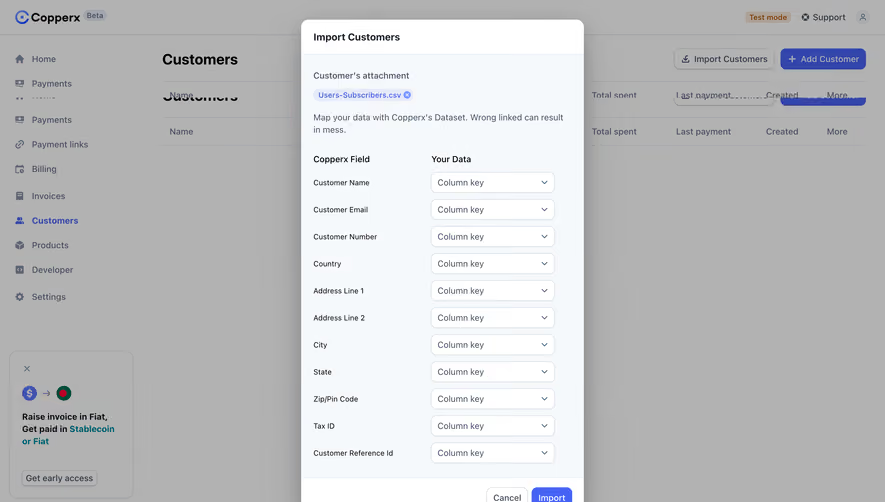




Upgrade to SaaSFrame Pro now to see similar examples.
Monthly
$18 /month
Billed $18 monthly
Browse all screens & flows
Filter and search screens & flows
Search text in screenshots
Access Figma files
Access mobile versions
Join now
Quarterly
$16 /month
Billed $48 quarterly
Browse all screens & flows
Filter and search screens & flows
Search text in screenshots
Access Figma files
Access mobile versions
Join now
Yearly
$15 /month
Billed $180 yearly
Browse all screens & flows
Filter and search screens & flows
Search text in screenshots
Access Figma files
Access mobile versions
Join now