.webp)
Thank you! Your submission has been received!
Oops! Something went wrong while submitting the form.
Get SaaSFrame Pro
Monthly
$18
Quarterly
$48
Yearly
$180
Upgrade to access this feature
Browse all screens & flows
Filter and search screens & flows
Access Figma files
Access mobile versions
Bookmark screens & flows
Join now
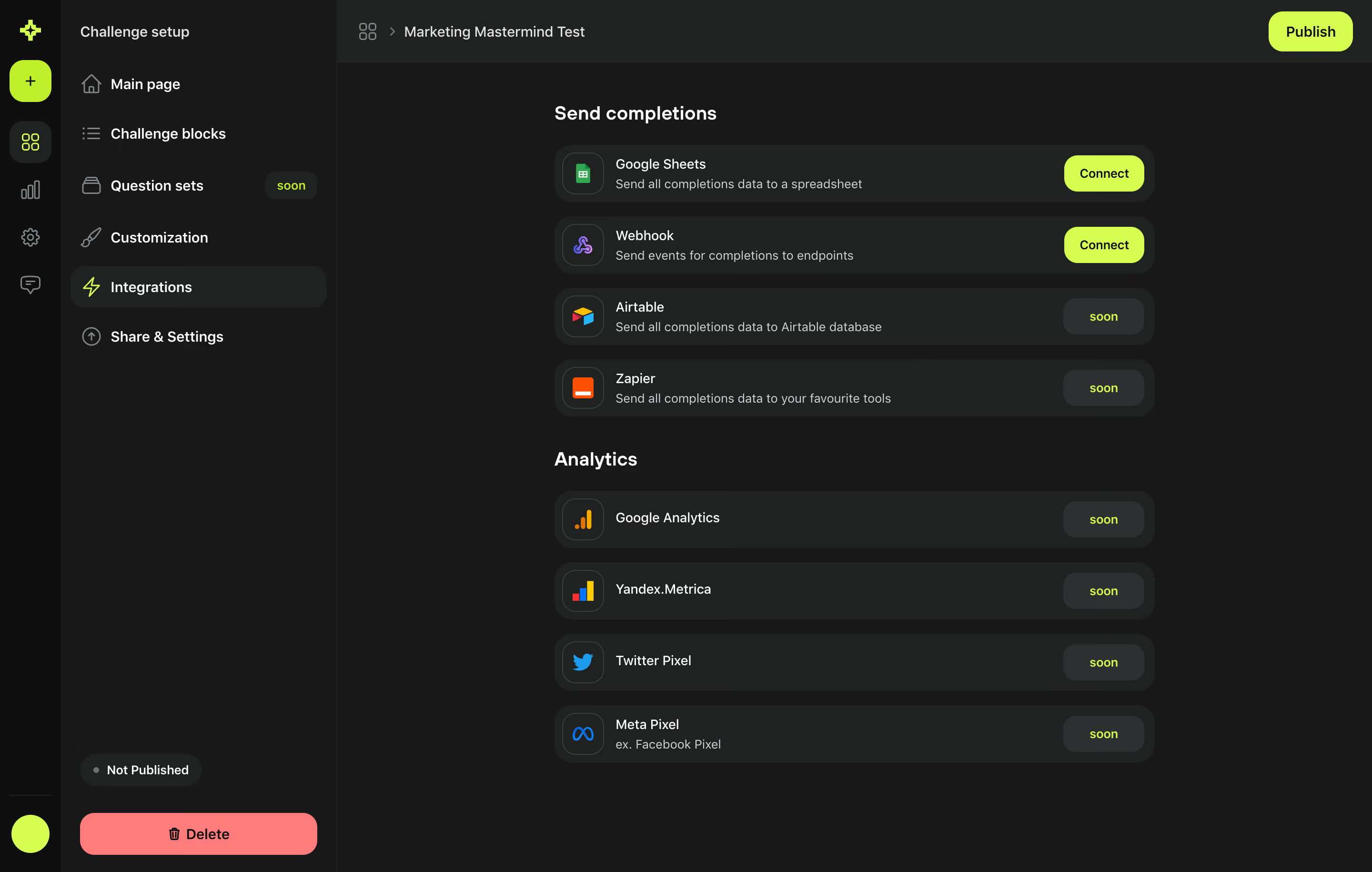
Meiro Challenge Integrations Setup

Meiro
AI-powered builder for tests & quizzes
Designed by
No items found.

Bookmark
Bookmark

Design with AI
Thank you! Your submission has been received!
Oops! Something went wrong while submitting the form.
# Design from Reference: Meiro Challenge Integrations Setup
Create an original, high-fidelity visual design inspired by the reference. Prioritize composition, typography, colors, spacing, and component styling over technical implementation.
## Reference
- **Product:** Meiro
- **Category:** Integrations
- **Screenshot:** https://cdn.prod.website-files.com/5e9dc792e1210c5325f7ebbc/6acadbe2d05a3f53c0a8624a_6acadb2a6cd44b3ad4d9054f_cms-0cc05c387389cf791958dbb0.webp
Analyze the screenshot first. If inaccessible, request it rather than guessing.
## Content
{{content.instructions}}
{{content.data}}
Preserve essential messaging and factual accuracy. Adapt structure and copy length for visual balance; never invent product claims.
## Visual Design
### Overall aesthetic
- **Character:** A dark challenge-setup interface uses charcoal surfaces, neon lime actions, rounded integration rows, and small colorful service logos.
- **Tone:** The interface is compact and tool-like, with strong action/status contrast and minimal decoration.
- **Observed scale:** The source measures 2880 × 1830 pixels. CSS estimates assume a 2× capture, roughly 1440 × 915; actual pixel ratio is unverified.
### Page composition
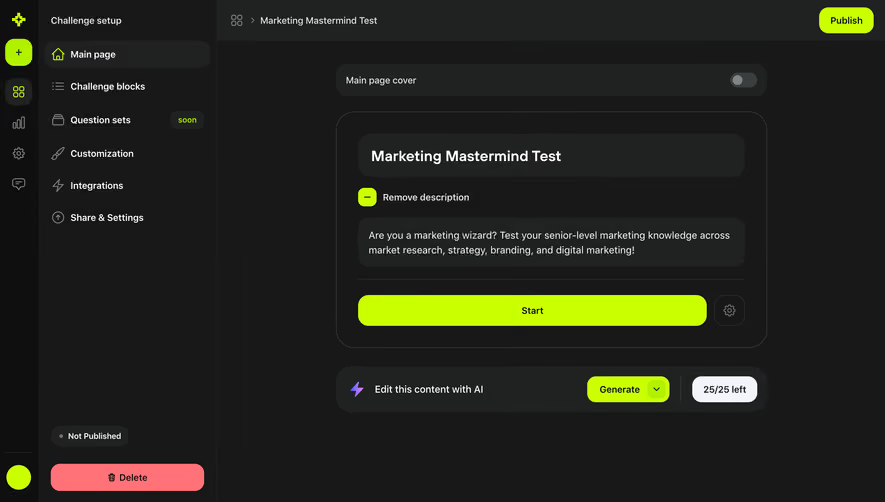
- **Icon rail:** A narrow near-black strip at left contains a lime brand-like mark, plus control, module icons, and a lime circular lower control.
- **Setup sidebar:** A roughly 290-pixel dark column lists Main page, Challenge blocks, Question sets, Customization, Integrations, and Share & Settings.
- **Sidebar ending:** A Not Published status pill and wide coral Delete button sit near the bottom.
- **Top bar:** A small grid/breadcrumb symbol and challenge title appear left; a lime Publish pill aligns at upper right.
- **Main column:** A roughly 630-pixel integration list sits in the central-right area, with substantial surrounding dark space.
- **Groups:** Send completions contains four rows; Analytics contains four more rows beneath a larger gap.
### Information hierarchy
- **Current section:** Integrations is selected in the setup sidebar with a rounded dark fill and lime lightning icon.
- **Group purpose:** Send completions and Analytics headings separate data destinations from measurement services.
- **Availability:** Google Sheets and Webhook have bright Connect actions. Other visible integrations have muted dark pills labeled soon.
- **Row hierarchy:** Service name is brighter than the short description beneath where present.
- **Publication state:** Not Published is visible; no publication has occurred in the captured state.
- **Action scope:** Publish, Delete, and Connect are screenshot controls only. Their behavior and outcomes are not shown.
- **Historical scope:** Availability/coming-soon labels reflect captured product state, not verified current support.
### Typography
- **Typeface appearance:** A clean rounded sans-serif is used. Exact font identity is unverified.
- **Group headings:** Approximately 20 pixels, semibold/bold, with line-height near 26 pixels.
- **Sidebar labels:** Around 15–16 pixels, medium weight.
- **Service names:** Approximately 14–15 pixels, regular/medium, in near-white.
- **Descriptions:** Around 13–14 pixels, muted gray, with compact line-height.
- **Buttons/status:** Connect, Publish, soon, and status labels use around 13–15-pixel medium text.
### Colors & surfaces
- **Measured canvas:** #171818 forms the main dark background.
- **Measured rows:** #202222 supplies the integration-card family; #0E0F0F supplies the deepest rail.
- **Measured controls:** #2C3030 appears in muted pill/control surfaces.
- **Measured lime:** #CAFF00 supplies the strong accent, with #B2F100 also sampled in related detail.
- **Measured coral:** #FF7277 supplies the destructive action family.
- **Measured text:** #FFFFFF is primary, while #CDD1D1 contributes to softer text.
- **Flat depth:** Rounded fills and subtle icon-tile outlines create hierarchy without pronounced shadows.
### Components
- **Rail controls:** Small line icons stack vertically; the plus is enclosed in a lime rounded square.
- **Setup links:** Icon-label rows use generous horizontal padding. Question sets includes a small soon badge.
- **Publication controls:** A dark status pill contains a small dot and Not Published text; Delete is coral with a trash icon.
- **Integration row:** A roughly 630 × 60 CSS-pixel rounded dark rectangle contains an outlined icon tile, text block, and right-aligned action/status.
- **Service tiles:** Small square rounded holders contain Google Sheets, webhook, Airtable, Zapier, analytics, and pixel logos.
- **Connect buttons:** Bright lime pills around 84 × 38 pixels use dark text.
- **Soon status:** Muted dark pills match the Connect width but use lime text.
- **Row descriptions:** Completion destinations include one-line explanations; the Meta Pixel row includes a smaller former-name note.
- **Unshown states:** Connection dialogs, credentials, success/error, active analytics, publishing, and deletion confirmation are not visible.
### Visual rhythm
- **Two-level navigation:** Narrow icon rail and wider setup list establish clear context before the main content.
- **Repeated rows:** Equal row heights, aligned icon tiles, and right-hand pills create a regular vertical cadence.
- **Group separation:** A larger gap distinguishes Analytics from completion destinations.
- **Action contrast:** Lime marks available actions and selected context; coral is reserved for deletion.
- **Open dark space:** The narrow list avoids filling the entire workspace, maintaining focus.
### Responsive
- **Evidence limit:** Only a desktop setup view is captured. Mobile and fixed positioning are unverified.
- **Recommended navigation:** Collapse the rail/sidebar into accessible menus on narrow screens.
- **Recommended rows:** Allow descriptions to wrap and move action pills below text if necessary.
- **Recommended publication controls:** Keep publishing and deletion clearly separated from routine integration actions.
- **Recommended accessibility:** Pair availability color with explicit text, label icons, provide keyboard focus, and preserve usable touch targets.
### Adaptation guidance
- **Preserve service grouping:** Separate completion-data destinations from analytics integrations.
- **Define connection behavior:** Authentication, endpoint configuration, permissions, and connection status require actual product specifications.
- **Keep availability honest:** Use real current states rather than copying historical soon labels.
- **Distinguish destructive actions:** Provide appropriate safeguards and clear scope for deletion; none is established by the screenshot.
- **Use safe examples:** Replace the challenge title and account context with approved data.
- **Build from measured tokens:** Near-black canvas, charcoal rows, lime actions, muted text, and coral deletion create the core visual system.
Use this context to reproduce the reference's visual language: layout, typography, colors, spacing, borders, radii, and distinctive elements. The screenshot takes priority if descriptions conflict.
## Direction
{{preferences.fidelityInstructions}}
## Output
{{output.instructions}}
Deliver a polished, cohesive design with precise alignment, hierarchy, and spacing. Produce the requested visual artifact, not just a description. If unsupported, explain the limitation.

.avif)
Category
Tech Stack

Added on
August 31, 2023




Similar screens





Upgrade to SaaSFrame Pro now to see similar examples.
Monthly
$18 /month
Billed $18 monthly
Browse all screens & flows
Filter and search screens & flows
Search text in screenshots
Access Figma files
Access mobile versions
Join now
Quarterly
$16 /month
Billed $48 quarterly
Browse all screens & flows
Filter and search screens & flows
Search text in screenshots
Access Figma files
Access mobile versions
Join now
Yearly
$15 /month
Billed $180 yearly
Browse all screens & flows
Filter and search screens & flows
Search text in screenshots
Access Figma files
Access mobile versions
Join now