.avif)



1. Header: The top section of the Abstract.com/webinars page consists of the header. Here, the Abstract logo is located on the left side, while a hamburger icon menu is on the right side. A "Register Now" button is also visible on the top right corner of the page. 2. Hero Section: The hero section occupies the top fold of the page and features a background video that plays on loop. It also includes a text box that gives a brief description of Abstract's webinars. 3. Webinar Schedule: Below the hero section, a section that displays the upcoming webinar's schedules is visible. The section shows the date and timing of the scheduled webinars along with the topic and a brief description of each of them. 4. Speakers: The section on the page features the speaker's introduction along with their photos. The name, position, and company of each speaker are also mentioned. 5. More Resources: This section shows some additional resources such as the latest blog, customer stories, and ebooks. 6. Footer: The footer is the last section of the page, which contains important links to the abstract.com blog, career opportunities, and company information. It also includes links to their social media profiles. 7. Other Features: Some other features of the page include the option to watch past webinars in the "Watch Now" section, the "Contact Us" form to ask questions to Abstract, and a "Resource Library" link that leads to the list of all available resources on the website. Overall, the Abstract.com/webinars page has a simple and user-friendly layout with featured webinars, speaker profiles, and additional resources, all displayed in a clear and visually attractive manner. The website's design is easy to navigate, ensuring that visitors can easily locate the information they're searching for.
.webp)
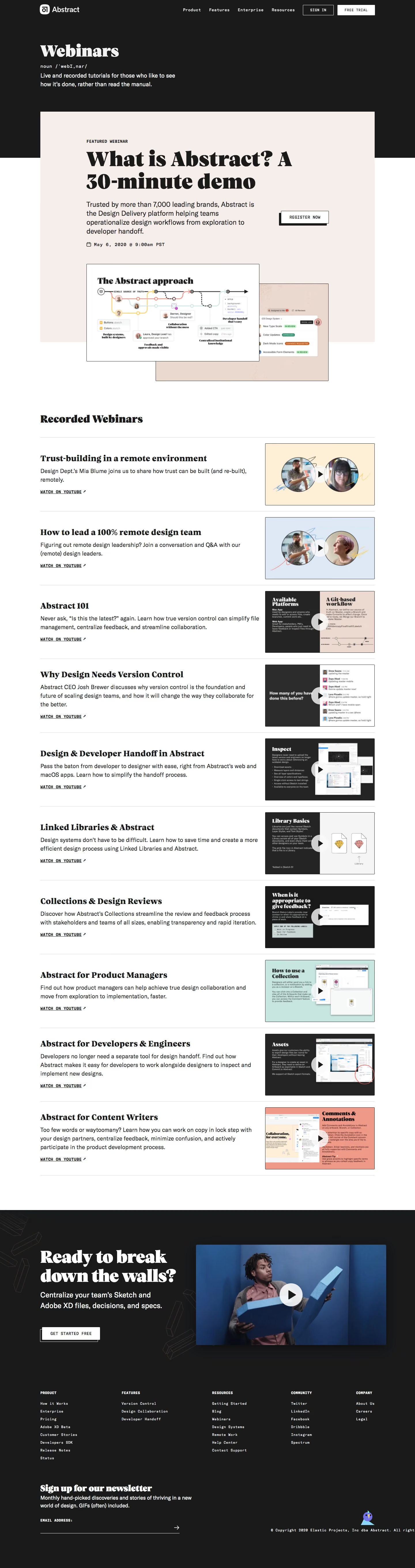
Abstract Webinars Page

Abstract
Version, Collaborate & Share
Designed by
No items found.
Category
Patterns
No items found.
Tech Stack
Added on
May 4, 2020