Generate a new design based on this screen using your own content.
Thank you! Your submission has been received!
Oops! Something went wrong while submitting the form.
# Design from Reference: Narrative BI Blog Post
Create an original, high-fidelity visual design inspired by the reference. Prioritize composition, typography, colors, spacing, and component styling over technical implementation.
## Reference
- **Product:** Narrative BI
- **Category:** Blog Post
- **Screenshot:** https://cdn.prod.website-files.com/5e9dc792e1210c5325f7ebbc/6acbbecd39e7f22db4028a2a_6acbbe15ee81535770a299c7_cms-872c7e3a73fd8b5adcd9b3aa.webp
Analyze the screenshot first. If inaccessible, request it rather than guessing.
## Content
{{content.instructions}}
{{content.data}}
Preserve essential messaging and factual accuracy. Adapt structure and copy length for visual balance; never invent product claims.
## Visual Design
Use this context to reproduce the reference's visual language: layout, typography, colors, spacing, borders, radii, and distinctive elements. The screenshot takes priority if descriptions conflict.
## Direction
{{preferences.fidelityInstructions}}
## Output
{{output.instructions}}
Deliver a polished, cohesive design with precise alignment, hierarchy, and spacing. Produce the requested visual artifact, not just a description. If unsupported, explain the limitation.
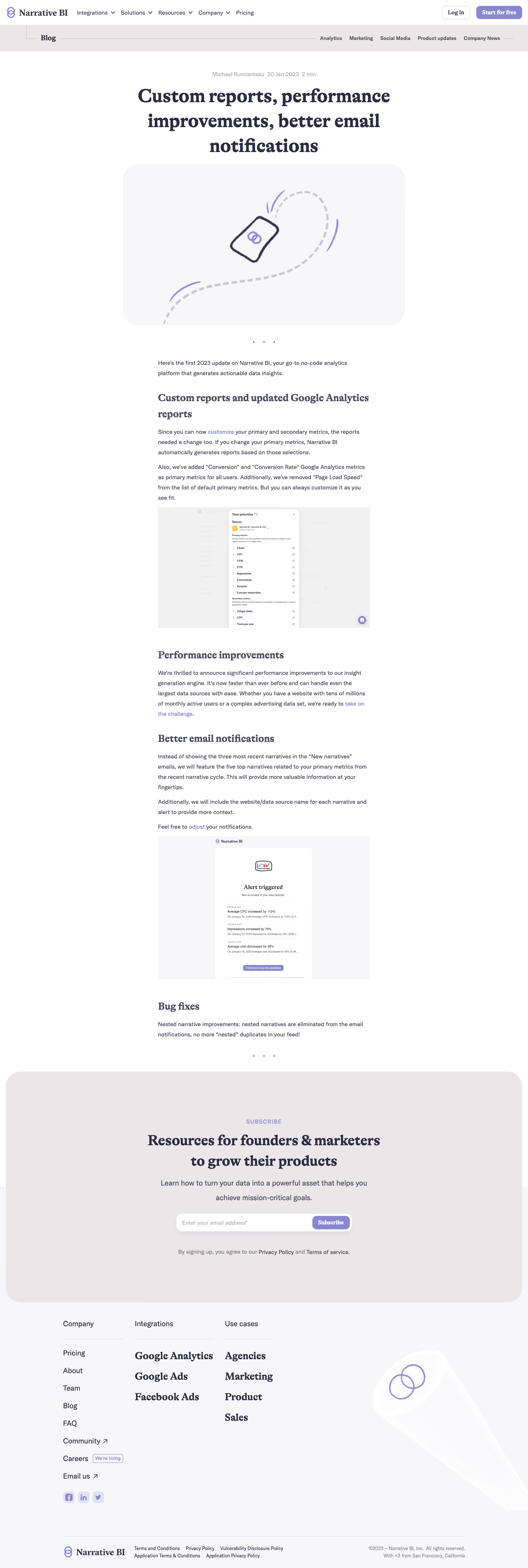
Narrative BI’s product update page delivers a crisp, minimalist visual language that radiates professionalism and clarity. Whitespace is used lavishly, imparting a sense of calm and making content easily digestible. The styling feels modern—clean lines and subtle animations create a polished, inviting environment while keeping distractions at bay.
Layout and Structure
The page adopts a streamlined, single-column structure, guiding the visitor’s attention downward from the hero section to the update content. Key information is introduced upfront with a welcoming headline and a brief, explanatory blurb. The layout emphasizes readable blocks—update details are chunked into clear sections with logical progression, and there’s an unobtrusive sticky navigation floating on the left, providing persistent access to related categories and archives.
Visual Elements
Elegant iconography supplements text, lending visual cues that break up paragraphs and highlight new features and enhancements. Illustrations are lightweight and purposeful, reinforcing a sense of innovation without dominating the experience. The absence of heavy imagery puts the focus squarely on readable, actionable updates.
Color Palette and Typography
A cool, trustworthy palette of blues and soft neutrals forms the foundation, punctuated with a signature accent color that draws the eye to CTAs and links. The typography features clear hierarchy: bold headlines, generous subheads, and accessible, sans-serif body text ensure maximum legibility across devices.
User Experience Patterns
Top and side navigation patterns promote effortless discovery and quick jumps to other areas of interest. Calls-to-action are contextually placed and visually differentiated. Subtle hover states and interactive elements invite engagement while remaining unobtrusive. The result is a seamless, frustration-free browsing journey.
Unique Design Choices and Tone
What stands out most is the editorial feel—this page frames each product update as an engaging story rather than a sterile changelog. The tone exudes transparency and expertise, fostering trust and excitement among users who crave innovation. For designers exploring SaaS patterns, this page exemplifies how simplicity, narrative structure, and thoughtful typography elevate product updates into an experience worth sharing.
.webp)




.avif)