Prompt 1,189 words Copy
# Design from Reference: Cake Equity About Page

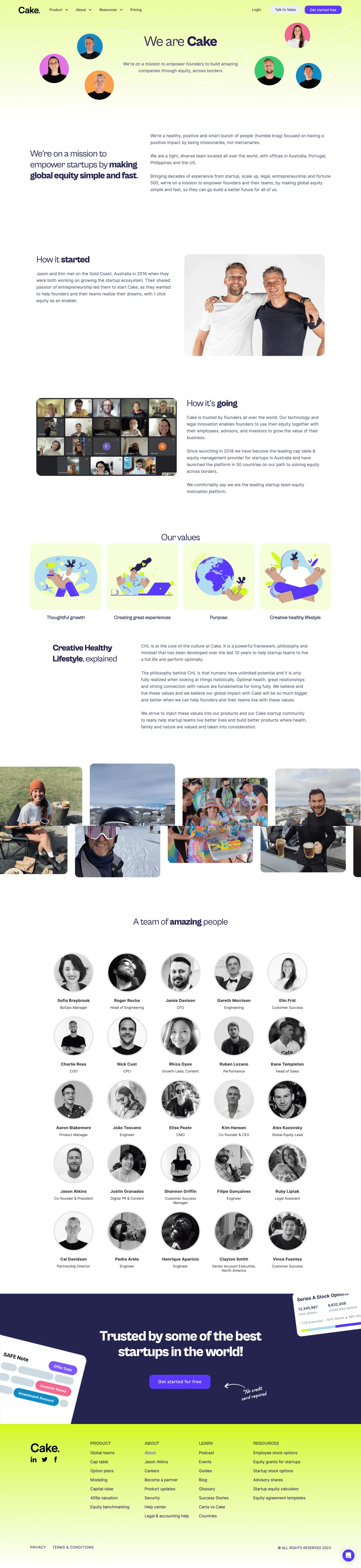
Create an original, high-fidelity visual design inspired by the reference. Prioritize composition, typography, colors, spacing, and component styling over technical implementation.

## Reference

- **Product:** Cake Equity
- **Category:** About Page
- **Screenshot:** attached to this message (also available at https://media.saasframe.io/v/53f5b01e24c44328b0b4-1600.webp)
- **Source:** https://www.cakeequity.com/about

Analyze the attached screenshot first. If no image is attached, open the screenshot link; if neither is accessible, ask for it rather than guessing.

## Visual Design Context

### Overall aesthetic
- **Character:** A people-focused company page combines white editorial sections, lime-tinted gradients, navy typography and vivid purple actions.
- **Personality:** Circular portraits, playful flat illustrations, lifestyle photography and handwritten accents create a warm startup identity.

### Page composition
- **Capture scale:** The source measures 2880 × 12512 image pixels. CSS estimates below assume a 2× capture; device-pixel ratio is unverified.
- **Hero:** Navigation sits over a lime-to-white background. A centered company heading and mission line are surrounded by six circular portraits connected by a looping white line.
- **Mission and history:** A two-column mission statement leads into alternating text/photo rows for the founding story and current team.
- **Values:** Four equal illustrated square tiles sit in one row, followed by a two-column explanation of the company's lifestyle philosophy.
- **Photo strip:** A wide row of rounded lifestyle images extends beyond the main content edges.
- **Team directory:** Twenty-five grayscale portraits form a five-column, five-row grid, each with name and role beneath.
- **Closing regions:** A navy conversion band with cropped product cards leads into a lime-gradient footer with brand/social links, four navigation groups and legal details.

### Information hierarchy
- **Company identity:** The hero mixes regular and bold words to emphasize the brand name.
- **Narrative headings:** Section titles similarly combine regular and heavy emphasis, while paragraphs remain muted navy.
- **Values:** Illustrations lead each value tile, with short centered labels below.
- **Team:** Circular portraits dominate each directory item; names are bold and roles smaller.
- **Conversion:** A large white statement and purple signup button become the strongest elements in the navy closing band.

### Typography
- **Family:** A rounded-looking sans serif is used throughout; exact identity is unverified. The conversion annotation uses an unverified handwritten style.
- **Hero:** Approximately 52–56 px CSS, with mixed regular/bold emphasis and compact leading.
- **Section titles:** Approximately 32–36 px, with selected phrases bolded.
- **Body:** Approximately 16–18 px with 26 px line height, left aligned in broad text columns.
- **Directory and footer:** Names are around 16 px and bold; roles around 14 px. Footer category labels use uppercase medium-weight text.

### Colors & surfaces
- **Measured foundation:** ICC-aware sRGB sampling yields white #FFFFFF and pale lime tones including #F5FDD5, #F9FEE1 and #EEFCB2.
- **Measured navy:** #24244F anchors text and the closing conversion surface.
- **Additional lime shades:** #EBFBA2 and #F0FCBA appear through the gradient regions.
- **Accents:** Saturated purple actions contrast with lime backgrounds; portrait circles introduce pink, orange, blue and green.
- **Neutral imagery:** Team portraits are grayscale with pale circular borders, distinct from the colorful hero portraits.

### Components
- **Navigation actions:** A pale sales pill and purple signup pill align at the upper right, using compact heights and rounded corners.
- **Portrait hero:** Circular cutouts have solid colored backgrounds and varying sizes; a thin white looping path visually links them.
- **Story photographs:** Large landscape images have approximately 18–20 px CSS corners and align beside narrative text.
- **Value tiles:** Four roughly 285 px CSS square illustrations use pale lime surfaces, rounded corners and a consistent purple/lime/blue palette.
- **Team entries:** Approximately 155 px circular portraits with light borders sit above centered name/role labels; longer roles wrap.
- **Conversion band:** Large cropped white product cards tilt into the navy edges. A handwritten arrow/note points toward the purple action.
- **Footer:** The black brand wordmark and social icons occupy the left column, with four link groups across the remaining width and a small purple chat launcher at the lower right.

### Visual rhythm
- **Editorial spacing:** Broad vertical gaps separate mission, history, values and team regions.
- **Alternating rows:** Text/photo placement reverses between history sections, preventing a monotonous reading path.
- **Grid cadence:** Equal value-tile widths and the regular team directory create order after the looser narrative/photo sections.
- **Color transitions:** Lime hero, white body, navy conversion and lime footer establish four distinct page stages.

### Responsive
- **Evidence boundary:** Only a desktop capture is shown; responsive behaviors are recommendations.
- **Narrative stacking:** Stack two-column text/photo regions and reduce hero portrait density on narrow screens.
- **Grid reflow:** Reduce value tiles and team portraits to fewer columns while preserving names and roles.
- **Image strip:** Allow accessible horizontal browsing or wrap lifestyle photos rather than clipping important content.
- **Footer and actions:** Stack link groups and keep sales/signup controls comfortably sized.

### Adaptation guidance
- **People narrative:** Reuse the progression from mission to history, values, lifestyle and directory for company storytelling.
- **Consistent imagery:** Distinguish hero portraits, story photography, flat value illustrations and grayscale directory images through intentional roles.
- **Flexible directory:** Support variable names/roles and missing portraits without breaking grid alignment.
- **Content separation:** Treat company claims, names and roles as captured content, not current organizational facts.
- **Accessibility and scale:** Provide useful image alternatives, decorative-path handling and visible focus states; validate the assumed 2× scale before implementing dimensions.

## Content

**Instructions:**

Generate realistic example content that fits the selected design reference.

Create appropriate headlines, descriptions, labels, buttons, and supporting copy based on the type of interface being designed.

If a product or business description is provided, use it to guide the content.

Otherwise, invent a plausible fictional SaaS product appropriate for the reference.

Keep the content concise, coherent, and visually balanced.

Do not present fictional statistics, customer names, or testimonials as verified facts.

## Design Direction

**Instructions:**

Use the reference screenshot as the main source of visual inspiration rather than a strict layout template.

Preserve its most distinctive design characteristics, such as typography, visual rhythm, color relationships, component treatments, and overall aesthetic.

Feel free to modify section arrangements, proportions, spacing, and individual components to better suit my content.

Introduce original design decisions where they improve usability, composition, or brand consistency.

The result should clearly reflect the reference's visual language without looking like a direct reproduction.

Follow the visual identity of the reference design.

Use its typography, color palette, component styling, and overall aesthetic as the primary design direction.

Do not introduce an unrelated visual identity.

## Output

**Instructions:**

Generate a high-fidelity visual mockup of the requested interface.

Present the design as a polished, realistic website or product UI screenshot.

Prioritize visual composition, typography, spacing, colors, alignment, and component details.

Use the available image-generation or visual-design capabilities.

Do not replace the mockup with source code, a written design specification, or a textual description.

If direct visual generation is unavailable, clearly explain the limitation.

## Constraints

- Use the actual screenshot as the primary visual reference.
- Preserve essential messaging and factual accuracy.
- Prioritize visual quality and consistency.
- Do not invent unsupported product claims.
- Adapt structure and copy length for visual balance.
Reference image Attach it to your message: assistants can’t open image links. Open in ChatGPT ↗ Open in Claude ↗
Build it in Lovable ↗ v0 ↗ Figma Make ↗
Opening a tool copies the screenshot so you can paste it with your prompt.
 SaaSFrame