Design with AI
Generate a new design based on this screen using your own content.
# Design from Reference: Air Signup Page
Create an original, high-fidelity visual design inspired by the reference. Prioritize composition, typography, colors, spacing, and component styling over technical implementation.
## Reference
- **Product:** Air
- **Category:** Signup
- **Screenshot:** https://cdn.prod.website-files.com/5e9dc792e1210c5325f7ebbc/6acbca85f1e28b554221d097_6acbc8f41790037d3e057a39_cms-beca7d57d1949b6b20d02896.webp
Analyze the screenshot first. If inaccessible, request it rather than guessing.
## Content
{{content.instructions}}
{{content.data}}
Preserve essential messaging and factual accuracy. Adapt structure and copy length for visual balance; never invent product claims.
## Visual Design
### Overall aesthetic
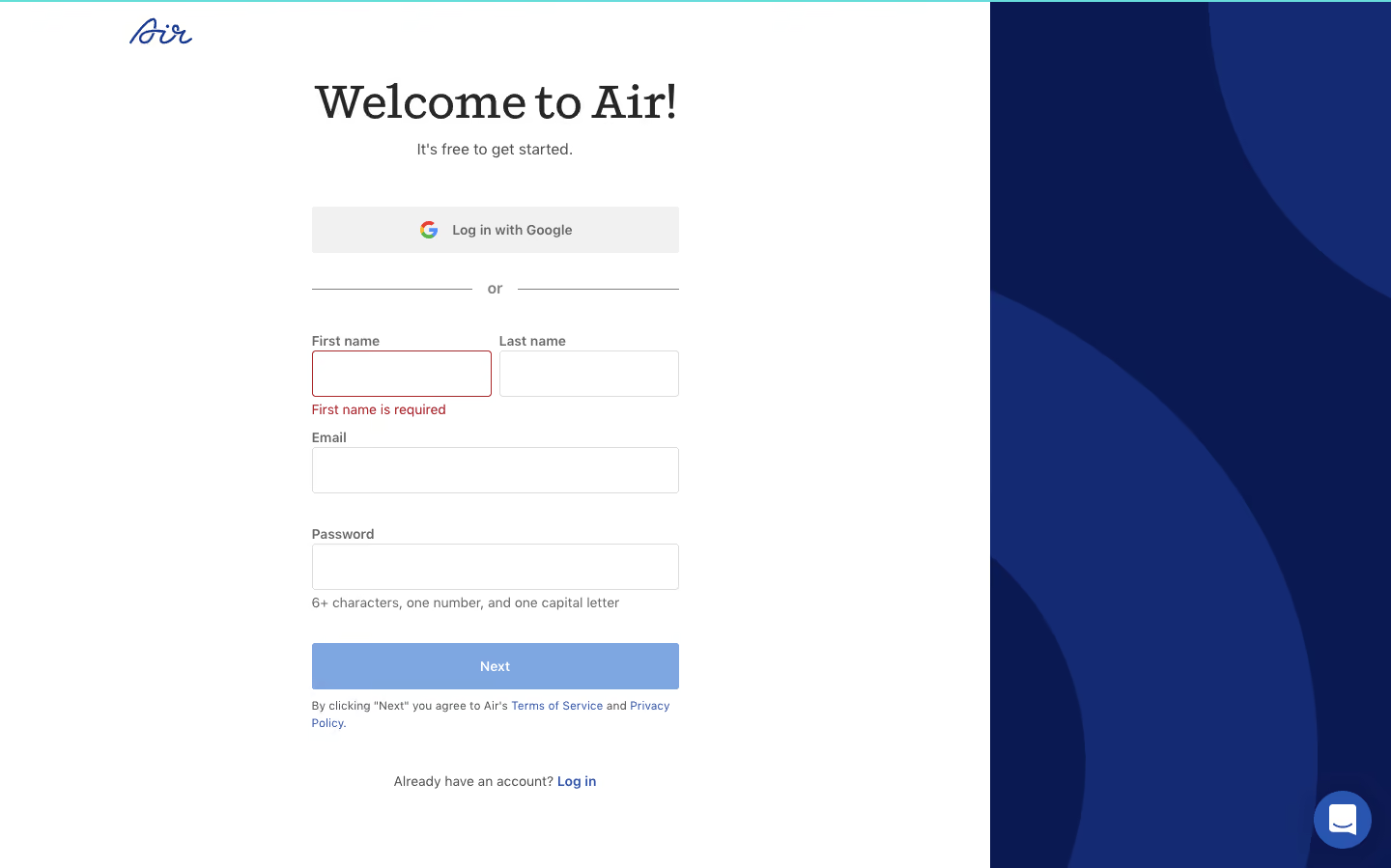
- **Character:** Classic signup layout with editorial serif greeting and abstract navy side panel.
### Page composition
- **Canvas:** 1440 × 899 screenshot px. White form area occupies about 71%; right navy panel contains oversized curved shapes. Logo sits upper left.
### Information hierarchy
- **Priority:** Welcome and free-start line precede Google option, divider, name/email/password fields, Next, legal text, and login link. First-name validation is visibly red.
### Typography
- **Scale:** Approximate screenshot serif heading 48 px, sans body 16 px, labels 14 px, legal 12 px. Families/CSS scale unverified.
### Colors & surfaces
- **Palette:** Sampled sRGB #FFFFFF, navy #0B1953, shape #142A72, muted blue #7EA6E0, provider surface #F1F1F1, and dark #262626.
### Components
- **Details:** Roughly 380 screenshot px form width; 48 px inputs with 4 px corners, split name row, red validation outline/helper, blue Next, and bottom-right chat.
### Visual rhythm
- **Spacing:** Generous 32–40 px field-section gaps and broad white margins support the narrow form.
### Responsive
- **Adaptation:** Mobile is not shown. Hide or move decorative panel and stack name fields if needed.
### Adaptation guidance
- **Transfer:** Preserve provider/manual signup paths and explicit inline error. Adapt password requirements and legal links to the actual service.
Use this context to reproduce the reference's visual language: layout, typography, colors, spacing, borders, radii, and distinctive elements. The screenshot takes priority if descriptions conflict.
## Direction
{{preferences.fidelityInstructions}}
## Output
{{output.instructions}}
Deliver a polished, cohesive design with precise alignment, hierarchy, and spacing. Produce the requested visual artifact, not just a description. If unsupported, explain the limitation.
.webp)




.avif)