Prompt 1,179 words Copy
# Design from Reference: Proof Scale or Die Show

Create an original, high-fidelity visual design inspired by the reference. Prioritize composition, typography, colors, spacing, and component styling over technical implementation.

## Reference

- **Product:** Proof
- **Category:** Podcast Page
- **Screenshot:** attached to this message (also available at https://media.saasframe.io/o/9dab7fb566e5ce0ce611.webp)
- **Source:** https://useproof.com/scaleordie

Analyze the attached screenshot first. If no image is attached, open the screenshot link; if neither is accessible, ask for it rather than guessing.

## Visual Design Context

### Overall aesthetic

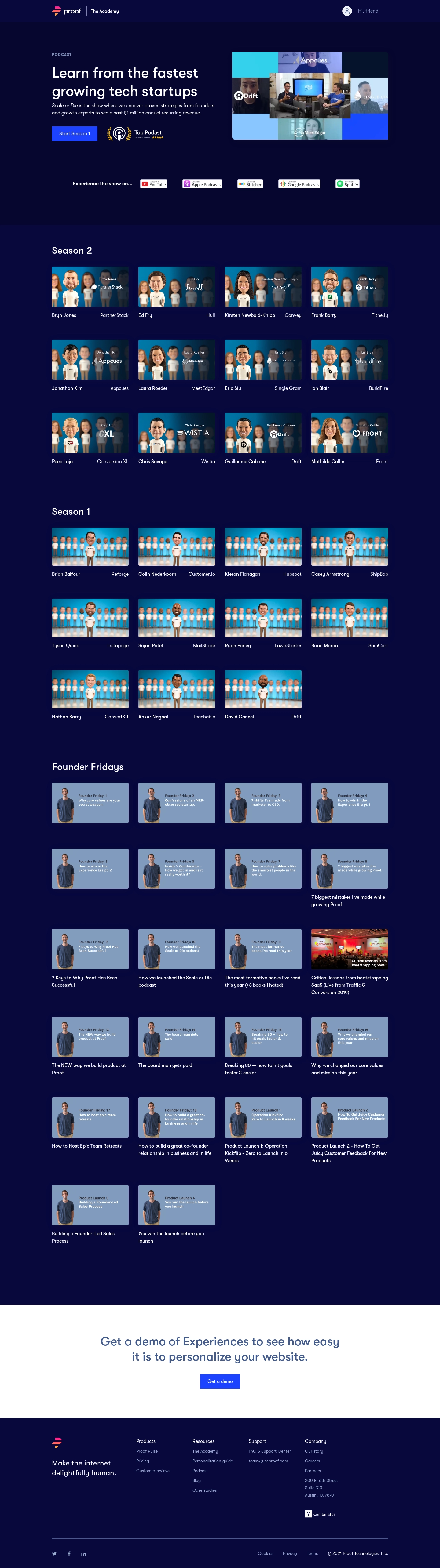
- **Visual character:** A dark podcast and education library uses midnight-blue surfaces, white rounded sans-serif type and vivid blue actions. Repeated illustrated guest thumbnails give the catalog a playful identity.
- **Image evidence:** The supplied screenshot is 1440 × 5136 pixels. Measurements below are approximate CSS-scale estimates assuming a 1× capture; capture density is unverified.

### Page composition

- **Header:** A roughly 72-pixel band places the Proof mark and Academy label on the left and a small profile icon with greeting on the right.
- **Hero:** A centered content container approximately 1100 pixels wide uses two columns: heading, explanation, season button and podcast award badge on the left; a wide video collage on the right.
- **Catalog:** A listening-platform row precedes Season 2, Season 1 and Founder Fridays sections. Each uses a four-column thumbnail grid; incomplete final rows remain left aligned.
- **Closing regions:** A full-width white demo panel interrupts the dark page before a dark footer containing a brand statement, four link columns and a separated legal/social row.

### Information hierarchy

- **Entry point:** The large two-line hero heading and bright Start Season 1 button establish the offer and immediate action; the collage gives the show a visual preview.
- **Browsing hierarchy:** Season headings organize the library before individual guest names and companies. Founder videos use longer, wrapping titles beneath selected thumbnails.
- **Secondary navigation:** Platform badges provide alternative listening destinations. Footer links and legal information use smaller, muted text.

### Typography

- **Hero:** The heading is approximately 46–48 pixels, medium-to-semibold weight, with about 1.25 line-height; the supporting paragraph is around 16 pixels with 24-pixel leading.
- **Section titles:** Season and Founder Fridays headings are roughly 30–32 pixels, medium weight, with generous space underneath.
- **Card labels:** Names, companies and video titles are approximately 16 pixels with 23–25-pixel line-height. Footer links are about 14 pixels; the brand statement is around 24 pixels.
- **Family:** Rounded geometric sans-serif forms are visible throughout; the exact font identity is unverified. The small PODCAST eyebrow uses uppercase letters and increased tracking.

### Colors & surfaces

- **Measured dark palette:** ICC-to-sRGB sampling identifies #08083C, #06062F and #06073D as dominant navy surfaces, with white #FFFFFF for principal text and the closing panel.
- **Measured thumbnail tone:** Desaturated blue #819BBE fills many Founder Fridays thumbnails, contrasting with cyan photographic/illustrated season artwork.
- **Accent treatment:** Saturated electric blue fills primary buttons; pink/orange colors belong to the brand mark and gold to the award graphic. Muted blue-gray text supports footer and eyebrow content.
- **Card surfaces:** Thumbnails sit directly on the page without full bordered card containers; subtle image shadows and small corner radii provide separation.

### Components

- **Hero media:** The collage is approximately 510 × 285 pixels, with slightly rounded corners and multiple guest/video panels.
- **Primary controls:** Start Season 1 is roughly 149 × 48 pixels; Get a demo is around 131 × 48 pixels. Both use white text, blue fills and nearly square corners.
- **Episode cards:** Four roughly 250-pixel-wide thumbnails sit in each row with about 32-pixel gutters. Images are approximately 130 pixels tall; guest and company labels align to opposite ends below them.
- **Founder cards:** Similar thumbnails combine a presenter cutout with short embedded titles. Longer external titles wrap over two or three lines; no playback overlay or hover state is established.
- **Footer:** A thin horizontal rule separates the lower legal row; small social icons align left and compact policy/copyright text right.

### Visual rhythm

- **Container alignment:** Header content, hero, grids and footer share approximately 170-pixel outer margins at the supplied width.
- **Grid cadence:** Repeated image sizes and gutters stabilize a long catalog; rows have roughly 70–95 pixels of vertical breathing room, adjusted for title height.
- **Section spacing:** Large gaps separate the hero, platform row and season groups. The white demo panel uses substantial top and bottom padding to mark the conversion point.

### Responsive

- **Observed scope:** One desktop layout is visible; narrower layouts and interaction states are not shown.
- **Recommended grid:** Reduce the catalog to two columns on tablets and one column on narrow phones, maintaining consistent thumbnail aspect ratios and left-aligned final rows.
- **Recommended hero/footer:** Stack hero copy above media, wrap platform badges, reduce the heading size and stack footer link groups. Keep button targets at least 44 CSS pixels tall.

### Adaptation guidance

- **Library pattern:** Use a concise introductory offer followed by clearly labeled collections and consistent media thumbnails, with names and organizations treated as separate metadata.
- **Artwork system:** Establish distinct but related thumbnail templates for interviews and founder advice; keep embedded text short and provide readable external titles.
- **Conversion sequence:** Place the product demo invitation after the browsable content and maintain its strong light/dark contrast. Confirm the actual font and capture scale before translating measurements into production tokens.

## Content

**Instructions:**

Generate realistic example content that fits the selected design reference.

Create appropriate headlines, descriptions, labels, buttons, and supporting copy based on the type of interface being designed.

If a product or business description is provided, use it to guide the content.

Otherwise, invent a plausible fictional SaaS product appropriate for the reference.

Keep the content concise, coherent, and visually balanced.

Do not present fictional statistics, customer names, or testimonials as verified facts.

## Design Direction

**Instructions:**

Use the reference screenshot as the main source of visual inspiration rather than a strict layout template.

Preserve its most distinctive design characteristics, such as typography, visual rhythm, color relationships, component treatments, and overall aesthetic.

Feel free to modify section arrangements, proportions, spacing, and individual components to better suit my content.

Introduce original design decisions where they improve usability, composition, or brand consistency.

The result should clearly reflect the reference's visual language without looking like a direct reproduction.

Follow the visual identity of the reference design.

Use its typography, color palette, component styling, and overall aesthetic as the primary design direction.

Do not introduce an unrelated visual identity.

## Output

**Instructions:**

Generate a high-fidelity visual mockup of the requested interface.

Present the design as a polished, realistic website or product UI screenshot.

Prioritize visual composition, typography, spacing, colors, alignment, and component details.

Use the available image-generation or visual-design capabilities.

Do not replace the mockup with source code, a written design specification, or a textual description.

If direct visual generation is unavailable, clearly explain the limitation.

## Constraints

- Use the actual screenshot as the primary visual reference.
- Preserve essential messaging and factual accuracy.
- Prioritize visual quality and consistency.
- Do not invent unsupported product claims.
- Adapt structure and copy length for visual balance.
Reference image Attach it to your message: assistants can’t open image links. Open in ChatGPT ↗ Open in Claude ↗
Build it in Lovable ↗ v0 ↗ Figma Make ↗
Opening a tool copies the screenshot so you can paste it with your prompt.
 SaaSFrame