Generate a new design based on this screen using your own content.
Thank you! Your submission has been received!
Oops! Something went wrong while submitting the form.
# Design from Reference: Wise Payments
Create an original, high-fidelity visual design inspired by the reference. Prioritize composition, typography, colors, spacing, and component styling over technical implementation.
## Reference
- **Product:** Wise
- **Category:** Empty
- **Screenshot:** https://cdn.prod.website-files.com/5e9dc792e1210c5325f7ebbc/6acad463886583e9d96b6eba_6acad31191186b2d49d7d8fa_cms-1f30ebed9d5012b3bcea3a15.webp
Analyze the screenshot first. If inaccessible, request it rather than guessing.
## Content
{{content.instructions}}
{{content.data}}
Preserve essential messaging and factual accuracy. Adapt structure and copy length for visual balance; never invent product claims.
## Visual Design
Use this context to reproduce the reference's visual language: layout, typography, colors, spacing, borders, radii, and distinctive elements. The screenshot takes priority if descriptions conflict.
## Direction
{{preferences.fidelityInstructions}}
## Output
{{output.instructions}}
Deliver a polished, cohesive design with precise alignment, hierarchy, and spacing. Produce the requested visual artifact, not just a description. If unsupported, explain the limitation.
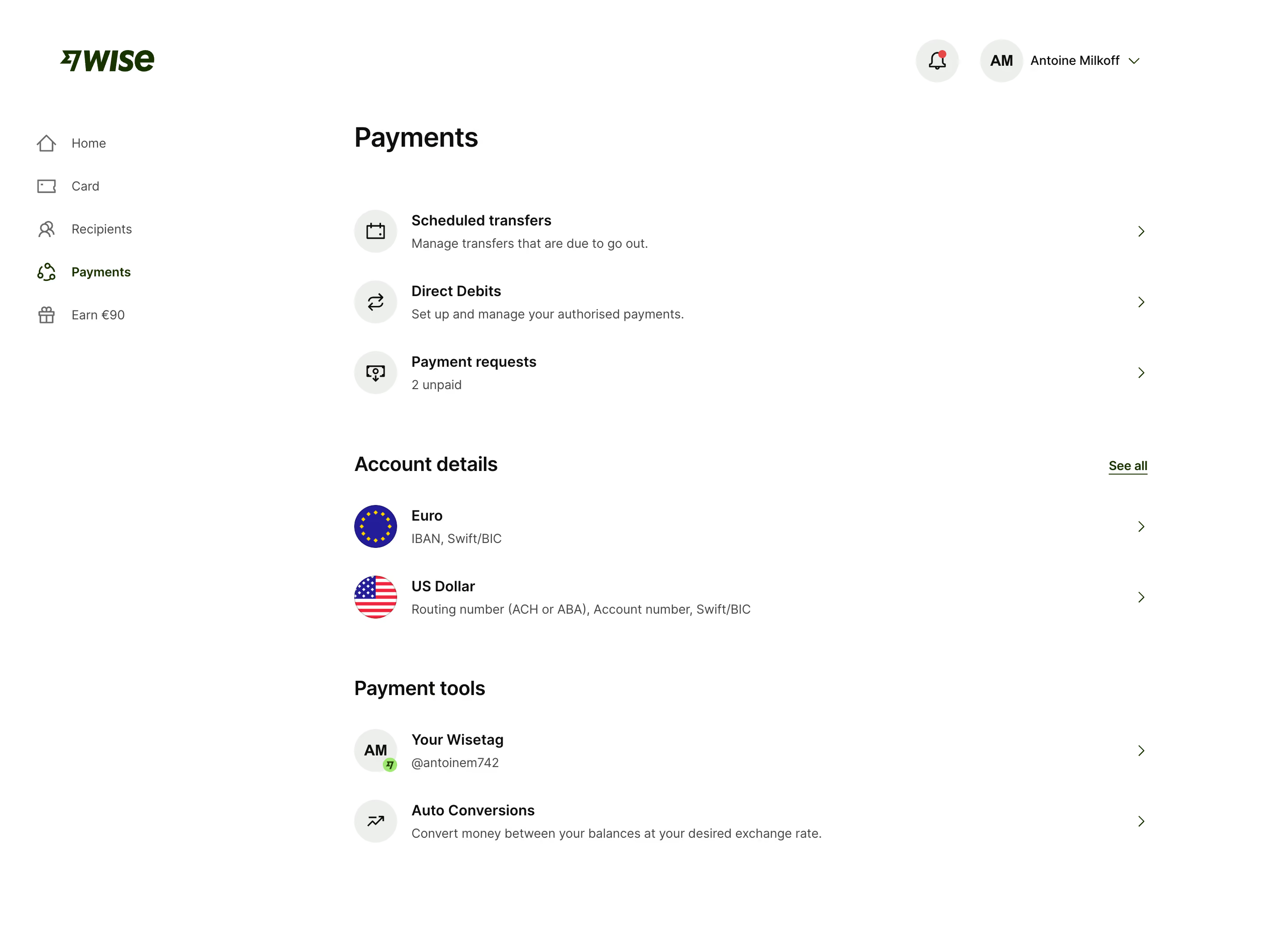
First thing you notice is how calm this page feels. Wise's Payments dashboard uses a ton of white space and a strict vertical rhythm that makes scanning effortless. Three clear sections: Payments, Account details, Payment tools. Each one separated by generous padding. No clutter, no competing elements.
Typography Doing the Heavy Lifting
The bold "Payments" header in that chunky dark serif-ish font anchors everything. Section headers like "Account details" are slightly smaller but still commanding. Body text stays light gray and small. It's a simple hierarchy but executed with discipline. The left nav is minimal, just five items with solid icons. "Payments" gets a green highlight to show active state. Love that "Earn €90" sits at the bottom with a little gift icon. Subtle upsell.
Smart Use of Visual Cues
The circular icons with flags for Euro and US Dollar accounts add just enough color without being loud. Chevrons on every row signal clickability. The Wisetag section with "AM" initials mirrors the top-right avatar pattern. Everything feels consistent and predictable, which is exactly what you want in a financial product.
.webp)




.avif)