Prompt 1,415 words Copy
# Design from Reference: Station Landing Page

Create an original, high-fidelity visual design inspired by the reference. Prioritize composition, typography, colors, spacing, and component styling over technical implementation.

## Reference

- **Product:** Station
- **Category:** Landing Page
- **Screenshot:** attached to this message (also available at https://media.saasframe.io/o/9094f68e3efd0aa2b164.webp)
- **Source:** https://getstation.com/

Analyze the attached screenshot first. If no image is attached, open the screenshot link; if neither is accessible, ask for it rather than guessing.

## Visual Design Context

### Overall aesthetic
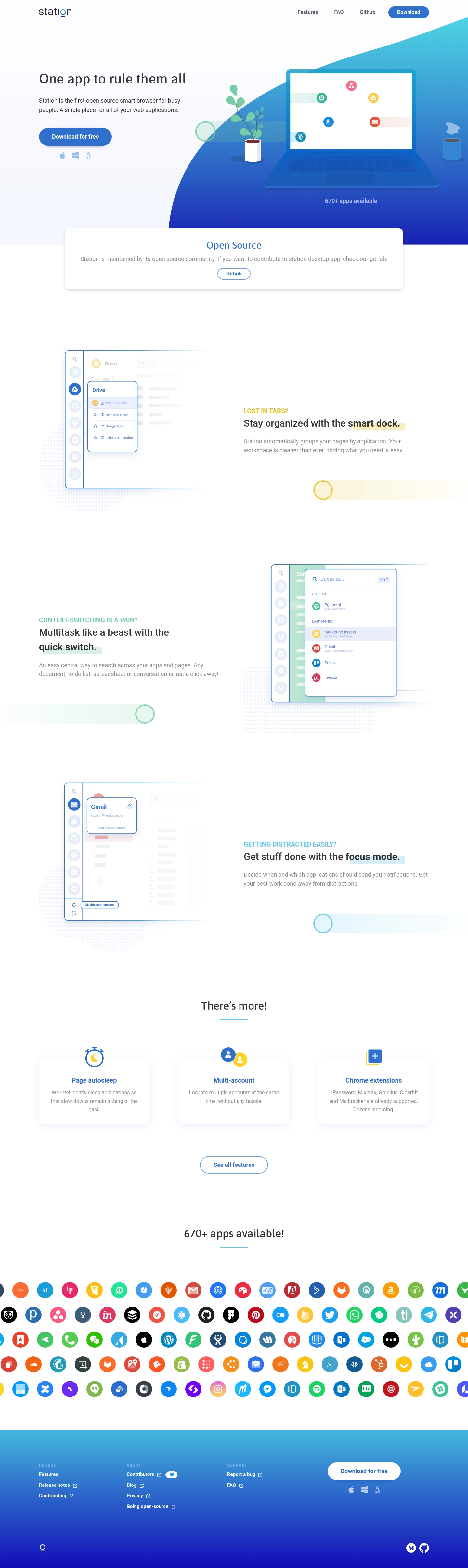
- **Character:** A bright browser-product landing page combines white space, blue/cyan gradients, flat desk illustration, softly outlined product mockups, and rounded blue actions.
- **Tone:** The presentation is friendly and productivity-focused, with light pastel highlights and a large colorful application-logo wall.
- **Observed scale:** The source measures 1440 × 4827 pixels. Approximate dimensions below refer to image pixels; CSS estimates assume an unverified 1× capture.

### Page composition
- **Header:** Station wordmark sits left; Features, FAQ, Github, and a blue Download pill align right.
- **Hero:** A left text block contains a concise heading, two-line explanation, download action, and three platform marks. A large laptop/plant/cup illustration fills the right over a curved cyan-to-blue background.
- **Open-source banner:** A broad white rounded card overlaps the hero’s lower boundary, with centered heading, explanation, and outlined Github action.
- **Feature narrative:** Three alternating text/mockup rows explain dock organization, quick switching, and focus mode.
- **Additional features:** A centered heading introduces three equal white cards for page autosleep, multiple accounts, and extensions, followed by an outlined feature link.
- **Application wall:** A centered availability heading sits above five rows of colorful circular service marks spanning the page width.
- **Footer:** A blue gradient region contains three link groups and a separated download action/platform marks, with small brand/social marks lower down.

### Information hierarchy
- **Hero outcome:** The short heading is the primary text; supporting copy introduces the product category.
- **Download priority:** Filled blue download controls appear in the header and hero, then reverse to white in the footer.
- **Community context:** The open-source card creates a separate contribution path beneath the hero.
- **Feature pattern:** Each major row uses a colored uppercase problem statement, bold solution heading with a highlighted phrase, and short muted explanation.
- **Breadth:** Three small cards add secondary capabilities, while the logo wall signals a broad app ecosystem.
- **Historical scope:** Open-source status, platform support, app counts, and feature claims are captured marketing content, not independently verified current specifications.

### Typography
- **Typeface appearance:** A clean sans-serif with rounded humanist forms is used. Exact family is unverified.
- **Hero heading:** Approximately 40–42 pixels, medium weight, with line-height near 50 pixels.
- **Feature headings:** Around 28–30 pixels, bold, often wrapping to two lines.
- **Eyebrows:** Around 18 pixels, uppercase and semibold, colored by feature theme.
- **Body copy:** Approximately 17–18 pixels with 26-pixel line-height, in soft gray.
- **Section titles:** Around 30–32 pixels, regular/medium, centered.
- **Controls/footer:** Buttons and links use roughly 14–16-pixel semibold text; footer group labels are small uppercase with tracking.

### Colors & surfaces
- **Measured base:** #FFFFFF dominates; #FDFCFF, #F8F9FF, #FBFDFF, and #F5F8FF occur in pale backgrounds and demonstration detail.
- **Measured action blue:** #3070CC appears prominently in the download-button family.
- **Measured text:** #363636 appears in strong heading detail.
- **Measured gradient samples:** #3A93D5 and #40ADDA occur in the footer’s blue/cyan range.
- **Feature accents:** Yellow, mint, and cyan mark the three problem/solution rows through eyebrow text, highlighted words, and decorative trails.
- **Depth:** White cards and product popovers have soft shadows. Product demonstrations use thin blue outlines and pale circular/dotted backdrops.
- **Graphic richness:** Service logos retain their own saturated colors within circular holders, contrasting with the restrained feature sections.

### Components
- **Hero download:** A blue pill approximately 225 × 54 pixels has white bold text and subtle shadow. Apple, Windows, and Linux marks sit below.
- **Desk illustration:** A laptop with service icons, plant, cup, and broad curved gradient forms the hero’s right side.
- **Open-source card:** A wide white panel, roughly 1040 pixels across, has rounded corners, soft shadow, centered copy, and a small outlined Github pill.
- **Dock demonstration:** A pale application window and blue-outlined sidebar popover illustrate grouped pages.
- **Quick-switch demonstration:** A larger outlined search/switcher panel overlays a pale app window, with service icons and compact result rows.
- **Focus demonstration:** A small account/notification popover overlays a pale mail interface, with a compact disable-notifications control in the artwork.
- **Highlight treatment:** Selected heading phrases have translucent rectangular color blocks behind the text.
- **Decorative trails:** Fading horizontal bands end in outlined circles; dotted circles sit behind mockups.
- **Additional cards:** Three white rounded panels have small icons overlapping their tops, blue titles, and centered muted descriptions.
- **Application grid:** Five rows of circular colorful logos extend beyond the visible horizontal edges. The screenshot does not establish scrolling or individual link behavior.
- **Footer download:** A white pill with blue text repeats the platform marks beneath.
- **Unshown states:** Download destination, installation, Github content, focus switching, and open menus are not visible.

### Visual rhythm
- **Alternating rows:** Mockup-left/text-right and text-left/mockup-right arrangements create a steady explanatory flow.
- **Large gaps:** Broad vertical intervals separate the three major features and later capability sections.
- **Consistent theme structure:** Problem label, solution heading, paragraph, and illustration repeat with different accent colors.
- **Density shift:** Sparse feature rows transition to compact cards and then the dense multicolor logo wall.
- **Blue bookends:** Hero gradient and footer gradient frame a predominantly white center.

### Responsive
- **Evidence limit:** Only a desktop landing page is captured. Mobile and fixed navigation behavior are unverified.
- **Recommended hero:** Stack copy above illustration and preserve a clear download action.
- **Recommended features:** Stack alternating rows consistently, scaling mockups or using focused crops when labels become too small.
- **Recommended cards:** Reduce three columns to one or two according to available width.
- **Recommended logo wall:** Wrap or provide accessible horizontal browsing without relying on clipped logos for meaning.
- **Recommended footer:** Stack groups and keep platform/download controls readable and keyboard accessible.

### Adaptation guidance
- **Preserve the productivity narrative:** Introduce the unified workspace, explain organization/switching/focus, then show additional capabilities and ecosystem breadth.
- **Validate current claims:** Confirm platform availability, app counts, extension support, and open-source/community wording before reuse.
- **Separate demonstrations from live UI:** Mockup controls are illustrative and should not imply interactive product state.
- **Use reusable feature rows:** Standardize heading highlights, mockup frames, accent trails, and spacing.
- **Implement accessible actions:** Provide clear download targets, descriptive image alternatives, visible focus, and meaningful platform labels.
- **Build from measured palette:** White, soft cool tints, blue actions, cyan gradients, and limited yellow/mint highlights provide the core system.

## Content

**Instructions:**

Generate realistic example content that fits the selected design reference.

Create appropriate headlines, descriptions, labels, buttons, and supporting copy based on the type of interface being designed.

If a product or business description is provided, use it to guide the content.

Otherwise, invent a plausible fictional SaaS product appropriate for the reference.

Keep the content concise, coherent, and visually balanced.

Do not present fictional statistics, customer names, or testimonials as verified facts.

## Design Direction

**Instructions:**

Use the reference screenshot as the main source of visual inspiration rather than a strict layout template.

Preserve its most distinctive design characteristics, such as typography, visual rhythm, color relationships, component treatments, and overall aesthetic.

Feel free to modify section arrangements, proportions, spacing, and individual components to better suit my content.

Introduce original design decisions where they improve usability, composition, or brand consistency.

The result should clearly reflect the reference's visual language without looking like a direct reproduction.

Follow the visual identity of the reference design.

Use its typography, color palette, component styling, and overall aesthetic as the primary design direction.

Do not introduce an unrelated visual identity.

## Output

**Instructions:**

Generate a high-fidelity visual mockup of the requested interface.

Present the design as a polished, realistic website or product UI screenshot.

Prioritize visual composition, typography, spacing, colors, alignment, and component details.

Use the available image-generation or visual-design capabilities.

Do not replace the mockup with source code, a written design specification, or a textual description.

If direct visual generation is unavailable, clearly explain the limitation.

## Constraints

- Use the actual screenshot as the primary visual reference.
- Preserve essential messaging and factual accuracy.
- Prioritize visual quality and consistency.
- Do not invent unsupported product claims.
- Adapt structure and copy length for visual balance.
Reference image Attach it to your message: assistants can’t open image links. Open in ChatGPT ↗ Open in Claude ↗
Build it in Lovable ↗ v0 ↗ Figma Make ↗
Opening a tool copies the screenshot so you can paste it with your prompt.
 SaaSFrame