.webp)
Thank you! Your submission has been received!
Oops! Something went wrong while submitting the form.
Get SaaSFrame Pro
Monthly
$18
Quarterly
$48
Yearly
$180
Upgrade to access this feature
Browse all screens & flows
Filter and search screens & flows
Access Figma files
Access mobile versions
Bookmark screens & flows
Join now

Lattice Academy

Lattice
People success platform
Designed by
No items found.

Bookmark
Bookmark

Design with AI
Thank you! Your submission has been received!
Oops! Something went wrong while submitting the form.
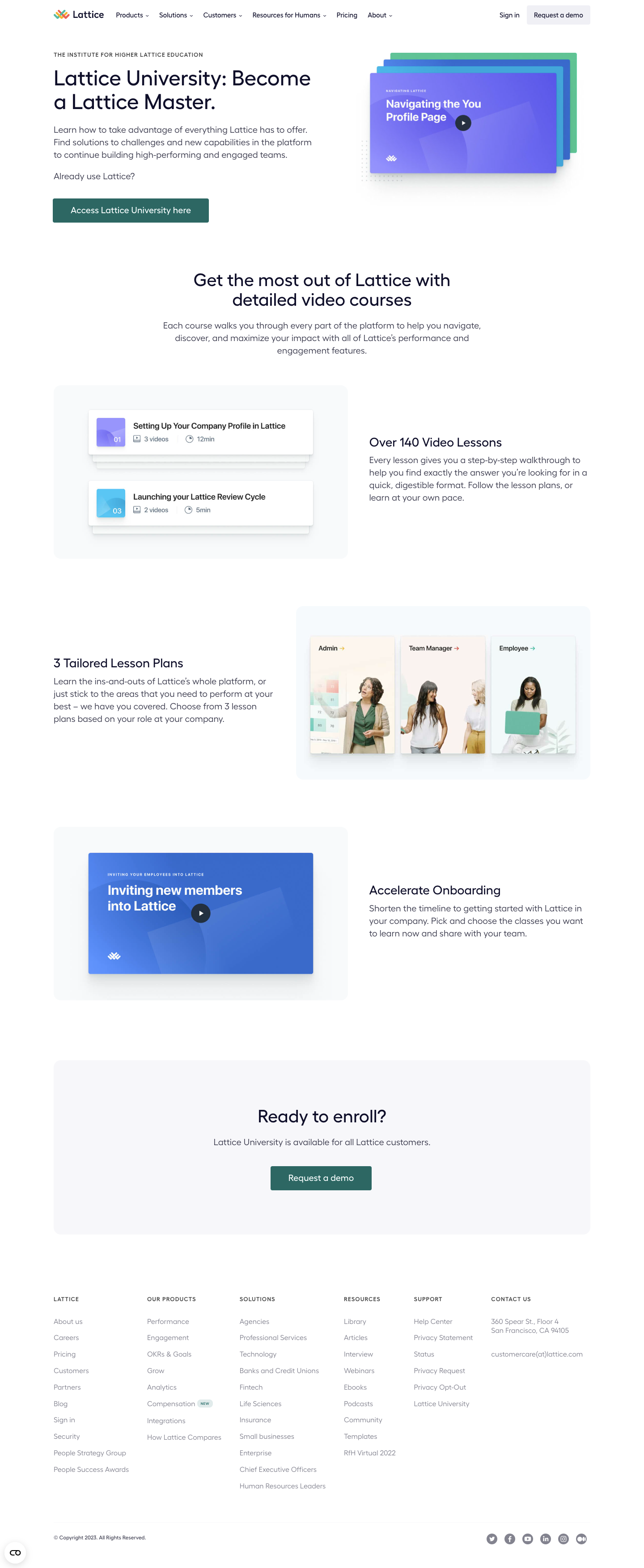
# Design from Reference: Lattice Academy
Create an original, high-fidelity visual design inspired by the reference. Prioritize composition, typography, colors, spacing, and component styling over technical implementation.
## Reference
- **Product:** Lattice
- **Category:** Academy
- **Screenshot:** https://cdn.prod.website-files.com/5e9dc792e1210c5325f7ebbc/6acb6c155391d62536b67207_6acb6a9fbaddc9f317df70bb_cms-5169028c7741150a53854715.webp
Analyze the screenshot first. If inaccessible, request it rather than guessing.
## Content
{{content.instructions}}
{{content.data}}
Preserve essential messaging and factual accuracy. Adapt structure and copy length for visual balance; never invent product claims.
## Visual Design
### Overall aesthetic
- **Character:** Airy education landing page with a white canvas, dark navy rounded typography, muted teal actions and blue/purple course imagery.
- **Visual language:** Stacked video covers, layered lesson cards and role-based portraits explain learning through tangible content objects.
- **Capture:** The screenshot measures 1440 × 3508 image px and was inspected in three portions. Dimensions below are image-based estimates; CSS scale is unverified.
### Page composition
- **Header:** A centered approximately 1200 px container holds the multicolor wordmark, six navigation groups and sign-in/demo actions in one horizontal row.
- **Hero:** A two-column layout places a small uppercase eyebrow, large two-line university heading, explanatory paragraph and teal access button left. A layered stack of colored video covers sits right.
- **Section introduction:** A centered two-line heading and short paragraph explain video courses, separated from the hero by generous white space.
- **Benefits:** Three alternating image/text rows cover the lesson library, three role-specific plans and accelerated onboarding. Images sit inside pale rounded rectangles.
- **Closing panel:** A broad pale-gray rounded block contains a centered enrollment heading, one-line availability statement and teal demo button.
- **Footer:** Six columns organize company, product, solution, resource, support and contact information. A lower rule separates copyright and social links.
### Information hierarchy
- **Hero task:** The university proposition is the largest type; explanatory copy leads into an explicit access button for existing users.
- **Benefits:** Each row uses one short heading and a compact paragraph, while product-like imagery supplies detail without adding live controls.
- **Learning evidence:** Lesson-card previews show video counts and durations. Three portrait cards identify admin, manager and employee learning paths.
- **Conversion:** The enrollment panel creates a separate final action zone with a single central button.
- **Footer:** Small uppercase group labels organize extensive muted links, reducing competition with primary content.
### Typography
- **Family:** Rounded geometric sans-serif with a friendly, open appearance; exact family is unverified.
- **Hero:** Approximately 46–48 image px, medium weight, around 52 px line-height and slightly tight tracking.
- **Section titles:** Centered headings are around 38–40 px with 44 px leading; feature titles approximately 27–29 px.
- **Body:** Approximately 19–20 px with 28 px line-height, rendered in muted navy-gray. Hero copy spans about three lines.
- **Small roles:** Eyebrow and footer labels are around 12–13 px, uppercase with expanded tracking. Navigation is roughly 14–15 px; footer links around 15–16 px.
- **Image typography:** Course-cover lettering and metadata belong to the embedded illustrations and have their own size hierarchy.
### Colors & surfaces
- **Measured canvas:** ICC-aware sRGB sampling yields #FFFFFF as the dominant surface, with #F7F7FA, #F8FAFB and #F7FAFD in pale supporting panels.
- **Measured foreground/action:** Dark navy #0C1128 appears in text; muted teal #3D6562 is used for primary action treatment.
- **Measured imagery:** #3D72C7 is a prominent blue in course graphics. Purple, cyan and green stacked covers supply additional accent color.
- **Warm image accents:** #F9F3F0 occurs in pale portrait-card areas, balancing the cooler video graphics.
- **Depth:** Soft shadows lift lesson cards and cover stacks; main sections use flat white or very pale fills with minimal outlines.
### Components
- **Primary buttons:** Teal rectangular actions have white text, approximately 4 px corners and around 54 px height. The hero action is wider than the closing demo button.
- **Cover stack:** Four offset landscape cards create depth behind the front purple video cover. A dark circular play control overlays the front cover; no playback is demonstrated.
- **Lesson previews:** White horizontal cards pair a small numbered colored cover with title, video-count icon and duration metadata. Offset backing cards suggest a larger collection.
- **Role cards:** Three tall adjacent portrait panels show role labels and colored arrows above imagery, inside a pale rounded illustration container.
- **Onboarding video:** A blue landscape poster with large white title and centered play symbol sits within a pale frame.
- **Enrollment block:** Approximately 1200 × 390 image px with 16–18 px corners and substantial centered padding.
- **Footer utilities:** Plain link columns, a row of small circular social icons and a small floating lower-left control complete the screen.
### Visual rhythm
- **Container alignment:** Header, hero, feature rows, enrollment panel and footer share a broad centered content axis with roughly 120 px outer margins.
- **Alternation:** Feature images switch sides, balancing the longer page while preserving consistent text widths.
- **Macro spacing:** Large approximately 100–140 px intervals separate key content groups, with especially generous spacing around the centered introduction.
- **Internal spacing:** Benefit headings sit close to paragraphs; buttons have more breathing room below copy. Cards use tighter internal spacing than their surrounding frames.
- **Image consistency:** Pale rounded illustration grounds unify otherwise different lesson, portrait and video compositions.
### Responsive
- **Evidence limit:** Only desktop is shown; these are recommendations rather than observed behavior.
- **Header and hero:** Collapse navigation and stack hero copy above the video stack, reducing title size fluidly.
- **Benefits:** Present each heading and paragraph before its related illustration in one column; preserve legible video metadata.
- **Cards:** Let role cards stack or scroll accessibly rather than shrinking portraits and labels excessively.
- **Footer:** Reduce six columns to fewer groups per row and wrap the final social/legal strip with comfortable touch spacing.
### Adaptation guidance
- **Reusable structure:** Pair a direct education proposition with visual lesson examples, role-specific paths and a final enrollment panel.
- **Visual system:** Use pale rounded frames and soft object shadows to connect varied educational assets, reserving teal for main actions.
- **Interaction truth:** Keep illustrated play buttons distinct from actual accessible video controls when recreating the page.
- **Content discipline:** Give each benefit row one concrete learning outcome and concise supporting copy; avoid turning the imagery into unreadable miniature UI.
- **Accessibility:** Use semantic headings, descriptive image alternatives, captions/transcripts for real video and clear keyboard focus on access/demo actions.
Use this context to reproduce the reference's visual language: layout, typography, colors, spacing, borders, radii, and distinctive elements. The screenshot takes priority if descriptions conflict.
## Direction
{{preferences.fidelityInstructions}}
## Output
{{output.instructions}}
Deliver a polished, cohesive design with precise alignment, hierarchy, and spacing. Produce the requested visual artifact, not just a description. If unsupported, explain the limitation.

.avif)
Category
Patterns
No items found.
Tech Stack




Added on
April 4, 2023
Similar screens




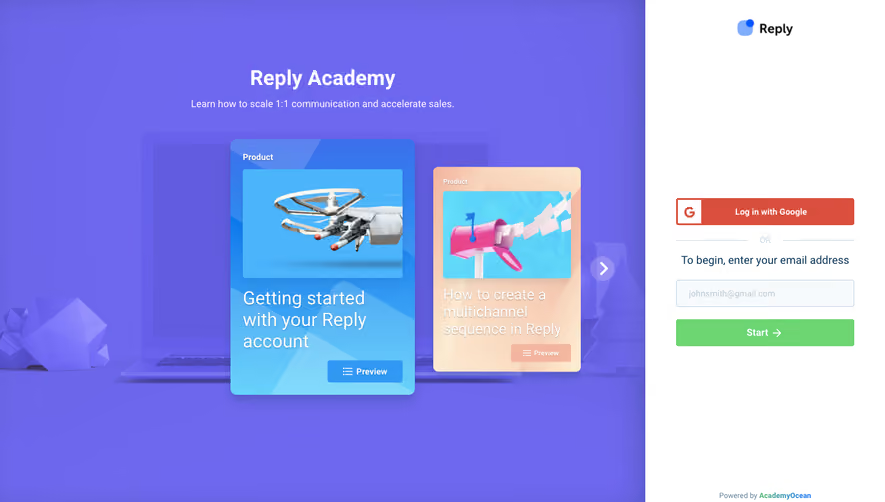

Upgrade to SaaSFrame Pro now to see similar examples.
Monthly
$18 /month
Billed $18 monthly
Browse all screens & flows
Filter and search screens & flows
Search text in screenshots
Access Figma files
Access mobile versions
Join now
Quarterly
$16 /month
Billed $48 quarterly
Browse all screens & flows
Filter and search screens & flows
Search text in screenshots
Access Figma files
Access mobile versions
Join now
Yearly
$15 /month
Billed $180 yearly
Browse all screens & flows
Filter and search screens & flows
Search text in screenshots
Access Figma files
Access mobile versions
Join now