 SaaSFrame
Model Picker
A control to choose which AI model powers a chat, generation or task.




Model Picker: design guide
Short answer
A model picker lets people choose which AI model runs a chat, a generation or a task. Put it where the choice applies, usually in the composer or a configuration panel. Show the active model by name, offer a default that works without expertise, explain trade-offs in a line and keep the choice stable until the person changes it.
In the libraryas of November 2026
- Examples
- 9
- SaaS products
- 7
- Last added
- Nov 2026
Most common inChat 4Playground 3Add & Edit 2Details 1
A model picker is the control that decides which AI model handles a request. It can be a small dropdown inside a chat composer, a field in an assistant's configuration, or a setting on a generation panel. The model affects quality, speed, cost, language support and sometimes what the product can do at all, so the control carries more weight than its size suggests.
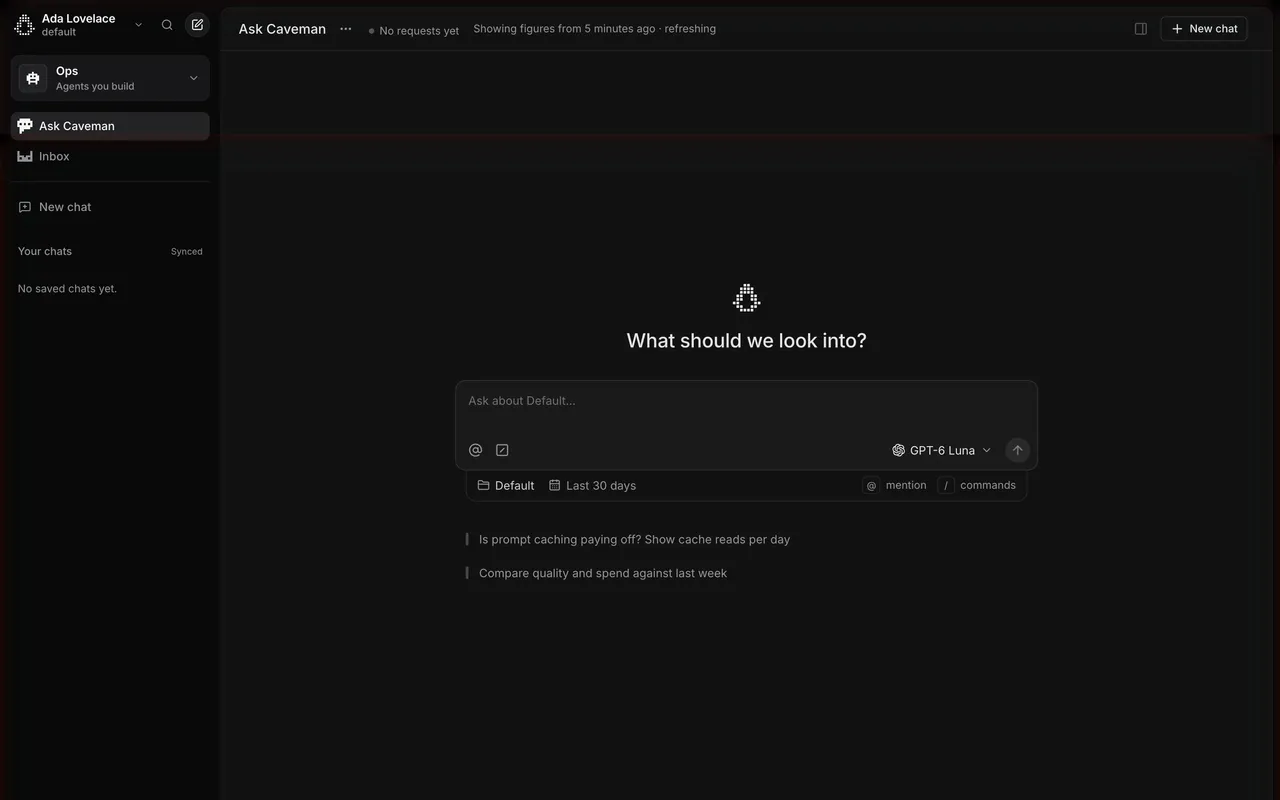
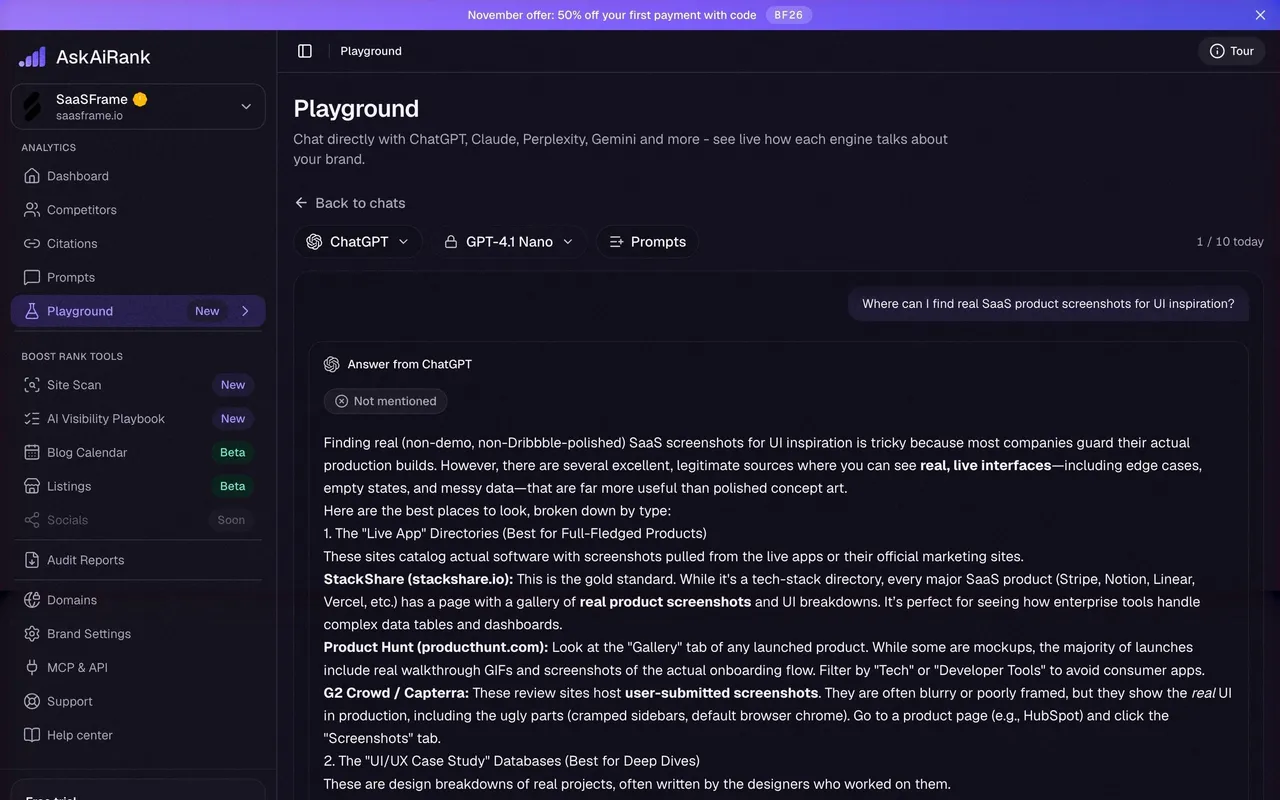
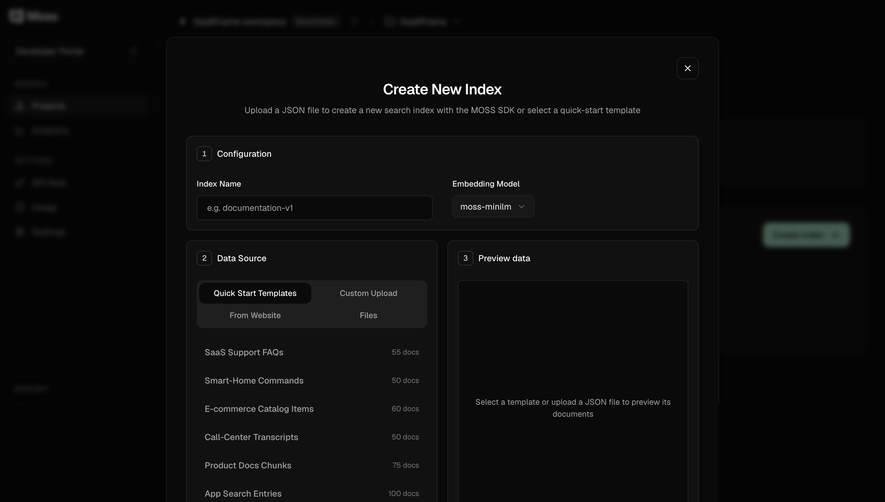
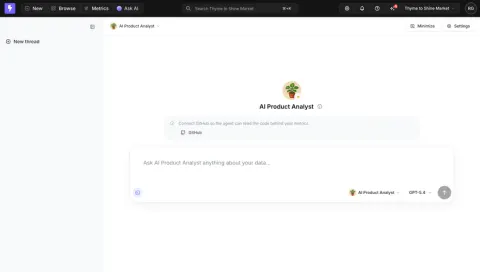
The captured examples show the same decision in very different places: Claude and Lightdash keep it beside the send button, OpenAI and Moss treat it as a configuration field, Hume puts it in a settings column, and AskAiRank uses it to compare engines. The right form depends on how often people change the model and how much the choice matters for the result.
Where should the model picker sit?
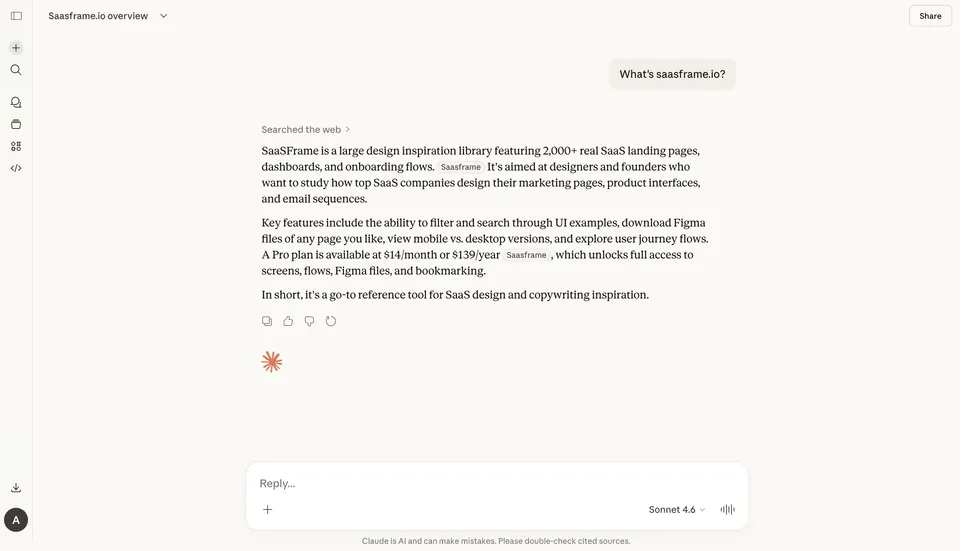
Place the picker next to the thing it changes. When the model applies to the next message, the composer is the natural home. Claude's chat shows the active model as a quiet text label, Sonnet 4.6 with a small chevron, between the attachment button and the voice control. People see it every time they write, but it does not compete with the reply field.
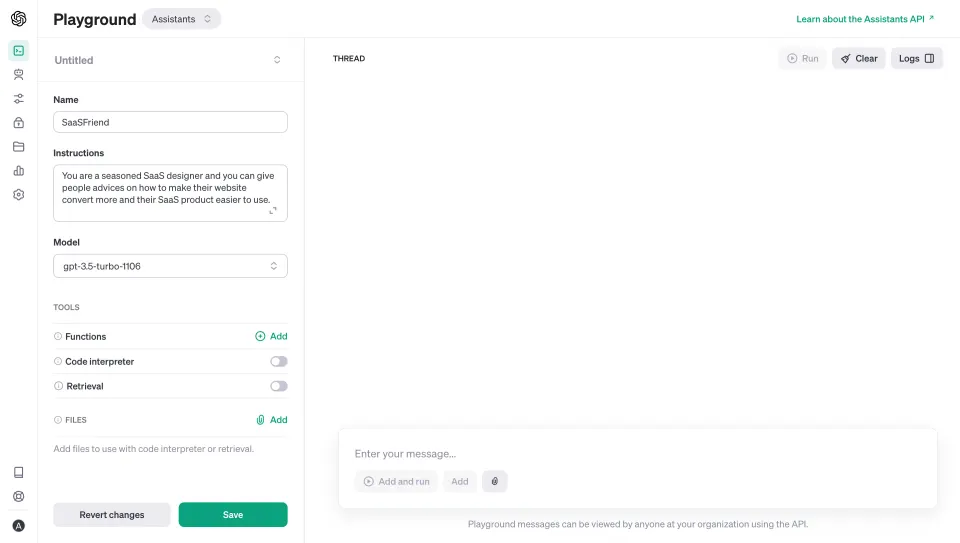
When the model is part of a saved object, such as an assistant, an index or a pipeline, put it in that object's settings. OpenAI's assistant form lists Name, Instructions, then Model as a select showing gpt-3.5-turbo-1106, followed by tools and files. The model is one property among others, and changing it enables Save and Revert changes like any other edit.
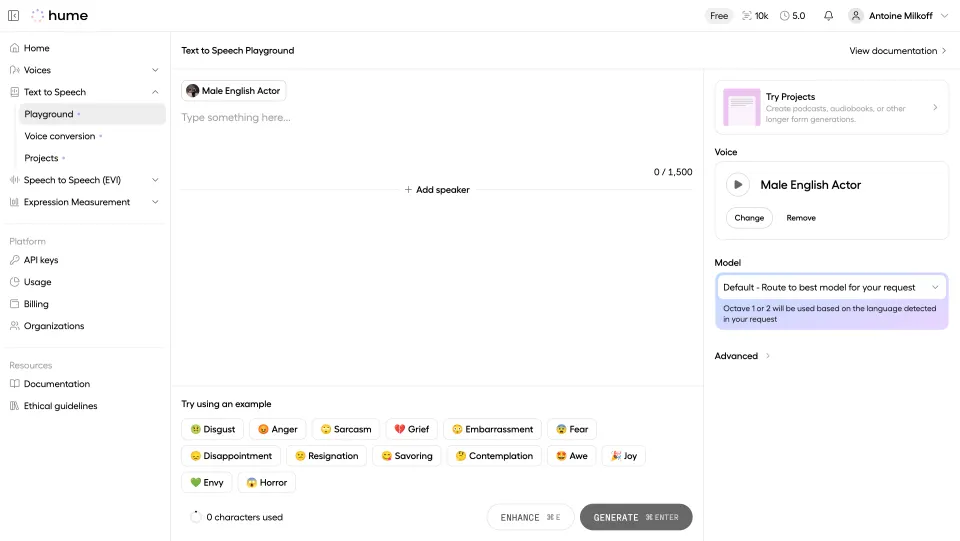
A settings column works when a tool has several generation parameters. Hume's text-to-speech playground keeps Voice and Model in the right panel, beside the text area, so the writing surface stays clean while the parameters remain visible.
How should you name the active model?
Show the model's real name in the closed state. People who care about models recognise names, and people who do not can still notice when something changed. A generic label such as AI or Smart hides the one fact the control exists to communicate.
Decide how precise the name should be for your audience. A developer console can show a dated identifier like gpt-3.5-turbo-1106, because developers need to pin a specific version. A consumer chat can use a family name and version, as Claude does. If you show both, put the friendly name first and the identifier in secondary text inside the menu.
Keep the label short enough to fit in the composer at narrow widths. Truncating the end of a model name often removes the version, which is the part that distinguishes it. Prefer shortening the surrounding text or moving secondary details into the menu.
Offer a default that needs no expertise
Most people should not have to choose. A good default lets them start immediately and leaves the picker for those who have a reason to change it. Hume makes the default explicit: the Model field reads Default - Route to best model for your request, and a tinted note under it explains that Octave 1 or 2 will be used based on the language detected.
If your product routes automatically, say what the routing depends on. Language, input length or task type are understandable criteria. After a response, consider showing which model actually handled it, so people can connect the result to the choice when they compare outputs.
Separate the model from the agent or persona
Products with agents often have two choices that look similar: which assistant answers, and which model powers it. Lightdash shows both in its composer: an agent selector with the AI Product Analyst avatar, then a separate model selector labelled GPT-5.4, both beside the send button.
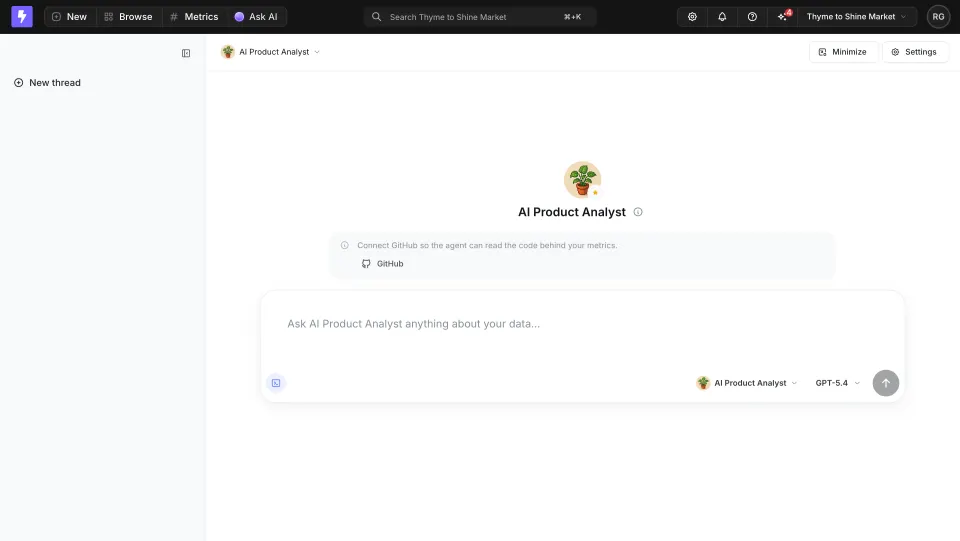
Keep the two visually distinct. An avatar or icon for the agent and plain text for the model helps people understand that one defines behaviour and data access, while the other defines the engine. If changing the model can break an agent's tools or instructions, warn before the change rather than after a failed reply.
Not every model choice is a chat choice
Some models shape stored data rather than a single response. Moss's Create New Index modal asks for an Embedding Model, set to moss-minilm, in the first Configuration panel, before Data Source and Preview data. An embedding model determines how documents are indexed, so it belongs to the setup of the index.
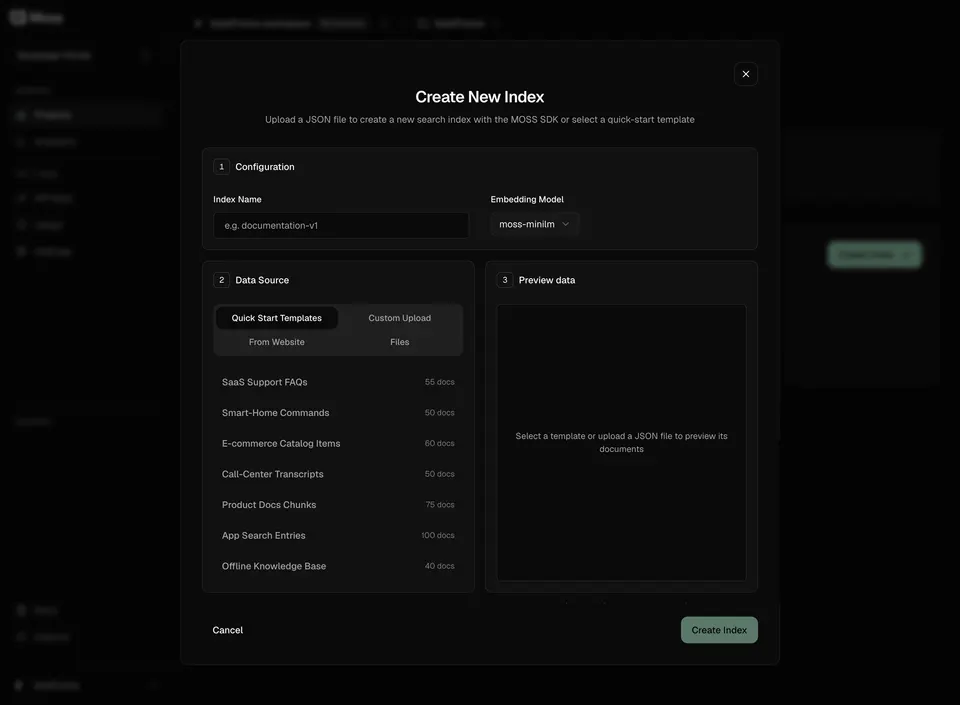
For choices like this, say whether the model can be changed later and what changing it means. If switching requires rebuilding the index or regenerating content, put that consequence next to the field. People make better decisions at creation time when they know which settings are hard to reverse.
Explain trade-offs inside the menu
The closed picker only needs a name. The open menu is where people decide, so give each option a short description of what it is good at: faster responses, deeper reasoning, longer documents, a specific language. One line per model is usually enough; a full comparison table belongs in documentation.
Mark constraints at the option level. If a model is limited to a plan, uses more credits, or is unavailable for the current workspace, show that on the option before selection. A model that silently fails after being chosen teaches people not to trust the control.
Compare engines when comparison is the job
In some products the model is the subject, not a setting. AskAiRank's Playground lets people ask ChatGPT, Claude, Perplexity, Gemini and others how they talk about a brand. Above the conversation, an engine dropdown (ChatGPT) and a model dropdown (GPT-4.1 Nano) sit next to a Prompts shortcut, with a 1 / 10 today counter on the right. The answer is labelled Answer from ChatGPT.

Labelling each answer with its source matters here, because people scroll back and compare. A visible daily limit next to the picker also sets expectations before people spend their messages switching between engines.
Keep the choice stable and scoped
Decide what the selection applies to: the next message, the whole conversation, every new conversation, or a saved object. Then make that scope predictable. A picker that resets to the default after every reply forces people to check it each time; a picker that silently changes the model of a shared assistant can surprise teammates.
Caveman's Ask Caveman screen shows a model picker, GPT-6 Luna, in a composer that also carries scope chips for the project and the time range. Placing these controls together tells people that the model and the context are both set for this question.
When a model is retired or becomes unavailable, keep the conversation readable and explain what will answer next. Do not leave a dead model name in the picker or switch without notice.
Make the picker accessible
Use a real button with a menu or listbox, with an accessible name such as Model: Sonnet 4.6, not only the model name. Options need readable descriptions for assistive technology, and disabled options need a reason. Keyboard users should be able to open the menu from the composer, choose, and return focus to the text field without losing their draft.
Model picker review checklist
- Is the picker next to the request, object or setting it changes?
- Does the closed state show the active model by name?
- Is there a default that works for people who do not want to choose?
- If routing is automatic, is its logic explained in a line?
- Are agent and model choices visually separate?
- Do options state what each model is good at and any plan or credit limits?
- Is the scope of the selection clear and stable?
- Are irreversible model choices flagged at creation time?
- Are answers labelled with their model when comparison matters?
- Does the menu work with a keyboard and keep the draft intact?
Model picker FAQ
Should every AI feature have a model picker?
No. Expose the choice when people have a real reason to change it, such as quality, speed, cost or comparison. Otherwise a good default, or automatic routing, is clearer.
Where should the model picker go in a chat?
Inside or next to the composer, close to the send button, so the choice is visible when people write the message it applies to.
Should you show model version identifiers?
Show them where people need to pin a version, as in developer tools. In consumer products, a family name and version is enough in the closed state, with details in the menu.
What should happen when a model is no longer available?
Explain which model will be used instead, keep past answers readable and update the picker so it never shows an option that cannot run.
Related patterns
See Prompt Input for the composer that usually hosts the picker, AI Chat for the conversation around it, Dropdown Menu for the menu mechanics, Usage Indicator for limits shown next to the choice and Settings & Preferences for default models set at account level.