SaaSFrame
Part of Onboarding and Workspace Setup
Langdock Onboarding Profile
 LangdockCompany-wide AI chat, agents and workflows
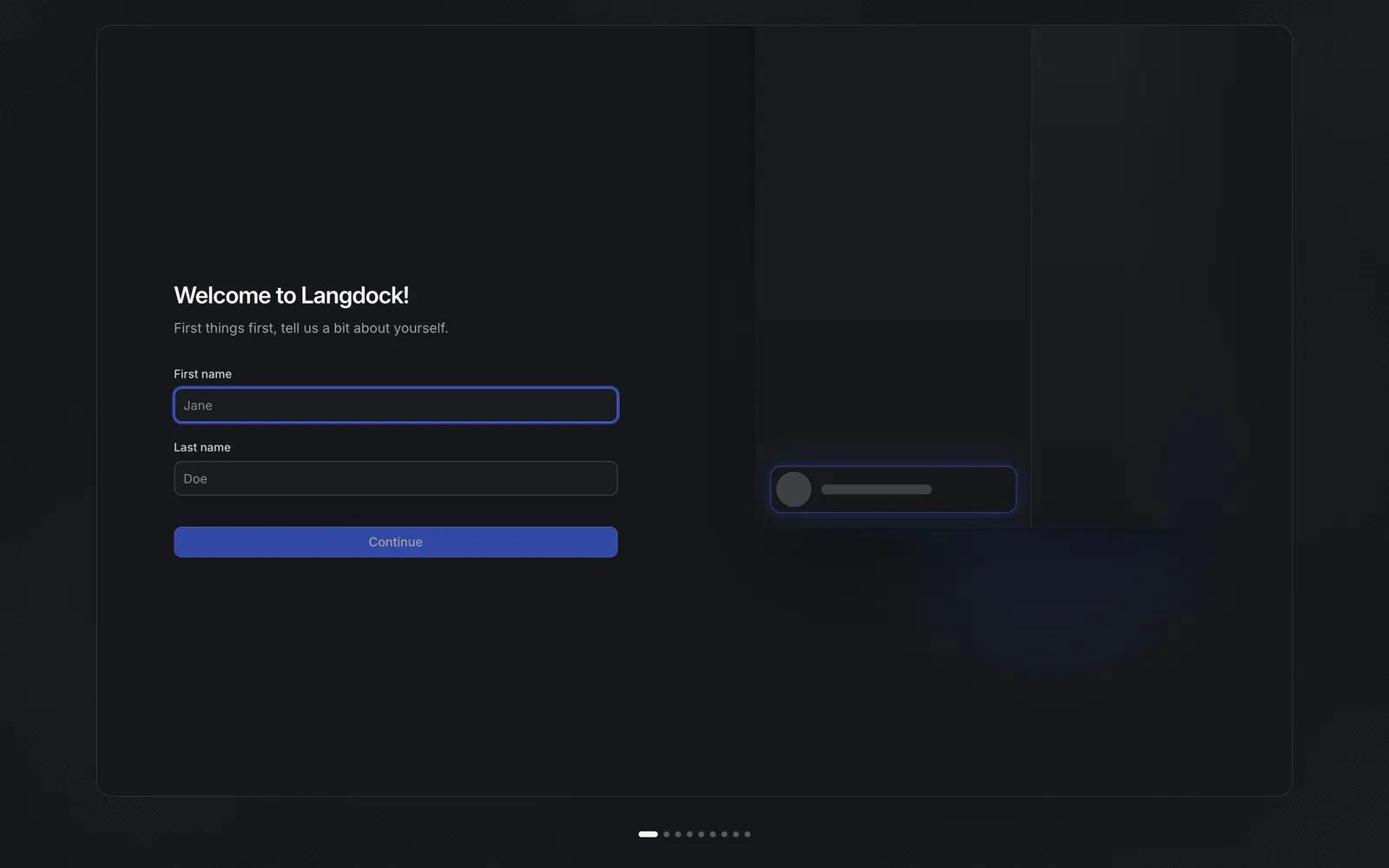
About this screen
A two-field start inside a framed stage
Langdock's onboarding opens on "Welcome to Langdock!" with a single line, "First things first, tell us a bit about yourself.", and only two inputs: first name and last name, prefilled with "Jane" and "Doe" placeholders. A full-width blue "Continue" button closes the form, and the whole step sits in a large rounded frame on a near-black page.
The product assembles itself on the right
The right half of the frame is a dim preview of the app that fills in as you progress. On this first step it only shows a glowing placeholder card where your name will appear, hinting that each answer shapes the workspace you are about to enter.
Progress told with dots
Instead of a numbered stepper, a row of small dots under the frame marks the position in the setup, with the active step drawn as a wider pill. The step carries no logo, navigation or skip link, so the only action is to type a name.