SaaSFrame
Part of Onboarding and Workspace Setup
Langdock Onboarding Job Function
 LangdockCompany-wide AI chat, agents and workflows
About this screen
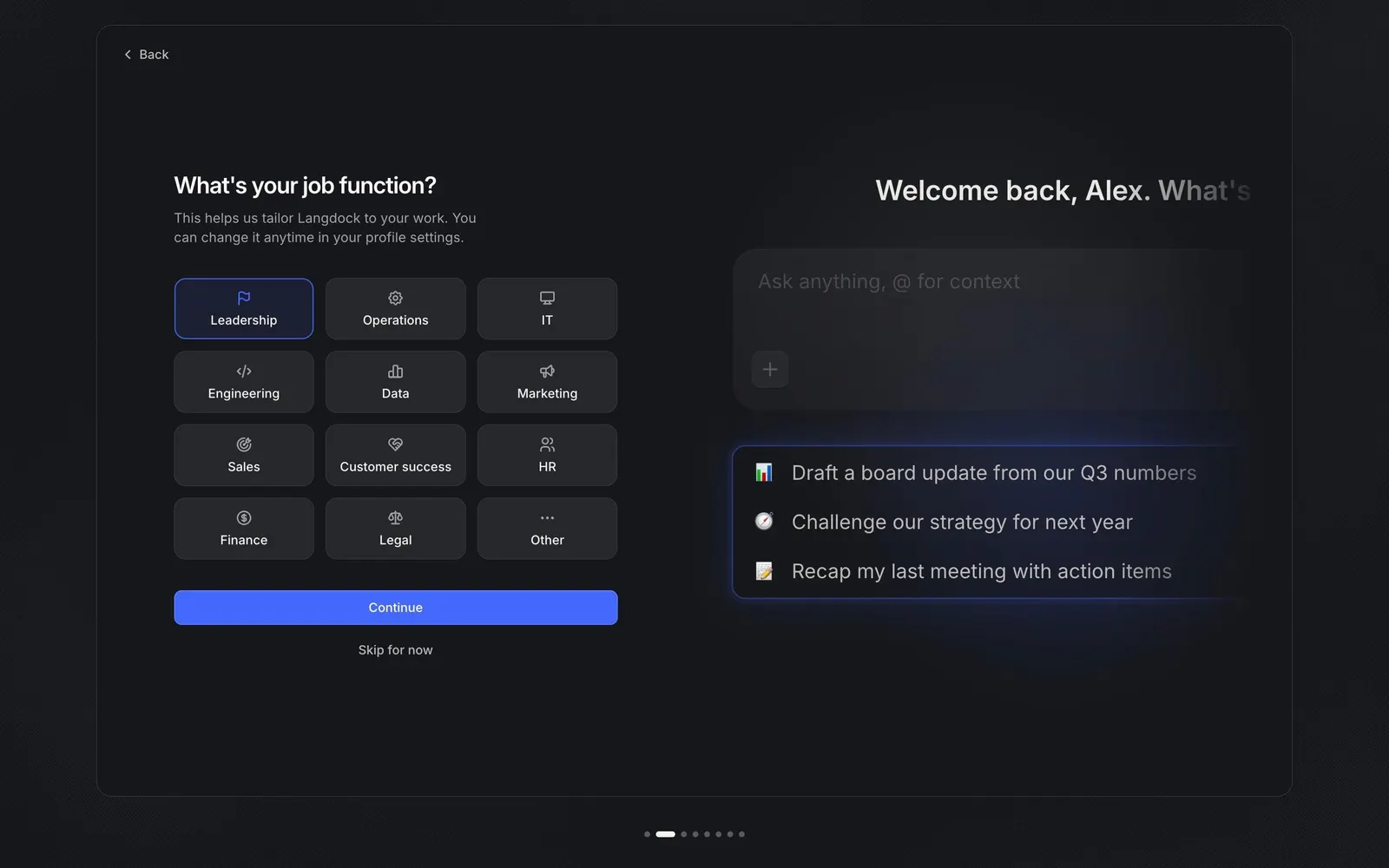
Twelve roles as a tile grid
The "What's your job function?" step of Langdock's onboarding replaces a dropdown with a 3-column grid of twelve tiles, from "Leadership" and "Operations" to "Legal" and "Other", each with a small line icon above its label. The selected tile gets a blue outline and tinted fill, and the copy notes "You can change it anytime in your profile settings."
The answer changes the preview
On the right, the preview now greets the user by first name with "What's next?" above a chat input and three suggested prompts tailored to the chosen role, such as "Draft a board update from our Q3 numbers". The suggestions sit in a card with a blue glow, showing what the answer unlocks.
Optional by design
A blue "Continue" button is paired with a plain "Skip for now" link, and a "Back" link sits in the frame's top-left corner, so the question never blocks the setup.