SaaSFrame
Part of Try the Voice APIs
Deepgram Speech-to-Text Playground
 DeepgramVoice AI APIs for speech, TTS and agents
About this screen
Settings left, transcript right
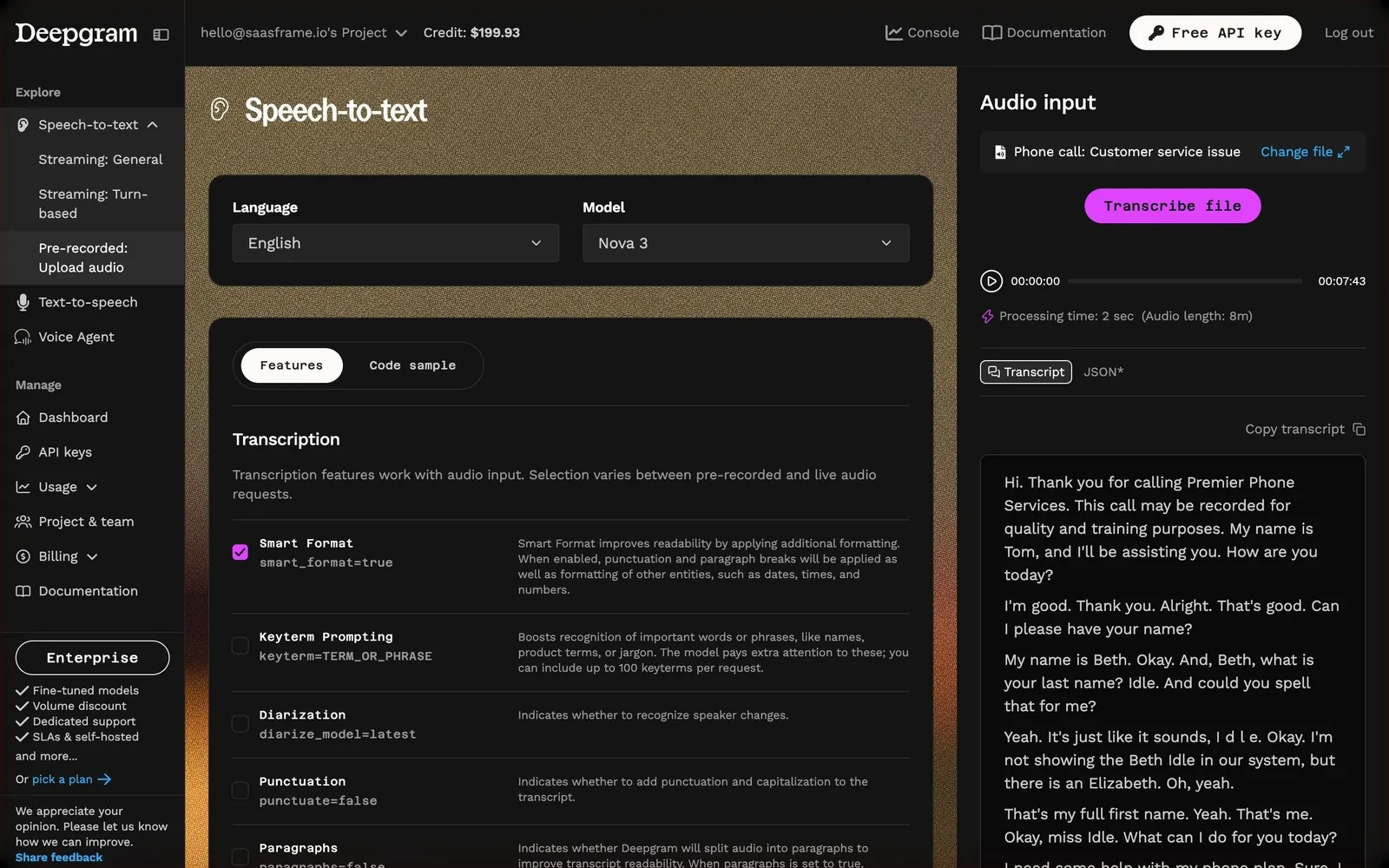
Deepgram's speech-to-text playground places language (English) and model (Nova 3) selects at the top of a dark panel over a warm, grainy brown background, followed by "Features" and "Code sample" tabs. The right column, "Audio input", holds the chosen sample "Phone call: Customer service issue", "Change file" and a magenta "Transcribe file" button.
Every option shows its API parameter
Under "Transcription", each feature row has a checkbox, a name with its parameter in mono ("smart_format=true", "keyterm=TERM_OR_PHRASE", "diarize_model=latest") and a grey explanation, so the form doubles as API documentation.
The result in context
After transcription, an audio player shows 07:43 of audio, "Processing time: 2 sec", Transcript and JSON tabs, "Copy transcript" and the formatted conversation in paragraphs. The sidebar expands Speech-to-text into Streaming: General, Streaming: Turn-based and Pre-recorded: Upload audio.