SaaSFrame

About this screen
Keys, credits and plan before anything else
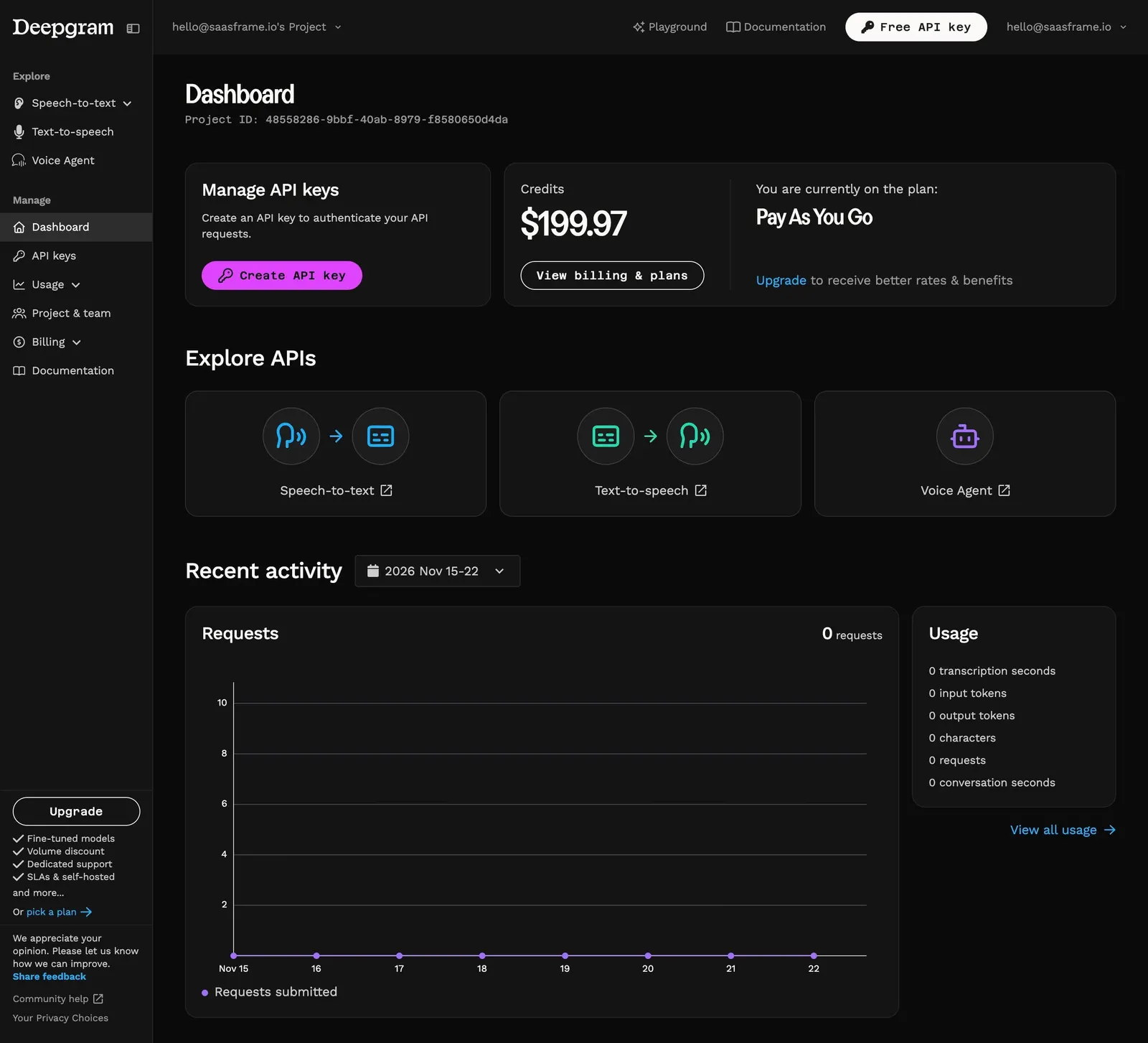
Deepgram's console dashboard opens on "Dashboard" with the project ID in mono under it. The first row splits into two dark cards: "Manage API keys" with a magenta "Create API key" button, and a credits card showing $199.97 next to "You are currently on the plan: Pay As You Go", with an outlined "View billing & plans" pill and an "Upgrade" link.
The three APIs as visual tiles
"Explore APIs" lays out three equal cards with icon pairs joined by arrows: speech to text (waveform to transcript), text to speech (transcript to waveform) and Voice Agent (a robot icon), each with an external-link label.
Activity at a glance
"Recent activity" has a date-range select, a requests line chart over the past week and a "Usage" card listing transcription seconds, input and output tokens, characters, requests and conversation seconds, with "View all usage". The sidebar splits Explore and Manage and ends with an outlined "Upgrade" pill and its benefits.