SaaSFrame
Part of First Steps in the Playground
Cartesia Text-to-Speech Playground
 CartesiaReal-time voice AI models for developers
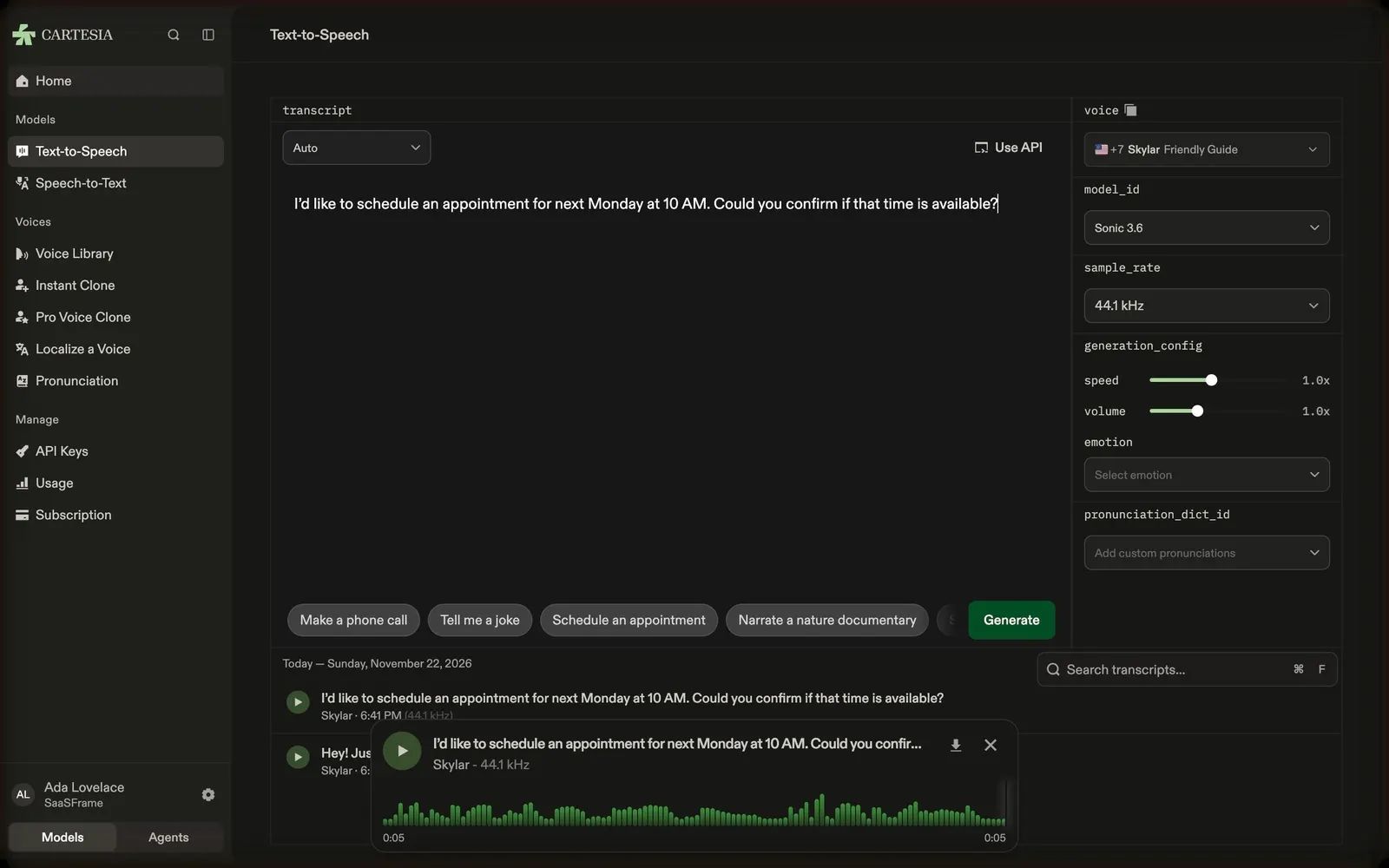
About this screen
A text editor with API parameters beside it
Cartesia's text-to-speech playground has a large "transcript" editor with a language select ("Auto") and "Use API" on top, here filled with "I'd like to schedule an appointment for next Monday at 10 AM…". The right panel names each setting by its API field: voice, model_id (Sonic 3.6), sample_rate (44.1 kHz), generation_config with speed and volume sliders, emotion and pronunciation_dict_id.
Example prompts as chips
Under the editor, chips such as "Make a phone call", "Tell me a joke", "Schedule an appointment" and "Narrate a nature documentary" fill the script, next to a green "Generate" button.
Playback and history
A floating player shows the generated clip with the transcript, voice and sample rate, a green waveform, download and close actions; below, a dated history lists past generations with a search field.