SaaSFrame

About this screen
Sample SQL ready to run
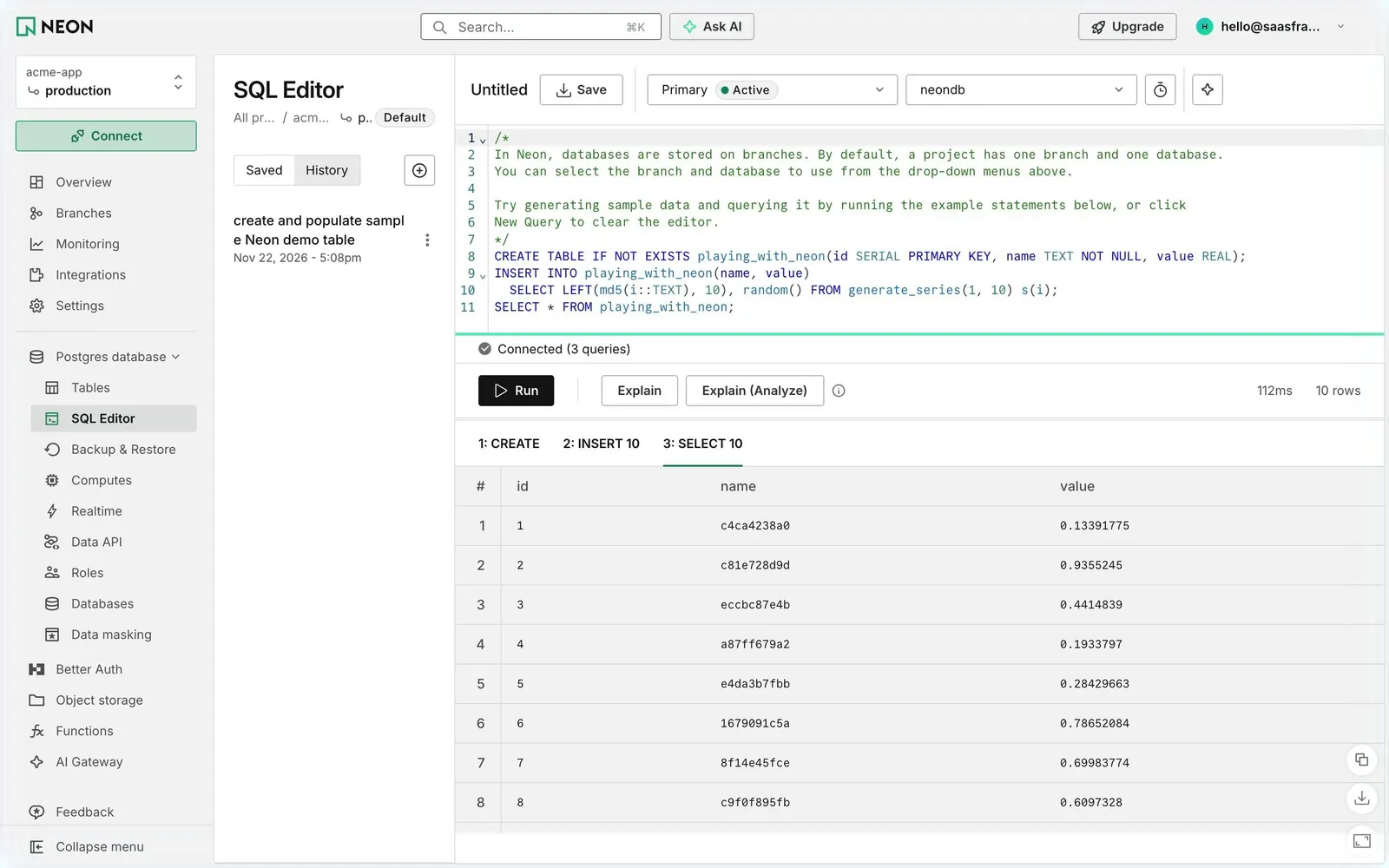
Neon's SQL Editor opens with commented statements that create the playing_with_neon table, insert ten random rows and select them, explaining that databases live on branches. A toolbar picks the Primary compute (Active) and the neondb database, with Save, a timer and an AI button.
Results per statement
Under "Connected (3 queries)", a black "Run" button sits next to "Explain" and "Explain (Analyze)", with 112ms and 10 rows on the right. Tabs "1: CREATE", "2: INSERT 10" and "3: SELECT 10" switch between outputs; the grid shows id, name and value with copy, download and expand buttons.
History in its own column
A middle column toggles Saved and History and lists "create and populate sample Neon demo table" with its date. The project rail expands Postgres database into Tables, SQL Editor, Backup & Restore, Computes, Realtime, Data API, Roles, Databases and Data masking.