SaaSFrame
Part of Gravity Recipe Workflow
MindCloud Gravity Recipe Workflow
 MindCloudIntegrations and workflow automation
About this screen
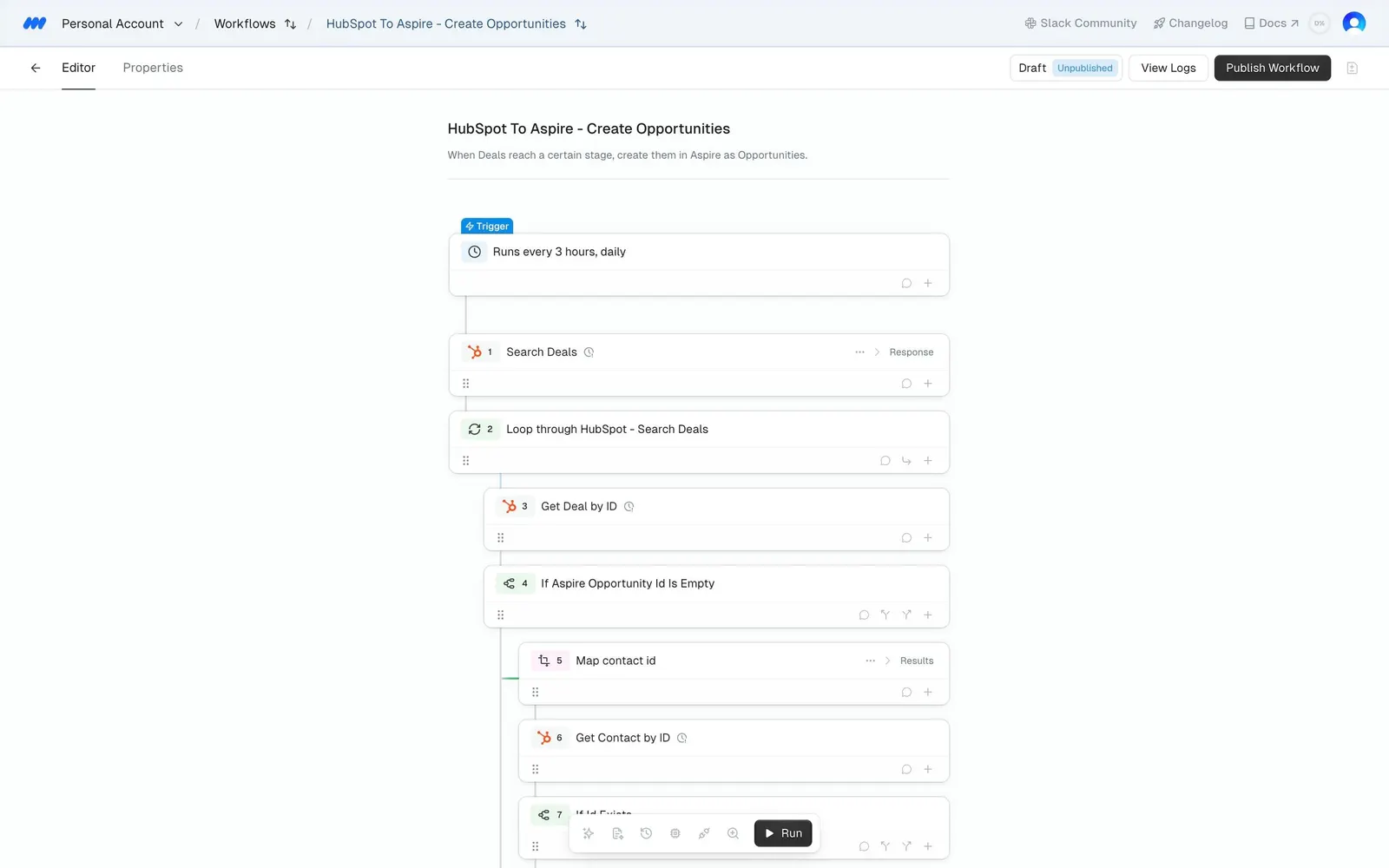
Recipe editor, nothing selected
The "HubSpot To Aspire - Create Opportunities" workflow opens in the "Editor" tab with its title and one-line description centred and no side panel on the right.
First steps of the list
A blue "Trigger" tag ("Runs every 3 hours, daily") heads numbered cards: "Search Deals", "Loop through HubSpot - Search Deals", "Get Deal by ID" and "If Aspire Opportunity Id is Empty", with "Map contact id" and "Get Contact by ID" indented inside the branch.
Header and toolbar
"Draft", an "Unpublished" pill, "View Logs" and a dark "Publish Workflow" button sit top right; a small icon toolbar with a dark chip floats at the bottom centre.