SaaSFrame
Part of Workspace Administration
Langdock Security Settings
 LangdockCompany-wide AI chat, agents and workflows
About this screen
Identity settings in one long page
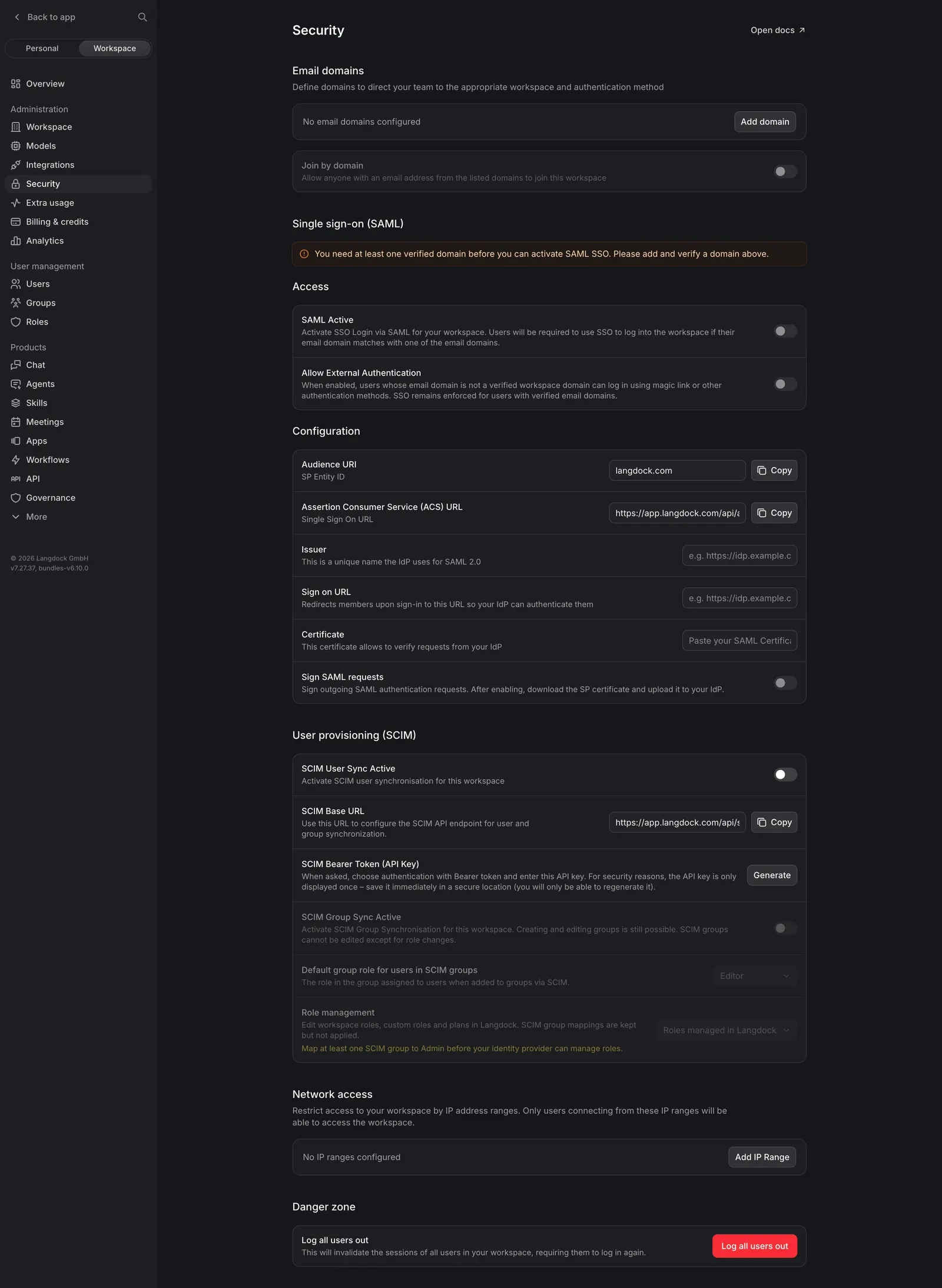
Langdock's Security settings cover "Email domains", "Single sign-on (SAML)", "Access", "Configuration", "User provisioning (SCIM)", "Network access" and a "Danger zone" on a single scrolling page. Each section is a card of rows with a label, a gray explanation and a control on the right.
Dependencies stated inline
A red warning bar explains that "You need at least one verified domain before you can activate SAML SSO", and the SAML and SCIM toggles stay off until then. Technical values such as the Audience URI and ACS URL are shown in read-only fields with "Copy" buttons.
A clear danger zone
The page ends with "Log all users out", explained in one line and triggered by a red button, separated from the rest of the configuration.