SaaSFrame
Part of Onboarding and Workspace Setup
Langdock Onboarding App Picker
 LangdockCompany-wide AI chat, agents and workflows
About this screen
Tools grouped by job
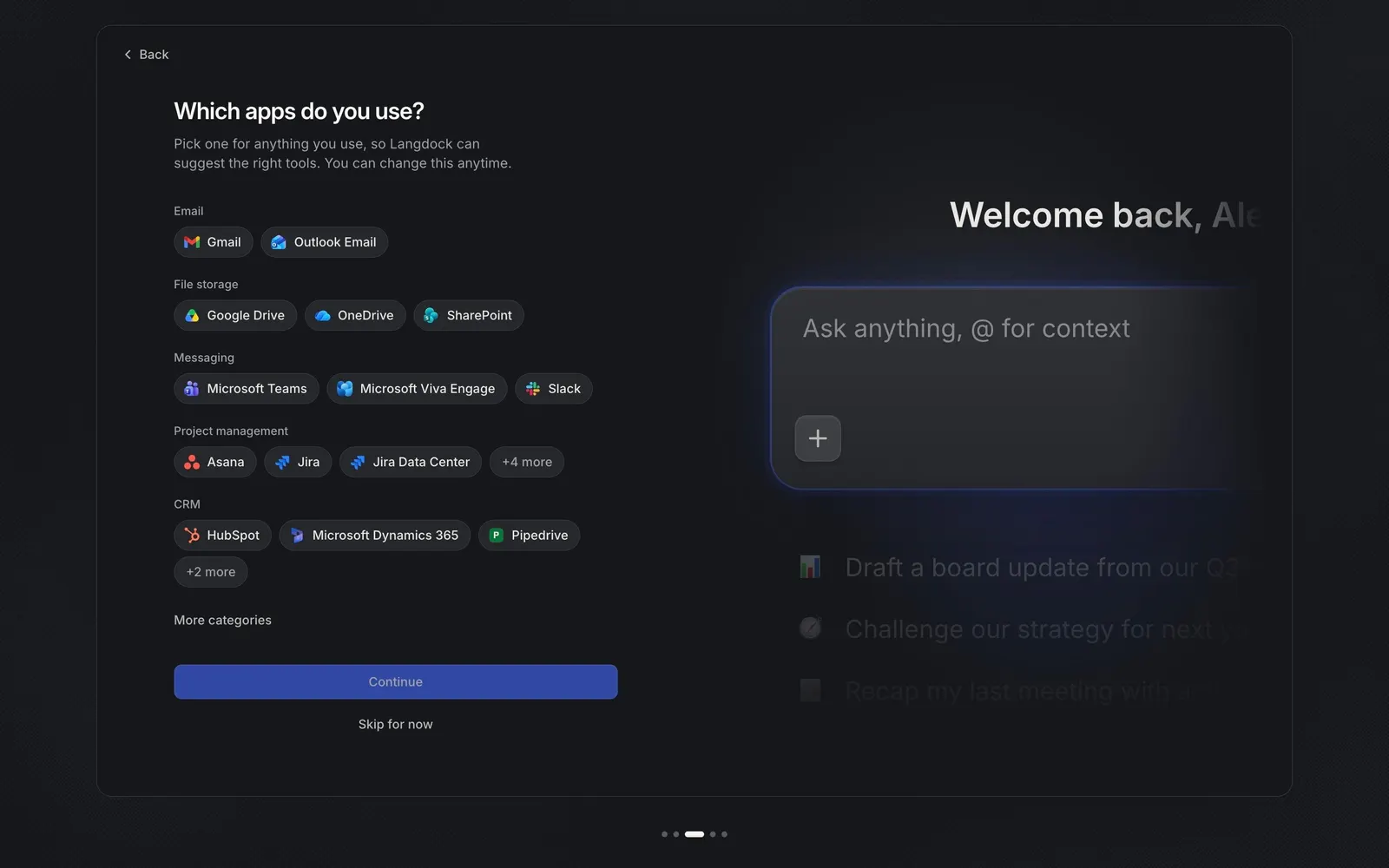
"Which apps do you use?" lets users pick their tools as chips grouped under small headings: Email, File storage, Messaging, Project management and CRM. Each chip pairs the app's logo with its name, such as "Gmail", "SharePoint" or "HubSpot", and longer groups end in a "+4 more" chip, with "More categories" below.
Picking is not connecting
The subline explains the intent: "Pick one for anything you use, so Langdock can suggest the right tools." Selecting chips only records preferences; connecting accounts happens on the next step, which keeps this screen fast and low-risk.
Chat stays in view
The right side shows the chat input "Ask anything, @ for context" under a cropped "Welcome back" greeting, with faded prompt suggestions beneath, keeping the destination visible while the user configures it.