 SaaSFrame
Agent Progress
An AI agent visibly working through steps, tool calls or searches on a multi-step task.



Index of all 5 Agent Progress examples
Agent Progress: design guide
Short answer
Agent progress shows what an AI agent is doing while it works through a multi-step task: thinking, tool calls, searches, subtasks. Summarise each step in a short past-tense line, collapse details by default, show what changed and how long it took, pause clearly when the agent needs input and report what it could not do.
In the libraryas of November 2026
- Examples
- 5
- SaaS products
- 4
- Last added
- Nov 2026
Most common inChat 2Add & Edit 1Details 1Empty State 1Playground 1
Agent progress is the visible trace of an AI agent working: the steps it takes, the tools it calls, the sources it reads and the questions it needs answered. A single chat reply can hide its work behind a spinner. An agent that searches, edits files or tests an app for several minutes cannot, because people need to know whether it is on track, what it has touched and when to step in.
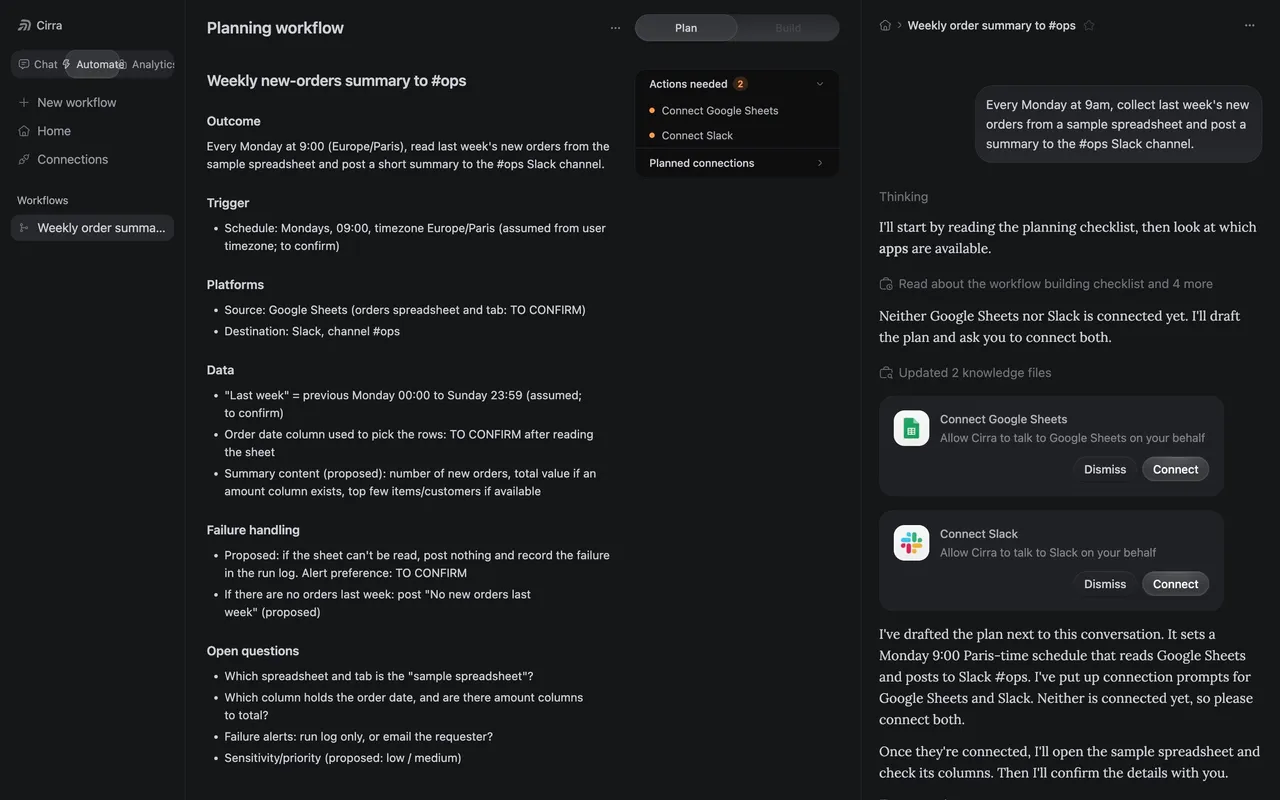
The captures range from a few seconds of reasoning in a Voiceflow test chat to an eight-minute run with subagents in Composal. In between, Unabyss collapses tool calls into a single line, MindCloud's Cirra drafts a plan and asks for connections, and Voiceflow's Atlas copilot narrates changes to an agent's configuration.
What should an agent show while it works?
Show enough to answer three questions: what is it doing now, what has it done, and does it need me? Everything else can be available on demand. A full log of every token and tool payload belongs in a debug view, not in the main conversation.
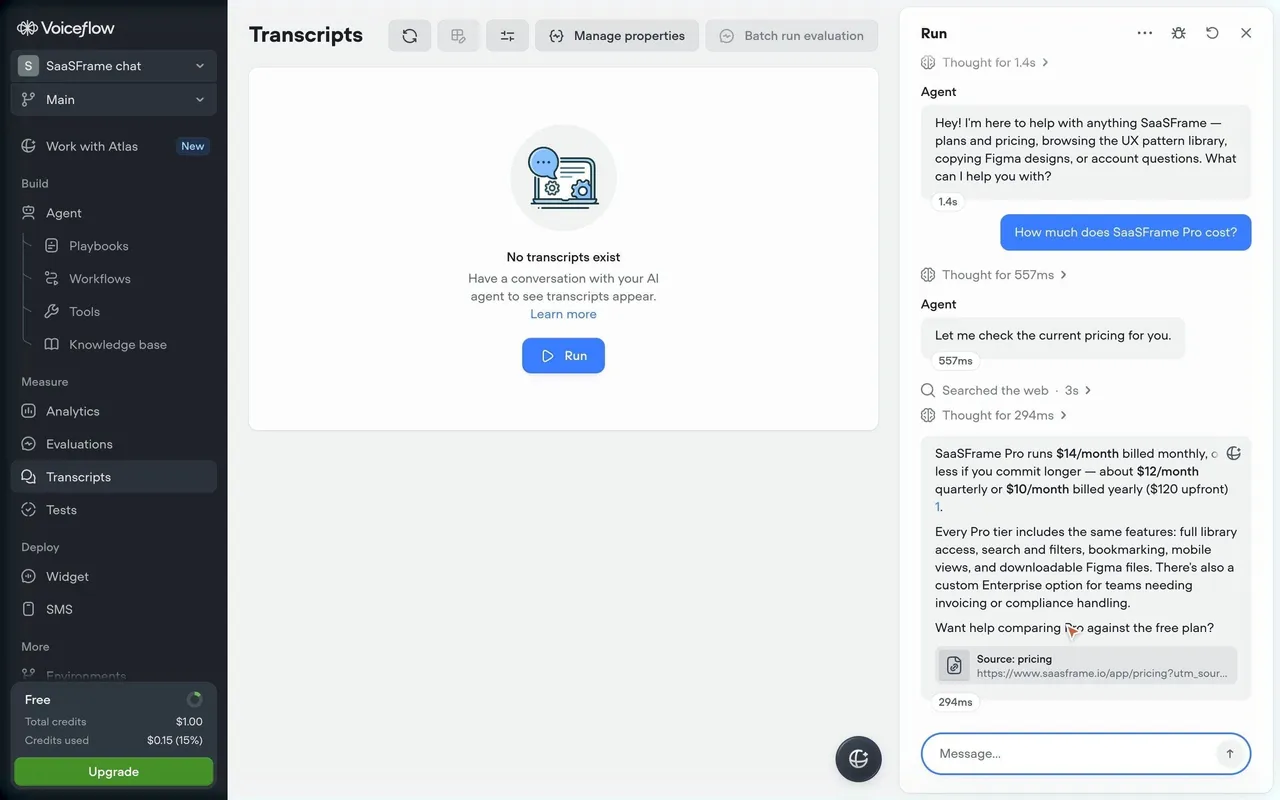
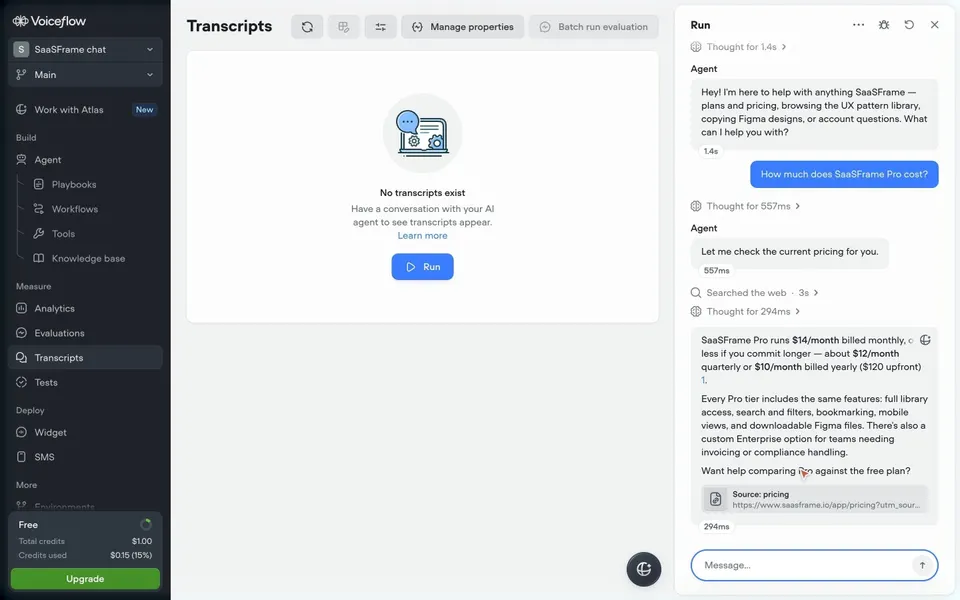
Voiceflow's test run shows the compact end of the spectrum. Between the question and the answer, light gray lines read Thought for 557ms, Let me check the current pricing for you, Searched the web · 3s and Thought for 294ms. The answer ends with a source card naming the pricing page and its URL, and each message shows its own response time.
Write steps as short past-tense summaries
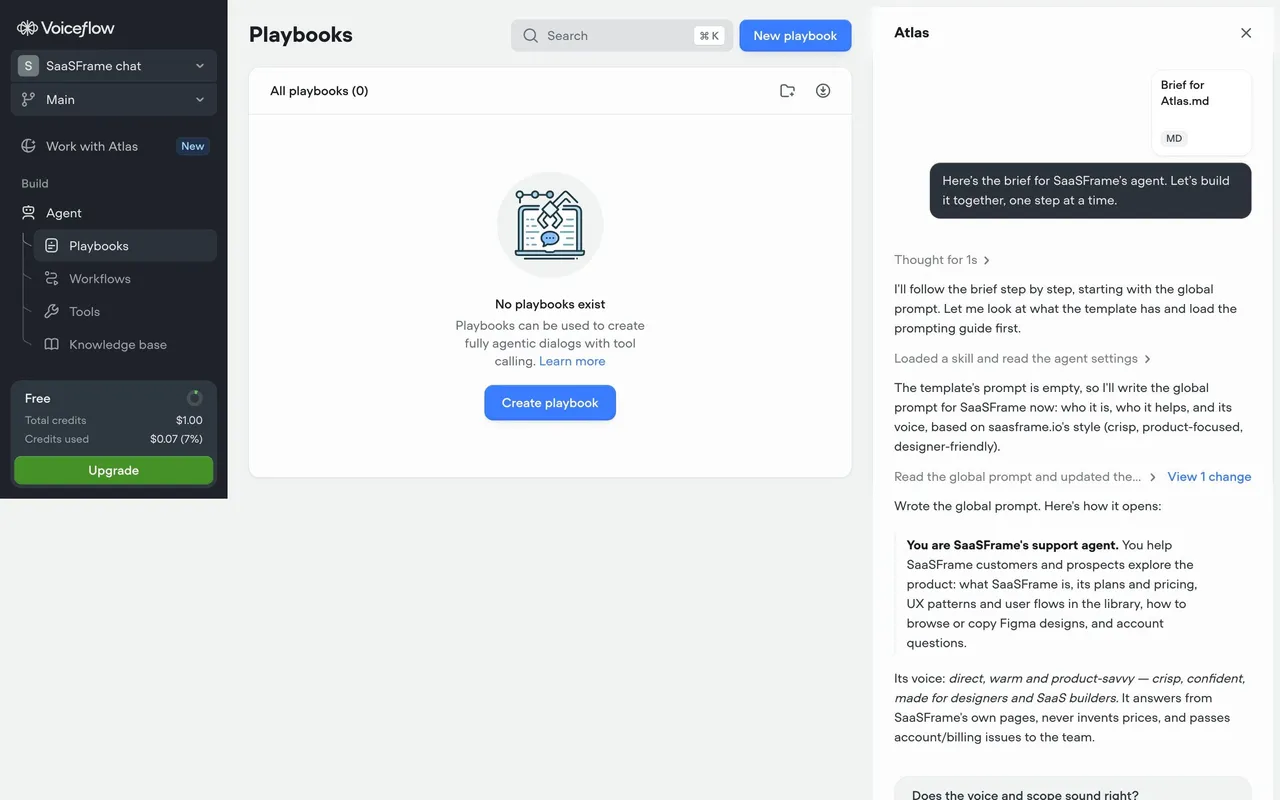
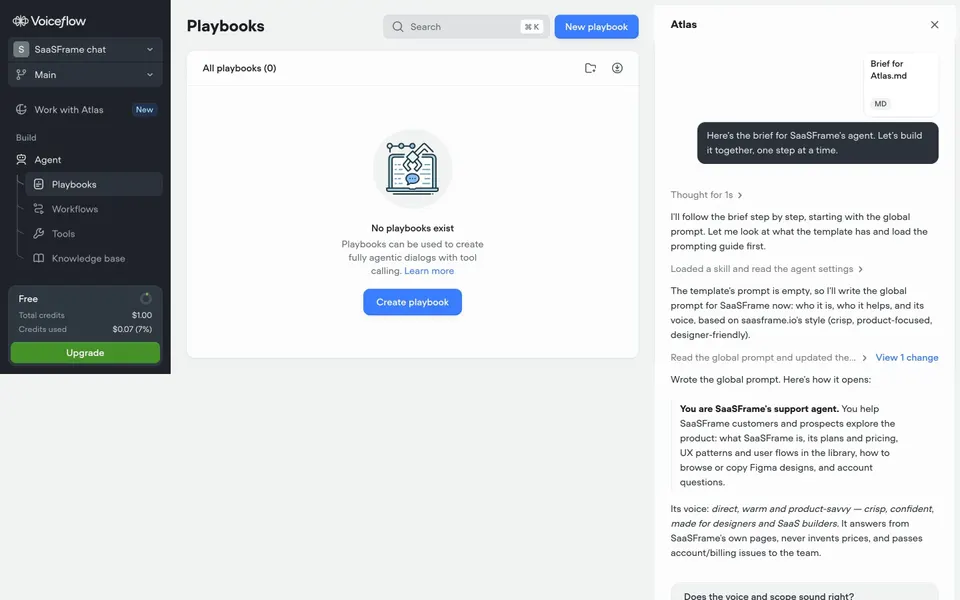
Describe each step in plain verbs and objects: Searched the web, Read the global prompt, Updated 2 knowledge files. Past tense marks completed work; present tense (Searching…) marks the current step. Tool names and function signatures are rarely useful to the reader unless the product is for developers.
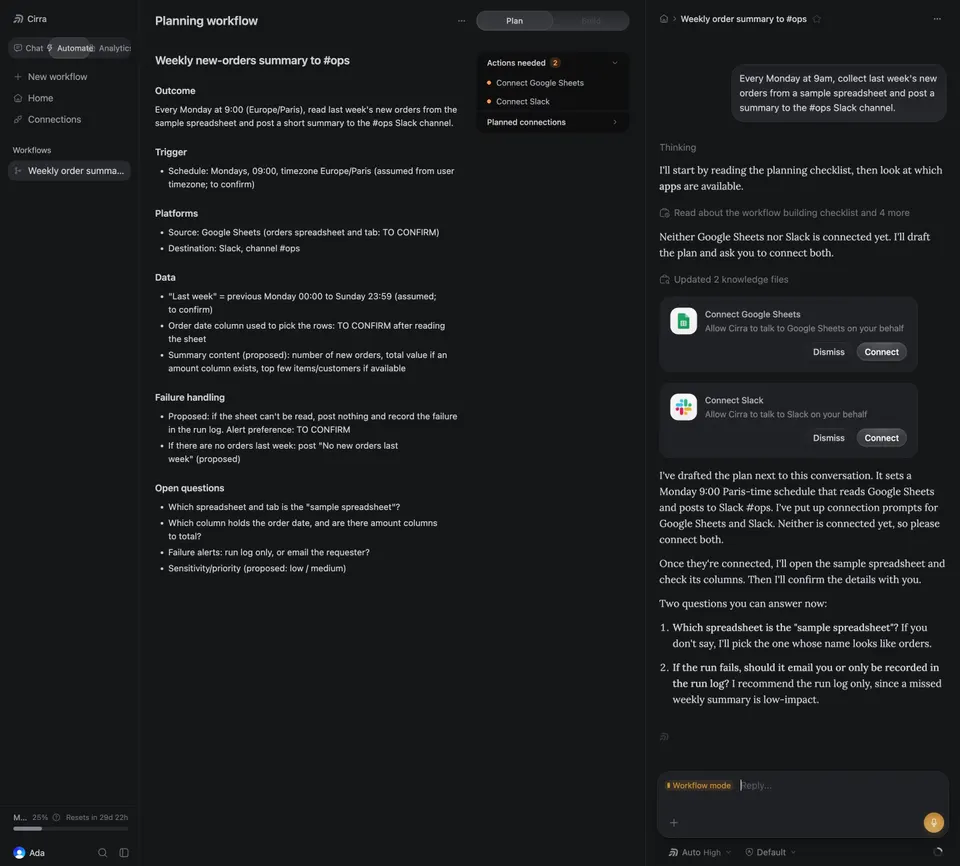
Group similar steps. Cirra writes Read about the workflow building checklist and 4 more instead of five separate lines, and Updated 2 knowledge files instead of listing each file. Grouping keeps the trace scannable while the details remain one click away.
Collapse tool calls by default
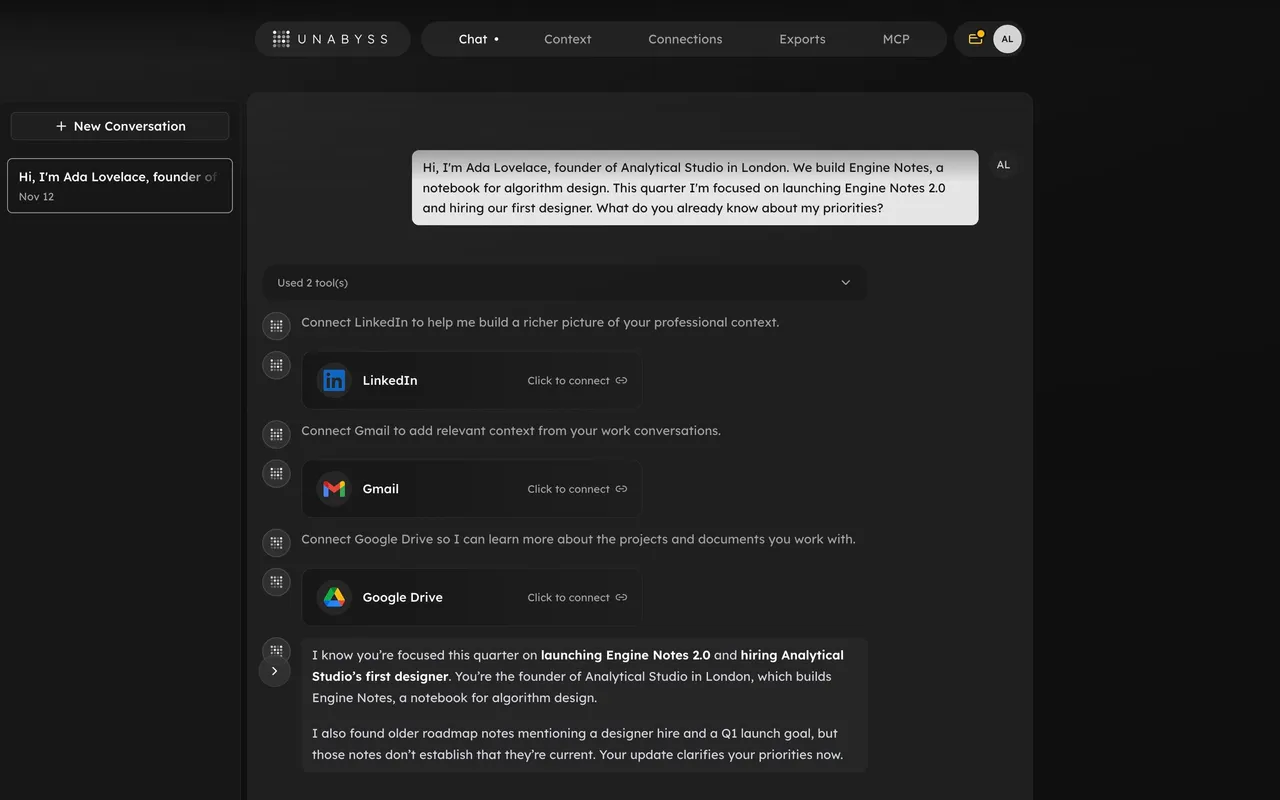
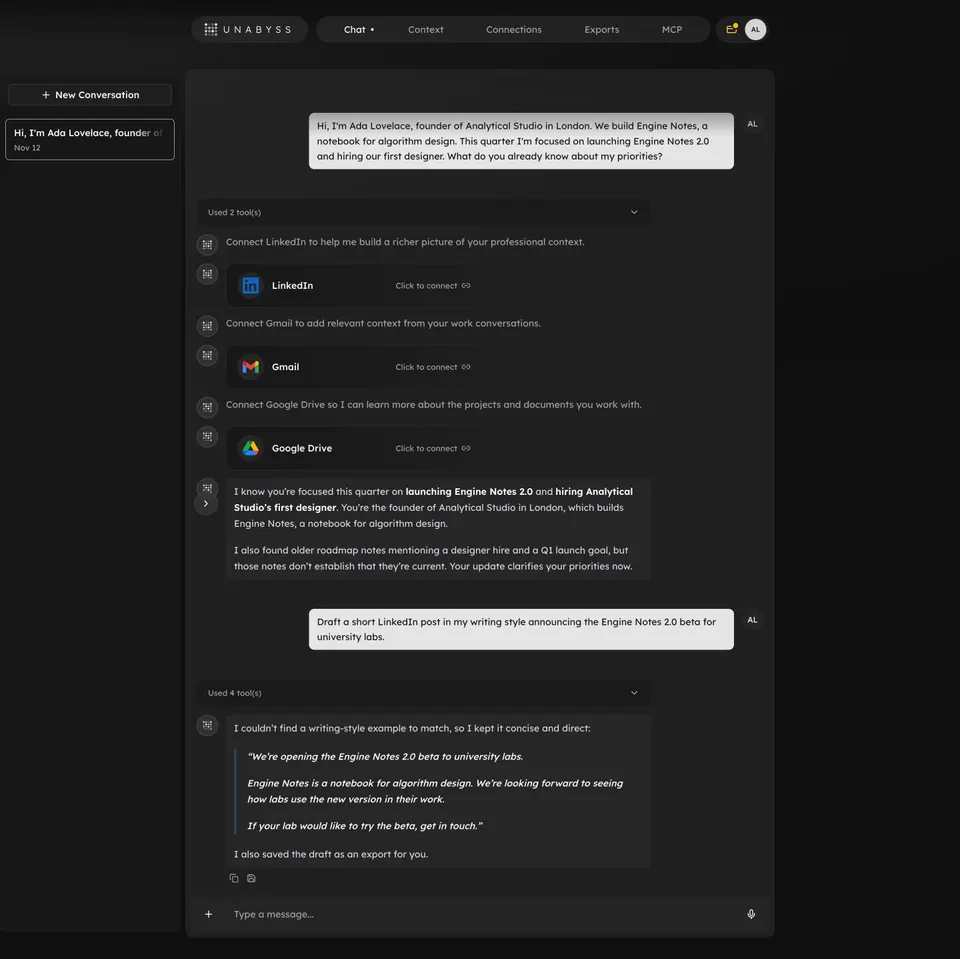
Most people want the answer, not the trace. A collapsed summary keeps the conversation readable and still signals that work happened. Unabyss puts a full-width bar reading Used 2 tool(s), with a chevron, above each answer, and Used 4 tool(s) above the next one. The tools are there for anyone who wants to check, and invisible to anyone who does not.
Keep the collapsed label informative. A count of tools is a minimum; a short phrase such as Searched 3 sources or Read 5 notes says more. When a step failed, show it in the collapsed state so people do not have to expand every bar to find problems.
Show what changed, not only what was read
Reading is harmless; writing is not. When an agent changes something, the trace should make the change visible and reviewable. In Voiceflow's Atlas panel, the line Read the global prompt and updated the… ends with a blue View 1 change link, and the next message quotes how the new prompt opens.
Unabyss does the same in prose at the end of an answer: I also saved the draft as an export for you. Any side effect, such as a file saved, a record created or a message sent, deserves a line that names it and, where possible, a link to it.
Pause clearly when the agent needs input
Agents get blocked by missing access, ambiguous instructions or decisions that are not theirs to make. Make the pause unmistakable and put the action in the trace. Cirra shows connection cards, Connect Google Sheets and Connect Slack, each with Dismiss and Connect buttons, then explains that it drafted the plan and lists Two questions you can answer now. Its plan document marks assumptions as TO CONFIRM.
Unabyss asks for connectors inline too, with LinkedIn, Gmail and Google Drive cards and a Click to connect link on each. Atlas ends with a direct question, Does the voice and scope sound right? A pause should say what the agent will do once it gets an answer, and what it will assume if the person does not reply.
Structure long runs as a tree of tasks
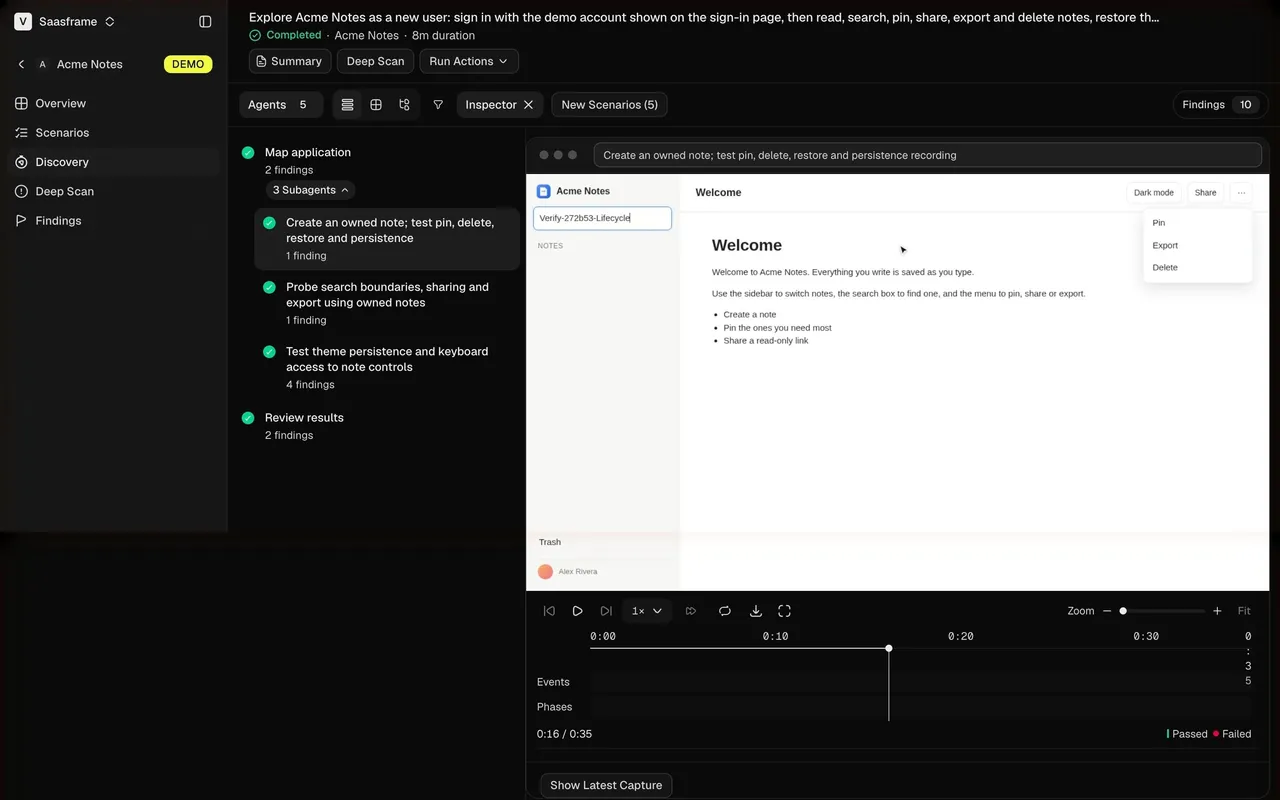
A run that lasts minutes and splits into subtasks needs more structure than a list of lines. Composal's discovery run states the goal at the top, then Completed · Acme Notes · 8m duration. On the left, a tree shows Map application with 2 findings, an expanded 3 Subagents group where each subagent's task has its own check mark and findings count, then Review results. Toolbar counters show Agents 5 and Findings 10.
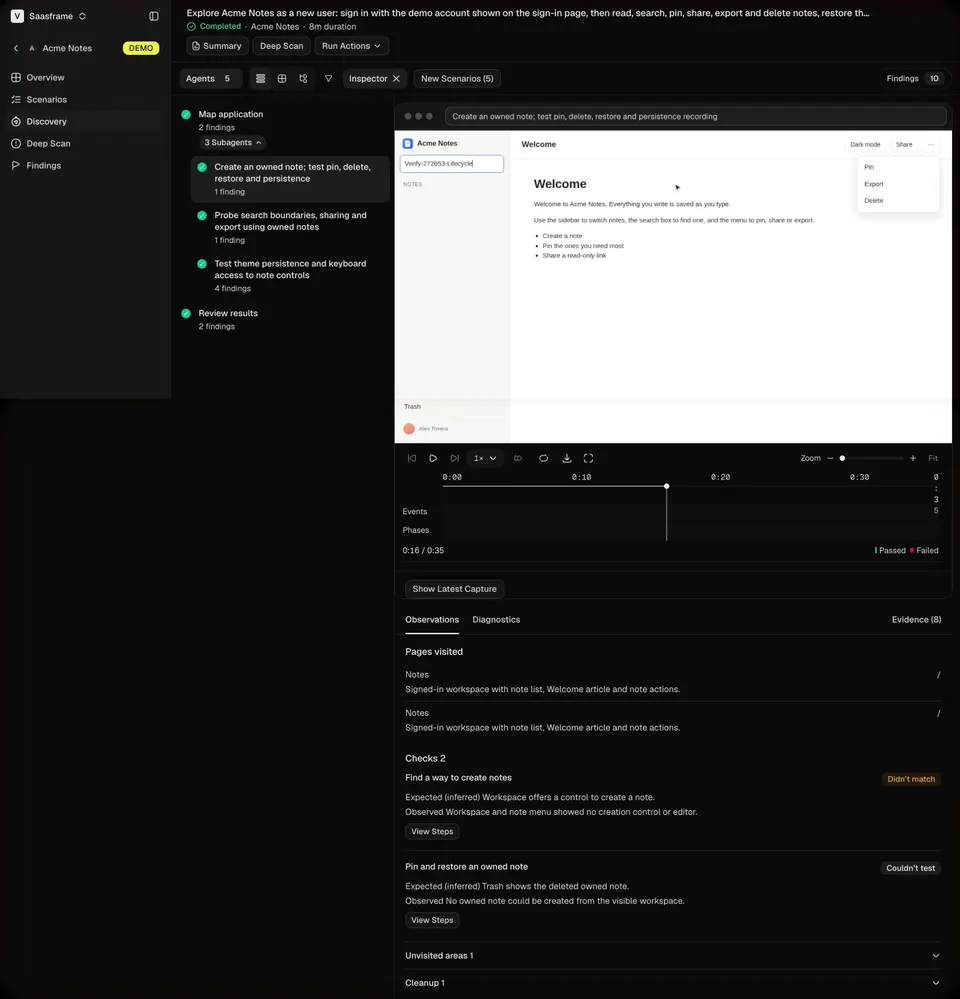
Selecting a task shows its evidence: a recording of the app with a timeline, Events and Phases tracks, and Passed and Failed markers, then Observations with pages visited and checks. Status, duration and outcome per task let people judge a long run at a glance and dig into one branch without reading the rest.
Report what the agent could not do
An agent that only reports success is hard to trust. Make gaps explicit. Composal's checks carry tags such as Didn't match and Couldn't test, with Expected (inferred) and Observed lines for each, and collapsible Unvisited areas and Cleanup sections. Unabyss writes I couldn't find a writing-style example to match, so I kept it concise and direct, and flags older roadmap notes as possibly outdated.
Put these statements next to the result they qualify, in plain language. A list of caveats hidden in an expanded log will not be read.
Show timing honestly
Durations help people calibrate. Voiceflow shows response times under each message and durations on steps; Composal shows the run's total duration. For long tasks, an elapsed time is more reliable than an estimated time remaining, which agents rarely know. If you do estimate, update it as the run progresses.
Let people stop a run. The captured screens show finished or paused states, so they do not show a stop control, but any agent that can run for more than a few seconds needs one, along with a clear account of what was done before it stopped.
Make progress accessible
Announce meaningful state changes, such as started, waiting for input, finished or failed, through a polite live region. Do not announce every step or streamed token. Collapsible step groups need proper button semantics and an expanded state. Status should never rely on colour alone: Composal pairs green checks with text labels, which is the right default.
Agent progress review checklist
- Can people tell what the agent is doing now and what it has done?
- Are steps short past-tense summaries, grouped when similar?
- Are tool details collapsed by default and available on demand?
- Are failed steps visible without expanding everything?
- Is every change the agent made named and linked?
- When blocked, does the agent show the action needed and its assumption?
- Do long runs show tasks with status, duration and outcome?
- Does the result state what the agent could not do or verify?
- Can people stop a run and see what was completed?
- Are state changes announced without flooding screen readers?
Agent progress FAQ
Should you show the agent's reasoning?
Show a short label such as Thought for 1s and let people expand it if your product exposes reasoning. Keep it secondary to actions and results, which are what people need to verify.
How much detail should each step include?
One line with a verb, an object and, when useful, a duration or count. Put inputs, outputs and raw tool payloads behind an expand control or in a separate log.
How is agent progress different from a loading state?
A loading state says work is happening. Agent progress says which work, in which order, with which side effects, and lets people intervene while it happens.
Where should agent progress appear?
Inline in the conversation for short tasks. For long runs with subtasks, a dedicated run view with a task tree and evidence works better, linked from the conversation.
Related patterns
See AI Generation State for simpler waiting states, AI Copilot for assistants that work beside the main view, Third-Party Connection for the access requests agents raise, Citations & Sources for showing what was read and Activity Log for a durable record of what was done.