SaaSFrame
Neon Project Settings
 NeonServerless Postgres for apps and agents
About this screen
IDs read-only, names editable
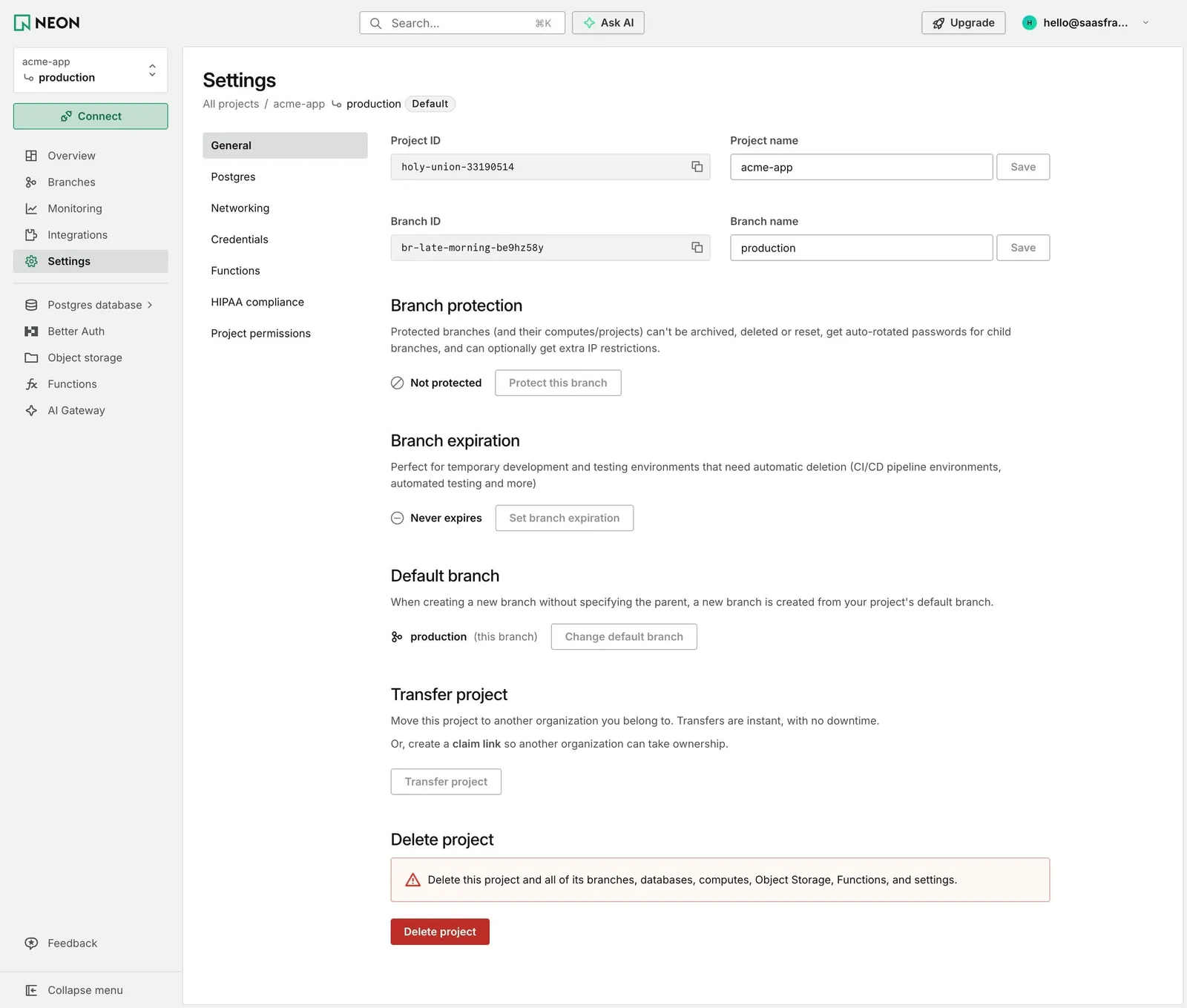
Neon's project Settings place read-only monospace fields for "Project ID" and "Branch ID", each with a copy button, next to editable "Project name" (acme-app) and "Branch name" (production) fields with their own greyed "Save" buttons.
Each branch rule as state plus action
"Branch protection", "Branch expiration" and "Default branch" each get a heading, a sentence and a status line: "Not protected" with "Protect this branch", "Never expires" with "Set branch expiration", production (this branch) with "Change default branch". "Transfer project" explains moving to another organization or creating a claim link.
Danger only at the end
"Delete project" closes the page with a pale red box warning that branches, databases, computes, object storage, functions and settings go too, and a red "Delete project" button. A sub-menu lists General, Postgres, Networking, Credentials, Functions, HIPAA compliance and Project permissions.