SaaSFrame
Part of Create a Workflow
Langdock Workflow Builder
 LangdockCompany-wide AI chat, agents and workflows
About this screen
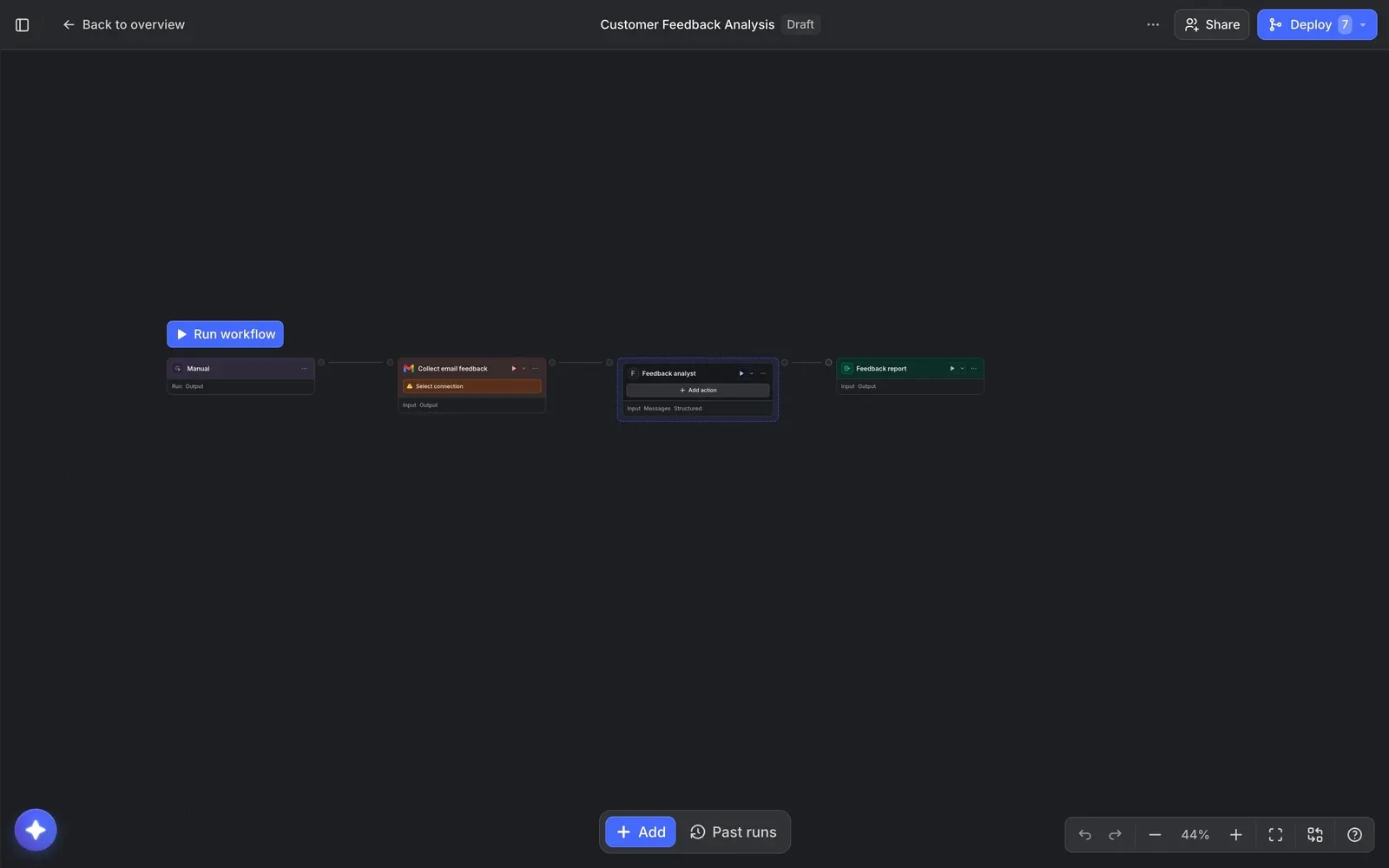
A node canvas built from a prompt
Langdock's workflow builder shows "Customer Feedback Analysis" as a horizontal chain of four nodes: a "Manual" trigger, "Collect email feedback", a "Feedback analyst" agent and a "Feedback report" output. The workflow was drafted by the builder's chat from a one-sentence description, and a "Draft" tag sits next to its name.
Each node shows its state
Nodes are small cards colored by type, with their inputs and outputs listed underneath. The Gmail step carries an orange "Select connection" warning, so missing setup is visible directly on the canvas, and a blue "Run workflow" button floats above the trigger.
Controls at the edges
A bottom bar holds "+ Add" and "Past runs", the bottom-right cluster has undo, redo, zoom and fit controls, and the top bar offers "Share" and a blue "Deploy" button with a counter.