SaaSFrame
Part of Onboarding and Workspace Setup
Langdock New Chat
 LangdockCompany-wide AI chat, agents and workflows
About this screen
A greeting and one input
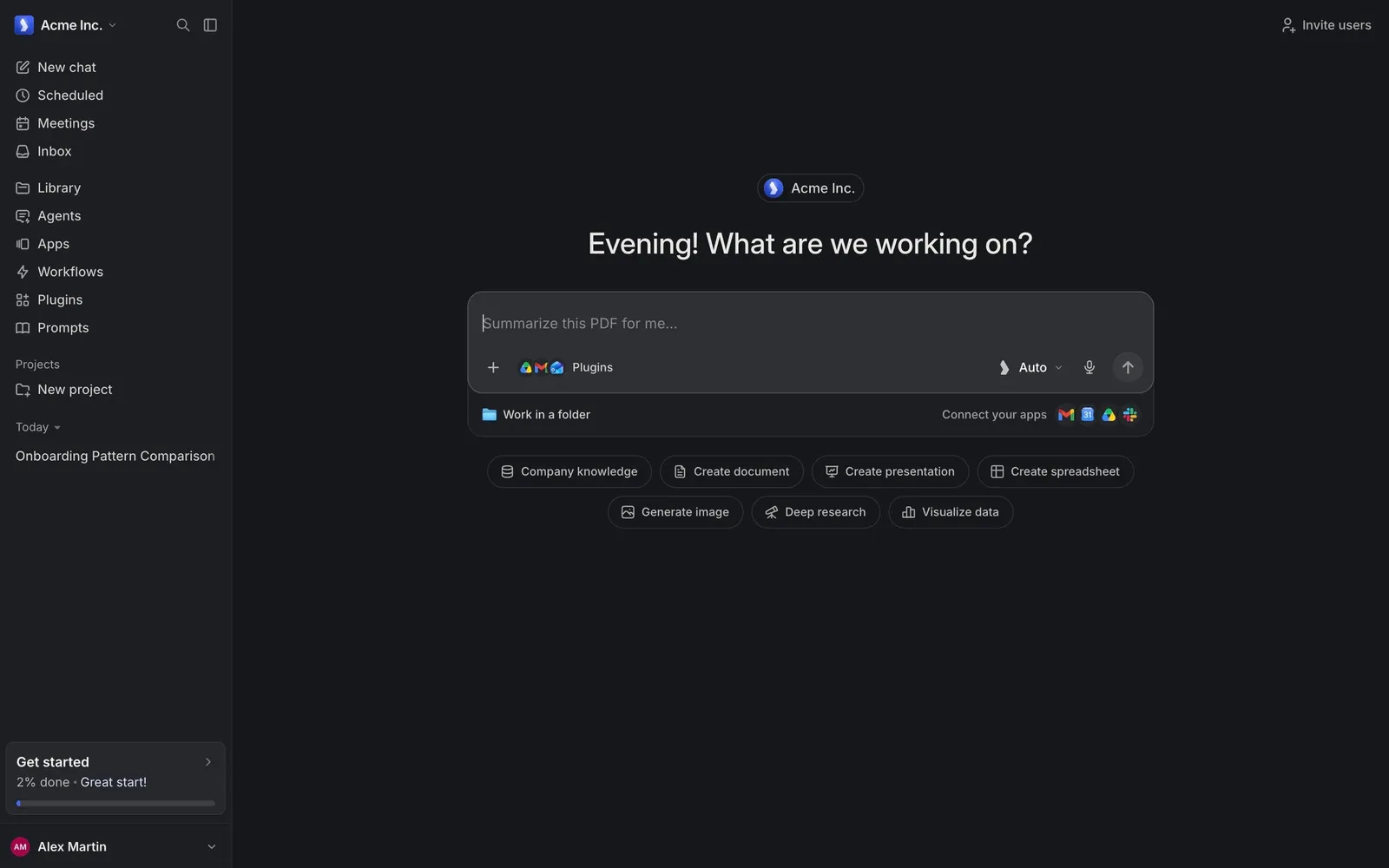
Langdock's new chat page centers a workspace badge, "Acme Inc.", above a large greeting, "Evening! What are we working on?", and a single composer with "Plugins", an "Auto" model switch, a microphone and a send button. Under the input, a slim bar offers "Work in a folder" and "Connect your apps" with small app logos.
Starting points as chips
Two rows of outlined chips suggest common jobs: "Company knowledge", "Create document", "Create presentation", "Create spreadsheet", "Generate image", "Deep research" and "Visualize data". They replace a feature tour with one-click entry points.
The rest stays in the sidebar
Navigation to Scheduled, Meetings, Inbox, Library, Agents, Apps, Workflows, Plugins and Prompts lives in the left sidebar, and "Invite users" sits alone in the top-right corner, keeping the center free for the prompt.